
Honda Civic Owners Manual: To Set Up Text/E-mail Message Options. Ring Tone
To Set Up Text/E-mail Message Options
To turn on or off the text/e-mail function
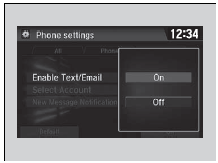
- Go to the phone settings screen.
- Select the Text/Email tab, then Enable Text/Email.
- A pop-up menu appears on the screen.
- Select On or Off.
|
To turn on or off the text/e-mail function To use the text/e-mail message function, it may be necessary to set up on your phone. |
To turn on or off the text/e-mail notice
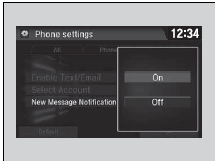
- Go to the phone settings screen.
- Select the Text/Email tab, then New Message Notification.
- A pop-up menu appears on the screen.
- Select On or Off.
|
To turn on or off the text/e-mail notice On: A pop-up notification comes on every time you receive a new message. Off: The message you receive is stored in the system without notification. |
Ring Tone

You can change the ring tone setting.
- Go to the phone settings screen.
- Select Ring Tone.
- Select Fixed or Mobile Phone.
|
Ring Tone Fixed: The fixed ring tone sounds from the speakers. Mobile Phone: For certain connected phones, the ring tone stored in the phone sounds from the speakers |
 Phone Setup
To pair a cell phone (when there is no
phone paired to the system)
Select Phone.
Select Yes.
Make sure your phone is in search or
discoverable mode, then select Contin ...
 Automatic Import of Cellular Phonebook and Call History
When Automatic Phone Sync is set to On
When your phone is paired, the contents of its
phonebook and call history are automatically
imported to the system.
Automatic Import of Cellul ...
See also:
Honda Civic Service Manual. Rearview Camera Removal and Installation ('13-'14)
1.
Trunk Lid Trim Panel
1.
Remove the trunk lid trim panel (A).
2.
Rearview Camera
1.
...
