
Honda Civic Owners Manual: Phone Setup
To pair a cell phone (when there is no phone paired to the system)
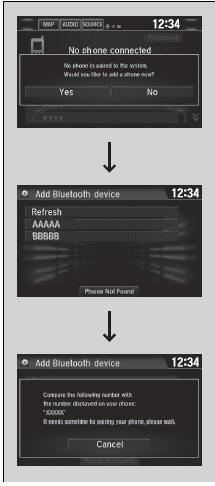
- Select Phone.
- Select Yes.
- Make sure your phone is in search or discoverable mode, then select Continue.
- HFL automatically searches for a Bluetooth device.
- Select your phone when it appears on the list.
- If your phone does not appear, you can select Refresh to search again.
- If your phone still does not appear, select
Phone Not Found and search for
Bluetooth devices using your phone.
From your phone, search for HandsFreeLink.
- The system gives you a pairing code on the audio/information screen.
- Confirm if the pairing code on the screen
and your phone match.
This may vary by phone.
|
Phone Setup Your Bluetooth-compatible phone must be paired to the system before you can make and receive handsfree calls. Phone Pairing Tips:
Once you have paired a phone, you can see it displayed on the screen with one or two icons on the right side. These icons indicate the following:
If there is an active connection to Apple CarPlay, pairing of additional Bluetooth-compatible devices is unavailable and Add Bluetooth Device is grayed out from the Bluetooth Device List screen. |
 : The phone can be used
with HFL.
: The phone can be used
with HFL. : The phone is compatible
with Bluetooth Audio.
: The phone is compatible
with Bluetooth Audio.To change the currently paired phone
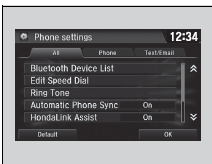
- Go to the phone settings screen.
- Phone settings screen P. 365
- Select Bluetooth Device List.
- Select a phone to connect.
- HFL disconnects the connected phone and starts searching for another paired phone.
- Select Connect

 , Connect
 , or
Connect
, or
Connect  .
.
|
To change the currently paired phone If no other phones are found or paired when trying to switch to another phone, HFL will inform you that the original phone is connected again. To pair other phones, select Add Bluetooth Device from the Bluetooth device list screen. |
To change the pairing code setting
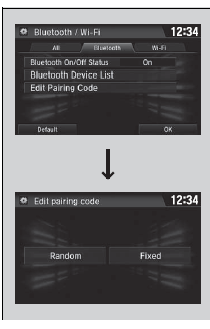
- Select
 .
. - Select Settings.
- Select Bluetooth/Wi-Fi.
- Select the Bluetooth tab.
- Select Edit Pairing Code.
- Select Random or Fixed.
|
To change the pairing code setting The default pairing code is 0000 until you change the setting. To create your own, select Fixed, and delete the current code, then enter a new one. For a randomly generated pairing code each time you pair a phone, select Random. |
To delete a paired phone
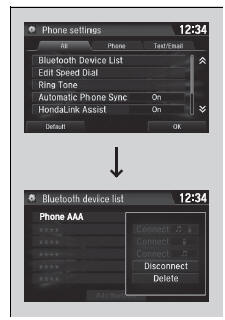
- Go to the phone settings screen.
- Select Bluetooth Device List.
- Select a phone you want to delete.
- Select Delete.
- A confirmation message appears on the screen. Select Yes.
 HFL Menus
The ignition switch must be in ACCESSORY (q or ON (w*1 to use HFL.
Phone settings screen
*1: Models with the smart entry system have an ENGINE START/STOP button
instead of an
ignition sw ...
 To Set Up Text/E-mail Message Options
To turn on or off the text/e-mail function
Go to the phone settings screen.
Select the Text/Email tab, then Enable
Text/Email.
A pop-up menu appears on the screen.
...
See also:
Honda Civic Owners Manual. Opening/Closing the Windows and Moonroof* with the Key
To open: Unlock the driver’s door with the
key. Within 10 seconds of returning the key to
the central position, turn the key in the unlock
direction and hold it there.
To close: Lock the driver’s door with the key.
Within 10 seconds of returning the key to the
central position, tur ...
