
Honda Civic Owners Manual: Status Area. Changing the Screen Interface
Status Area
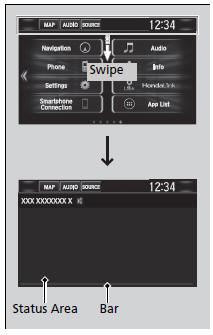
1. Swipe the upper area of the screen.
- The status area appears.
2. Select an item to see the details.
3. Select  or swipe up the bottom
bar to
close the area.
Changing the Screen Interface
You can change the screen interface design.
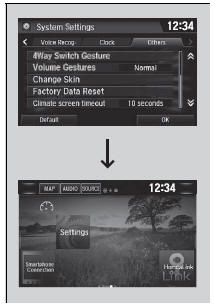
1. Select  .
2. Select Settings.
3. Select System.
4. Select the Others tab.
5. Select Change Skin.
6. A confirmation message appears on the screen. Select Yes.
Changing the Screen Interface
After changing the screen interface design, you can change the wallpaper by following procedure.
1. Select  .
2. Select and hold empty space on the home screen.
The pop-up menu appears on the screen.
3. Select Change Wallpaper.
4. Select Gallery, Live wallpapers, or Wallpapers.
If you change the screen interface, some of the setting items will change.
Customized Features
 Home Screen
To change to a next screen
Selecting or
, or swiping the screen left or right changes to the next screen.
Home Screen
The home screen has 5 pages (fixed). You cannot add
any more page ...
 Menu Customize. Closing Apps
Menu Customize
You can change menu icons on the right side of Audio, Phone, and Info screen.
1. Select and hold menu icon.
2. Select or
icon, then Audio, Phone,
or Info from Menu Custo ...
See also:
Honda Civic Service Manual. Right Front Driveshaft Inboard Boot Replacement
2191D2 RIGHT
2191D3 BOTH
1.
Vehicle Lift
1.
Raise the vehicle on a lift, and make sure it is securely supported.
2.
Tire and Wheel-Removal, Front Right
12x1mm
...
