
Honda Civic Owners Manual: Menu Customize. Closing Apps
Menu Customize
You can change menu icons on the right side of Audio, Phone, and Info screen.
1. Select and hold menu icon.
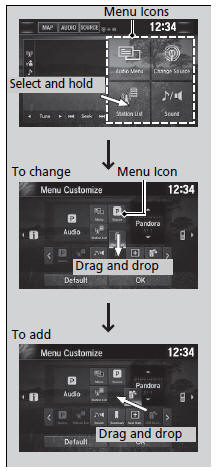
2. Select  or
 icon, then Audio, Phone,
or Info from Menu Customize.
3. Select and hold the menu icon you want to change, then drag and drop the icon to the bottom.
4. Select and hold the menu icon you want to add, then drag and drop the icon to above.
5. Select OK.
Menu Customize
You can also use the method below to change menu
icon:
Select Settings  System
 Home tab
 Menu icon
position
Closing Apps
You can close specific apps running in the background on the system.
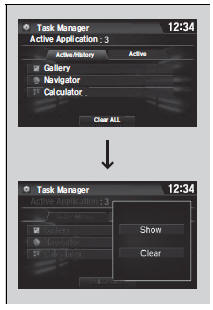
1. Select and hold  .
2. Select the Active tab.
- If you select the Active/History tab, you can close the apps that are currently running and delete the app activity history simultaneously.
3. Select an app you want to close.
4. Select Clear.
- The display will return to the app list.
Closing Apps
If you have a number of apps running in the background and something goes wrong with the audio system, some of those apps may not work properly. If this happens, close all the apps and relaunch the app/apps that you want to use.
To close all apps on the system, select Clear All, then Yes.
You cannot close the HondaLink’ and Garmin* apps.
 Status Area. Changing the Screen Interface
Status Area
1. Swipe the upper area of the screen.
The status area appears.
2. Select an item to see the details.
3. Select or swipe up the bottom
bar to
close the area.
Changing the S ...
 Adjusting the Sound. Display Setup
Adjusting the Sound
1. Select .
2. Select Audio.
3. Select .
4. Select Sound.
Select a tab from the following choices:
BAS-MID-TRE: Bass, Middle, Treble
FAD-BAL-SUBW*: Fader, Bal ...
See also:
. Daytime Running Lights
The parking/daytime running lights come on when the following conditions have
been met:
The ignition switch is in ON *1.
The headlight switch is off.
The parking brake is released.
The lights remain on even if you set the parking brake. Turning off the
ignition
switch or setting the p ...
