
Honda Civic Owners Manual: Receiving a Text/E-mail Message. Selecting a Mail Account
Receiving a Text/E-mail Message
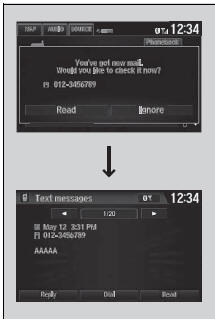
HFL can display newly received text or e-mail messages as well as 20 of the most recently received messages on a linked cell phone. Each received message can be read aloud and replied to using a fixed common phrase.
- A pop-up appears and notifies you of a new text or e-mail message.
- Select Read to listen to the message.
- The text or e-mail message is displayed.
The system automatically starts reading out the message.
- To discontinue the message read-out, select Stop.
|
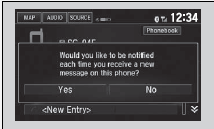
Receiving a Text/E-mail Message The system does not display any received messages while you are driving. You can only hear them read aloud. The system can only receive messages that are sent a text (SMS) messages. The message sent using the data services will not be displayed in the list. With some phones, you may be able to display up to 20 most recent text and e-mail messages. State or local laws may limit your use of the HFL text/ e-mail message feature. Only use the text/e-mail message feature when conditions allow you to do so safely. When you receive a text or e-mail message for the first time since the phone is paired to HFL, you are asked to turn the New Message Notification setting to On.
|
Selecting a Mail Account
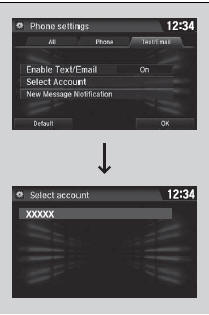
If a paired phone has text or mail message accounts, you can select one of them to be active and receive notifications.
- Go to the phone settings screen.
- Select the Text/Email tab, then Select Account.
- A pop-up menu appears on the screen.
- Select Text Messages or an e-mail account you want.
|
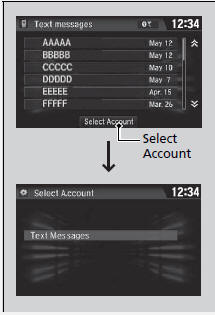
Selecting a Mail Account You can also select a mail account from the folder list screen or the message list screen.
You can only receive notifications from one text or mail message account at a time. |
 Receiving a Call. Options During a Call
Receiving a Call
When there is an incoming call, an audible
notification sounds (if activated) and the
Incoming call screen appears.
Press the button to answer the
call.
Press the butto ...
 Displaying Messages
Displaying text messages
Go to the Phone menu screen.
Select Text/Email.
Select account if necessary.
Select a message.
The text message is di ...
See also:
Honda Civic Service Manual. Catalytic Converter Removal and Installation (R18Z1)
1.
A/F Sensor (Sensor 1)
1.
Disconnect the connector.
2.
Remove the A/F sensor (A).
2.
Exhaust Chamber Cover
...
