
Honda Civic Owners Manual: Receiving a Call. Options During a Call
Receiving a Call
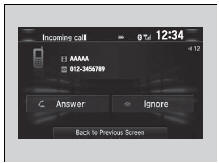
When there is an incoming call, an audible notification sounds (if activated) and the Incoming call screen appears.
Press the  button to answer the
call.
Press the  button to decline or end
the
call.
|
Receiving a Call Call Waiting Press the
Press the Select Ignore to ignore the incoming call if you do not want to answer it.
Press the
You can select the icons on the audio/information
screen instead of the |
 button to put
the current call on hold to
answer the incoming call.
 button again to
return to the current
call.
 button if you
want to hang up the
current call.
 and
 buttons.
Options During a Call
The following options are available during a call.
Mute: Mute your voice.
Transfer: Transfer a call from the system to your phone.
Touch Tones: Send numbers during a call. This is useful when you call a menudriven phone system.
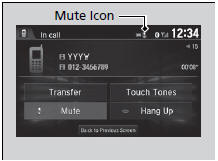
The available options are shown on the lower half of the screen.
Select the option.
- The mute icon appears when Mute is selected. Select Mute again to turn it off.
|
Options During a Call Touch Tones: Available on some phones. You can select the icons on the audio/information screen. |
 Making a Call
You can make calls by inputting any phone
number, or by using the imported
phonebook, call history, speed dial entries, or
redial.
Making a Call
Any voice-tagged speed dial entry ...
 Receiving a Text/E-mail Message. Selecting a Mail Account
Receiving a Text/E-mail Message
HFL can display newly received text or e-mail messages as well as 20 of the
most
recently received messages on a linked cell phone. Each received message can be
...
See also:
. Precautions for Opening/Closing the Trunk
Opening the trunk
Open the trunk all the way.
If it is not fully opened, the trunk lid may begin to close under its
own weight.
Closing the trunk
Keep the trunk lid closed while driving to:
Avoid possible damage.
Prevent exhaust gas from leaking into the vehicle.
Exhaust Gas Haz ...
