
Honda Civic Owners Manual: Wi-Fi Connection. Siri Eyes Free
Wi-Fi Connection
You can connect the audio system to the Internet using Wi-Fi and browse websites or use online services on the audio/information screen. If your phone has wireless hotspot capabilities, the system can be tethered to the phone. Use the following steps to setup.
Wi-Fi mode (setting for the first time)
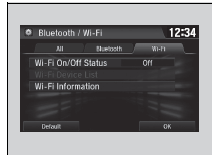
1. Select .
2. Select Settings.
3. Select Bluetooth/Wi-Fi.
4. Select the Wi-Fi tab.
5. Select Wi-Fi On/Off Status, then On.
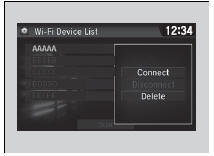
6. Select Wi-Fi Device List.
- Make sure your phone’s Wi-Fi setting is in access point (tethering) mode.
- Select the phone you want to connect to the system.
- If you do not find the phone you want to connect in the list, select Scan.
7. Select Connect.
- If needed, enter a password for your phone and select OK.
- When the connection is successful, the
 icon is displayed on the top of the
screen.
8. Select  to go back to
the home screen.
Wi-Fi mode (setting for the first time)
You cannot go through the setting procedure while a vehicle is moving. Park in a safe place to setup the Wi-Fi connection.
Some cell phone carriers charge for tethering and smartphone data use. Check your phone’s data subscription package.
Check your phone manual to find out if the phone has Wi-Fi connectivity.
You can confirm whether Wi-Fi connection is on or
off with the icon on Wi-Fi
Device List. Network
speed will not be displayed on this screen.
Wi-Fi mode (after the initial setting has been made)
Make sure your phone's Wi-Fi setting is in access point (tethering) mode.
iPhone users
You may need to go through an initial setup for Wi- Fi connection again after you boot your phone.
Siri Eyes Free
You can talk to Siri using the (Talk) button on the steering wheel when your iPhone is paired to the Bluetooth’ HandsFreeLink’ (HFL) system.
Using Siri Eyes Free
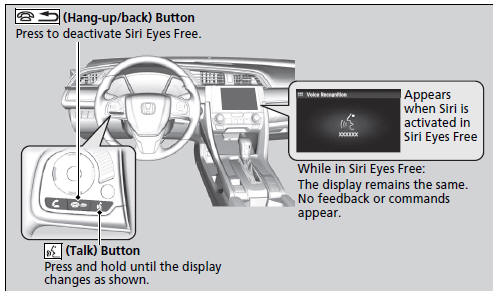
1Siri Eyes Free
Siri is a trademark of Apple Inc.
Check Apple Inc. website for features available for Siri.
We recommend against using Siri other than in Siri Eyes Free mode while operating a vehicle
Using Siri Eyes Free
Some commands work only on specific phone features or apps.
 HondaLink’
 connects you to the latest information from Honda. You can connect
your phone wirelessly through Wi-Fi or Bluetooth’.
Wi-Fi Connection
Phone Setup
HondaLink’ Menu
Places*
Disp ...
 Apple CarPlay
If you connect an Apple CarPlay-compatible iPhone to the system via the front
USB,
you can use the audio/information screen, instead of the iPhone display, to make
a
phone call, listen to music, ...
See also:
Honda Civic Owners Manual. Brake/Clutch* Fluid
Specified fluid: Honda Heavy Duty Brake Fluid DOT 3
Use the same fluid for both the brakes and clutch.
Checking the Brake Fluid
The fluid level should be between the MIN
and MAX marks on the side of the reserve
tank.
Manual transmission models
The brake fluid reserve tank is also used for ...
