
Honda Civic Owners Manual: HondaLink’
HondaLink’ connects you to the latest information from Honda. You can connect your phone wirelessly through Wi-Fi or Bluetooth’.
Wi-Fi Connection
Phone Setup
HondaLink’ Menu
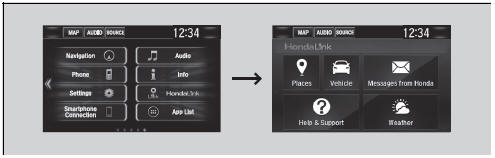
Places*
Displays restaurants, gas stations, Honda dealer, and so on. You can also navigate to the found locations via the navigation.
Vehicle
Displays instruction messages when the vehicle needs service.
Help & Support
Displays tips for vehicle usage, and get support via road side or customer service center.
HondaLink’
The HondaLink’ connect app is compatible with most iPhone and Android phones.
Some cell phone carriers charge for tethering and smartphone data use. Check your phone’s data subscription package.
When Apple CarPlay or Android Auto is connected to the audio system, HondaLink’ can be accessed even without a Wi-Fi connection.
Messages from Honda
Displays helpful and important information from Honda.
Weather*
Displays a weekly five-day weather forecast for any location you want. You can change the ZIP Code at any time.
To Set Up to Connect HondaLink’ Service
Use the following procedure to connect to HondaLink’ service.
To enable the HondaLink’ service
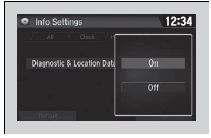
1. Select .
2. Select Settings.
3. Select Info.
4. Select the HondaLink tab.
5. Select Diagnostics & Location Data.
6. Select On.
1. Select .
2. Select Settings.
3. Select Info.
4. Select the HondaLink tab.
5. Select Diagnostics & Location Data.
6. Select On.
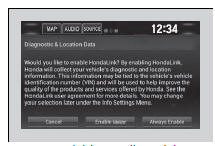
Enable once: Allows only one time. (Prompt shows again next time.) Always Enable: Allows anytime. (Prompt does not show again.) Cancel: Does not allow this consent.
* Not available on all models
To link with HondaLink’
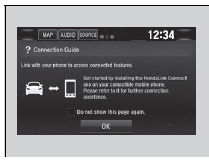
You can see the Connection Guide screen after launching HondaLink’. If you do not need this guide, select check-box and select OK.
Vehicle Information and Message from Honda Tips
You can check the messages that are received quickly in the shortcut operation.
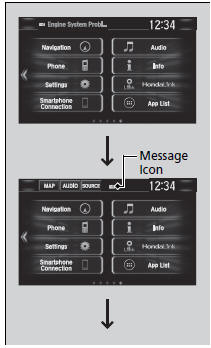
1. A message appears and notifies you of a new message on the header area.
- When the message is received, a notification ring can be heard.
2. A message icon is continuously displayed in the header area until the new message is read.
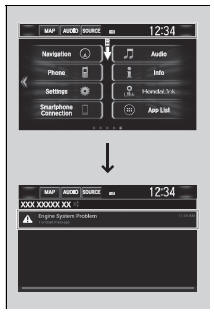
3. From the top of the screen, swipe down to see the messages.
4. Select a new message to open.
 Playing Bluetooth’ Audio
Your audio system allows you to listen to music from your
Bluetooth-compatible
phone.
This function is available when the phone is paired and connected to the
vehicle’s
Bluetooth’ HandsFr ...
 Wi-Fi Connection. Siri Eyes Free
Wi-Fi Connection
You can connect the audio system to the Internet using Wi-Fi and browse
websites
or use online services on the audio/information screen. If your phone has
wireless
hotspot capab ...
See also:
Honda Civic Service Manual. Rear Door Quarter Glass Removal and Installation (4-door)
Removal
1.
Rear Door Power Window Switch Panel
1.
Remove the power ...
