
Seat Ibiza (6F) 2017-2026 Owner's Manual: Wheel nut caps
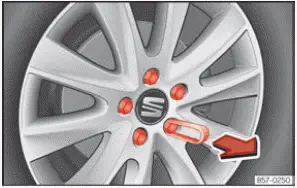
Fig. 184 Wheel: wheel nuts fitted with protective caps.
The wheel nuts on the Seat Ibiza are fitted with protective caps that help shield them from dirt, moisture and other contaminants encountered during everyday driving. These caps must be removed before the wheel nuts can be accessed for a tyre change or other wheel-related maintenance.
Removal
- Take the plastic removal clip from the vehicle tool kit (››› Fig. 148). Position it over the wheel nut cap and push it firmly into place until the clip engages with an audible click, as illustrated in ››› Fig. 184.
- Carefully pull the plastic clip away from the wheel, removing the protective cap together with it. Keep the cap in a clean, secure location while working on the wheel.
The protective caps help prevent dirt and moisture from accumulating around the wheel nuts. After changing a tyre or completing any work that requires their removal, refit the caps securely over the corresponding wheel nuts. Check that each cap is correctly seated and will not come loose during normal driving.
The anti-theft wheel locking bolt is equipped with a specially designed protective cap that differs from those used on standard wheel nuts. This cap is shaped specifically to fit the locking bolt and must not be installed on an ordinary wheel nut. When refitting the caps on your Seat Ibiza, make sure the correct type is used for each fastening point.
Anti-theft wheel nuts
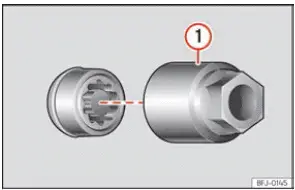
Fig. 185 Anti-theft wheel locking bolt with protective cap and matching adapter.
The anti-theft wheel locking bolt is designed to make unauthorised wheel removal more difficult. Unlike a conventional wheel nut, it requires a matching adapter before it can be loosened with the wheel wrench. The adapter is supplied as part of the vehicle tools and should be kept readily available whenever wheel removal may be necessary.
Loosening the anti-theft wheel nut
- Remove the wheel trim or hubcap, if fitted, to gain access to the wheel locking bolt. If the bolt has a protective cap, remove it using the appropriate plastic clip.
- Take the special adapter from the vehicle tool kit and place it onto the anti-theft wheel locking bolt, as shown in ››› Fig. 185 1. Push the adapter fully onto the bolt to ensure that its shaped profile engages correctly with the locking mechanism.
- Fit the wheel wrench from the vehicle tool kit onto the adapter. Push the wrench into position as far as it will go so that the connection remains secure while force is applied.
- Carefully loosen the anti-theft wheel locking bolt using the wheel wrench. Once the wheel has been raised and is ready for removal, the bolt can be completely unscrewed.
Note
Record the identification code of the anti-theft wheel locking bolt and store this information in a safe
place outside the vehicle. The code is needed if the matching adapter is lost or damaged. A replacement
adapter can be obtained through a SEAT Official Service centre by providing the corresponding code number.
Keeping this information separately from your Seat Ibiza helps ensure that a replacement can be ordered
without unnecessary difficulties.
 Wheel central trim
Fig. 182 Correct positioning of the central
wheel trim for steel rims.
The central wheel trims fitted to certain steel wheels on the Seat Ibiza cover the wheel fastening nuts or bolts
...
 Loosening wheel nuts
Fig. 186 Changing a tyre: loosening the wheel nuts with the wheel wrench.
Fig. 187 Changing a tyre: tyre valve position 1 and the correct locations for the anti-theft wheel
locking ...
See also:
Honda Civic Owners Manual. Android Auto Menu
Maps (Navigation)
Display Google Maps and use the navigation function just as you would with
your
Android phone. When the vehicle is in motion, it is not possible to make
keyboard
entries. Stop the vehicle in a safe location to undertake a search or provide
other
inputs.
Models w ...
