
Honda Civic Owners Manual: Receiving a Call. Options During a Call
Receiving a Call

When there is an incoming call, an audible notification sounds and the Incoming Call screen appears.
Press the button to answer the call.
Press the  button to decline or end
the
call.
|
Receiving a Call Call Waiting
Press the
Press the Select Ignore to ignore the incoming call if you do not want to answer it.
Press the
You can select the icons on the audio/information
screen instead of the |
Options During a Call
The following options are available during a call.
Swap Call: Put the current call on hold to answer the incoming call.
Mute: Mute your voice.
Transfer Call: Transfer a call from HFL to your phone.
Dial Tones: Send numbers during a call. This is useful when you call a menu-driven phone system.
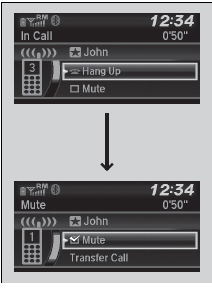
- To view the available options, press the
 button.
- Rotate
 to select the
option, then press
 .
- The check box is checked when Mute is selected. Select Mute again to turn it off.
|
Options During a Call Dial Tones: Available on some phones. |
 Making a Call
You can make calls by inputting any phone number, or by using the imported
phonebook, call history, speed dial entries, or redial.
Making a Call
Any voice-tagged speed dial entry c ...
 Bluetooth HandsFreeLink
Models with Display Audio
Bluetooth HandsFreeLink (HFL) allows you to place and receive phone calls
using
your vehicle's audio system, without handling your cell phone. ...
See also:
. Using the Trunk Release Button
Models with smart entry system
Push up the release button on the trunk lid
after the doors are unlocked.
When You Cannot Open the Trunk
Even if the trunk is locked, you can open the
trunk if you carry the smart entry remote.
Some exterior lights flash and the beeper
sounds.
Using t ...
