
Seat Ibiza (6F) 2017-2026 Owner's Manual: Navigation
Introduction
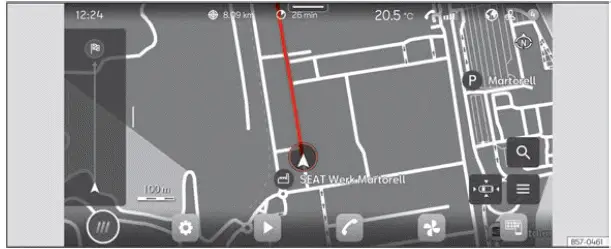
Fig. 133 Schematic representation: Navigation view.
The Seat Ibiza navigation system uses a global satellite positioning system to determine the vehicle's current location. At the same time, sensors installed in the vehicle monitor its movement and provide information about the route being travelled. By combining satellite positioning data with information from the vehicle's sensors, the infotainment system can calculate and continuously update the vehicle's position as the journey progresses.
The navigation system compares the collected positioning and movement data with the digital maps available in its memory. Where relevant information is available, it also takes reported traffic conditions and other events affecting the road network into account. This information is used to calculate a suitable route to the selected destination and to adapt the guidance when circumstances change. The accuracy and effectiveness of route calculation depend on the quality and completeness of the available map, positioning and traffic data.
Once route guidance has started, the Seat Ibiza navigation system provides both spoken instructions and visual information to help the driver follow the calculated route. Navigation announcements indicate upcoming manoeuvres, while graphical representations on the infotainment display show the route and other relevant guidance information. These two methods work together to help the driver identify the correct direction of travel and follow the planned journey.
Navigation functions are operated through the infotainment touchscreen. The display provides access to the available navigation controls and presents the information needed to select a destination, view the calculated route and follow the guidance instructions. The functions shown depend on the infotainment configuration and the navigation options supported by the vehicle.
In certain countries, some infotainment functions cannot be selected or operated on the screen once the vehicle exceeds a specified speed. These restrictions are intended to comply with the applicable national legislation and may affect the availability of particular navigation controls while driving. If a function becomes unavailable above a certain speed, this does not indicate a fault in the Seat Ibiza infotainment system. It is a normal operating restriction associated with the legal requirements of the country concerned.
Navigation announcements
Navigation announcements are spoken driving instructions generated by the infotainment system during active route guidance. They provide audible information about the current route and help the driver prepare for the manoeuvres needed to reach the selected destination. These instructions complement the graphical guidance displayed on the navigation screen, allowing the driver to receive route information without having to rely entirely on the map display.
The content, timing and frequency of navigation announcements vary according to the driving situation and the selected navigation settings. For example, the system may provide different types of instructions when route guidance first begins, when travelling along a motorway or when approaching and negotiating a roundabout. The announcements are adapted to the relevant stage of the journey so that the driver receives guidance appropriate to the road layout and the next required manoeuvre.
In some circumstances, the navigation system may be unable to calculate guidance directly to the exact destination. This can occur, for example, when the destination is located in an area that has not been included in the digital map data. If the final location cannot be reached using the available navigation information, the infotainment display provides indications relating to the destination address and the remaining distance. These details help the driver identify the approximate location of the destination even when complete route guidance is unavailable.
When dynamic route guidance is active, the Seat Ibiza navigation system can provide information about reported traffic congestion affecting the calculated route. The system takes the available traffic reports into account when evaluating the journey and may recalculate the route if congestion makes an alternative route appropriate. If the route is changed because of reported traffic conditions, an additional navigation announcement informs the driver that the guidance has been updated.
The volume of spoken navigation instructions can be adjusted while an announcement is being played. This allows the driver to set the guidance volume to a comfortable level according to the conditions inside the vehicle. Once the volume has been changed during an announcement, subsequent navigation instructions are reproduced at the newly selected level. The adjusted setting therefore continues to apply to later announcements rather than affecting only the instruction currently being heard.
Limitations during navigation
Satellite reception is not always available throughout a journey. For example, GPS signals may be interrupted when the Seat Ibiza enters a tunnel, an underground garage or another location where satellite signals cannot reach the vehicle reliably. If the infotainment system temporarily loses GPS reception, navigation does not necessarily stop. Instead, the system continues estimating the vehicle's position using information supplied by the vehicle's sensors. This allows route guidance to continue during periods when satellite positioning data cannot be received.
The navigation system may also encounter limitations in areas where the road network has not been fully recorded in the available digital maps. If a region is not digitised, or if only part of its road network is included in the infotainment system's map memory, the system will still attempt to provide route guidance using the information it has. However, the calculated route and the instructions displayed may be less complete than in areas with detailed map coverage.
Missing, incomplete or outdated navigation data can make it difficult for the infotainment system to determine the vehicle's exact position. When the available information does not accurately represent the surrounding roads or the vehicle's current location, the displayed position may differ from the actual position and route guidance may become less precise. This can affect the accuracy of the map display, the calculated route and the timing of navigation instructions. The Seat Ibiza navigation system therefore depends on sufficiently detailed map information and reliable positioning data to provide its normal level of guidance accuracy.
Road networks are continually changing as new streets and roads are constructed, existing routes undergo repairs, traffic restrictions are introduced and roads are temporarily or permanently closed. Street names and building numbers may also be changed. Because the Seat Ibiza navigation system calculates routes using the digital map information available to it, these changes may not always be reflected in the stored navigation data. If the map information is outdated, the system may suggest a road that is no longer accessible, fail to recognise a recently opened route or display an incorrect street name or address. Such discrepancies can result in inaccurate route calculations, unexpected navigation instructions or difficulties locating the selected destination. The reliability of route guidance therefore depends partly on how closely the available navigation data corresponds to the current road network.
Managing the navigation map
The Seat Ibiza infotainment system allows you to adjust the navigation map directly on the touchscreen using finger gestures. In addition to selecting the available on-screen controls, you can move the map, change its scale, switch between two-dimensional and three-dimensional perspectives, and rotate the displayed view. These gestures make it easier to examine the surrounding road network, inspect a particular location or adjust the map presentation to your preferred viewing angle. For reliable operation, perform each movement smoothly while maintaining the required contact with the screen.
Moving the map
Tip: Use your index finger to move the navigation map across the display. This gesture is useful when you want to examine an area that is not currently visible, look ahead along a route or inspect streets surrounding a destination without changing the map scale.
- Place your finger on the map and slide it across the touchscreen in the direction you want to move the displayed area. The map follows your finger movement, allowing you to explore different parts of the available navigation map. Lift your finger when the desired area is visible.
Zooming into or out of the view
Tip: Use your index finger to adjust the map scale with a single-finger gesture. Zooming in allows you to examine a smaller area in greater detail, while zooming out provides a broader overview of the surrounding roads and the general route. This can be particularly useful when checking the position of nearby streets or viewing a larger section of the journey.
- Tap the navigation map twice in succession. On the second tap, keep your finger pressed against the touchscreen instead of lifting it. Maintain contact with the display to activate the zoom gesture.
- With your finger still touching the screen, slide it upwards to zoom out and display a larger geographical area. Slide your finger downwards to zoom in and enlarge the map details. Continue moving your finger until the desired scale is reached, then release the screen to finish the adjustment.
Change the 2D / 3D view
Tip: Use your index and middle fingers together to change the viewing perspective of the navigation map. The two-dimensional view presents the map from above, while the three-dimensional view displays it from an angled perspective. Switching between these views allows you to choose the map presentation that is most convenient for examining the route or surrounding road layout.
- Place your index and middle fingers on the navigation map simultaneously, keeping both fingertips in contact with the touchscreen. Maintain this two-finger contact while performing the gesture so that the infotainment system can recognise the intended change in perspective.
- To switch towards the 2D view, slide both fingers downwards together. To change towards the 3D view, move both fingers upwards. Keep the movement smooth and coordinated, then lift your fingers when the map reaches the desired viewing perspective.
Rotate the map
Tip: Use your thumb and index finger to rotate the navigation map. This gesture changes the orientation of the displayed map, allowing you to view the road network from a different direction without changing the selected destination. It can be useful when examining junctions, comparing the direction of nearby roads or adjusting the map to a more convenient orientation.
- Place your thumb and index finger on the map at the same time and keep both fingers pressed against the touchscreen. The fingers should remain in contact with the display throughout the rotation gesture.
- Turn your fingers clockwise or anticlockwise while maintaining contact with the screen. The navigation map rotates in response to the movement, allowing you to adjust its orientation. Release your fingers when the map is positioned at the angle you want to use.
Saved data
The Seat Ibiza infotainment system stores certain navigation-related information to simplify destination entry and improve the operation of route guidance. This information may include frequently travelled routes and position data collected during navigation use. By retaining relevant information, the system can make it easier to enter destinations that are used regularly and support more efficient route guidance based on the data available to it. The stored information is associated with navigation functions and is used to assist the system when preparing and managing journeys.
Delete saved data
Navigation data stored by the infotainment system can be deleted through the corresponding settings menu. Use this function when you want to remove the saved information covered by the deletion option. Before confirming the operation, make sure that you intend to delete the relevant stored data, as this information may have been used to simplify destination entry and support navigation functions.
- Open the infotainment settings and select Settings > Basic function settings > Delete. Then press Accept to confirm the deletion. Follow the displayed menu sequence carefully and confirm the operation only after selecting the intended deletion function.
WARNING Only adjust navigation settings, enter destinations or make changes to the planned route while the Seat Ibiza is stationary. Operating the navigation touchscreen or concentrating on destination entry while driving can distract the driver from the road and surrounding traffic. Complete these operations before setting off or after stopping the vehicle in a safe location. The driver's attention must remain focused on driving, even when route guidance is active.
Note
- If you pass a detour or deviate from the route currently being followed, the Seat Ibiza navigation system may calculate a new route to the destination. The revised guidance depends on the vehicle's detected position and the available navigation information. A route recalculation may therefore occur when the system determines that the original route is no longer being followed.
- The accuracy and usefulness of the route recommendations provided by the infotainment system depend on the quality, completeness and currency of the available navigation data. Reported traffic congestion can also influence the recommended route when the relevant information is available. If road conditions have changed or traffic reports are incomplete, the suggested route may not fully reflect the actual driving situation.
- Spoken navigation instructions are not reproduced when the infotainment system's sound is muted. If you need audible route guidance, make sure that the sound is enabled. When the system is muted, the absence of navigation announcements does not necessarily indicate a navigation malfunction; route information can still be consulted on the display.
 Media Mode
Introduction
Fig. 132 Schematic representation: Media view
Media mode allows you to play compatible multimedia files from external storage devices and connected media
sources through the ...
 Telephone interface
Introduction
Fig. 134 Schematic representation: Phone view.
The telephone interface in the Seat Ibiza allows a compatible mobile phone to be connected to the infotainment
system so that ...
See also:
Honda Civic Service Manual. ODS Unit Removal and Installation (KA KC KL models)
7521B5
Removal
NOTE: SRS components are located in this area. Review the SRS component
locations and the precautions and procedures before doing repairs or service.
1.
Battery Terminal (SRS) - Disconnection
...
