
Seat Ibiza (6F) 2017-2026 Owner's Manual: Telephone interface
Introduction
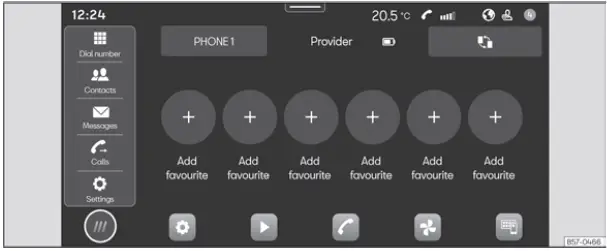
Fig. 134 Schematic representation: Phone view.
The telephone interface in the Seat Ibiza allows a compatible mobile phone to be connected to the infotainment system so that supported telephone functions can be operated through the vehicle's controls. Once the connection has been established, the infotainment display provides access to the available phone functions, while the sound from telephone conversations is reproduced through the vehicle's loudspeakers. This integration allows the driver to use the supported calling features without relying exclusively on the mobile phone's own screen and controls.
The infotainment system supports the simultaneous connection of up to two mobile phone devices. This makes it possible to keep two compatible phones connected to the Seat Ibiza at the same time, subject to the connection capabilities and functions supported by the system. The telephone features available for each connected device may differ depending on its compatibility and configuration.
The quality of telephone conversations inside the vehicle can be influenced by several factors. Driving at high speeds may increase wind and road noise, while poor weather conditions, uneven road surfaces and other environmental sounds can make speech more difficult to hear clearly. Noise originating outside the vehicle may also affect the conversation. In addition, the quality of the mobile network signal plays an important role in call clarity and connection stability. Even when the telephone interface is functioning correctly, poor reception or a noisy driving environment can reduce the quality of a call.
Note
- In most cases, a compatible device, such as a mobile phone, only needs to be paired with the Seat Ibiza infotainment system once. After the initial pairing has been completed, the connection can normally be re-established through Bluetooth or Wi-Fi without repeating the entire pairing procedure. This allows previously paired devices to reconnect when the appropriate wireless connection is available and the relevant settings are enabled.
- The availability of individual telephone functions depends on the capabilities of the mobile phone connected to the infotainment system. Factors such as the device's operating system, the mobile network being used and the services provided by the mobile network operator can influence which features are supported. Consequently, certain functions described in the telephone interface may not be available with every mobile phone or network configuration.
Connectivity Box
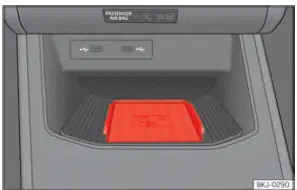
Fig. 135 On the centre console: pad for the mobile phone connection.
The Seat Ibiza Connectivity Box incorporates a Wireless Charger function that allows compatible mobile devices to be charged without connecting a charging cable. The charging area is integrated into the centre console and is designed to accommodate a suitable mobile phone positioned on the designated pad. Wireless charging is available only when the mobile device supports the required charging technology and is correctly placed within the charging area.
Wireless charger
Mobile phones equipped with Qi inductive charging technology can be charged wirelessly using the Connectivity Box. This technology transfers energy to a compatible device through the charging pad, eliminating the need to connect a charging cable for this purpose. The mobile phone must support the Qi charging standard, and its position on the pad must allow the charging system to recognise it correctly.
To charge your mobile phone wirelessly:
- Place the compatible mobile device in the centre of the Connectivity Box charging pad, with its screen facing upwards, as illustrated in Fig. 135. Position the phone so that it rests properly on the designated charging surface. Correct placement is necessary for the wireless charging function to detect the device and operate as intended.
Before placing the phone on the charging pad, check that there are no objects between the mobile device and the surface of the Connectivity Box. Items left underneath the phone can interfere with the charging process or prevent the device from being positioned correctly. The charging area should remain clear so that the phone can rest directly on the designated surface.
When a compatible mobile phone is correctly positioned on the pad and the necessary operating conditions are met, wireless charging begins automatically. No separate charging cable is required. If charging does not start, check that the device supports Qi technology, that it is positioned centrally and that nothing is obstructing the charging area.
For more detailed information about whether your mobile phone supports Qi inductive charging, consult the operating instructions supplied by the device manufacturer. You can also refer to the SEAT website for information relating to the Connectivity Box and compatible mobile devices. Compatibility should be confirmed before relying on the wireless charging function in the Seat Ibiza.
WARNING Notifications, messages and other information appearing on a mobile phone screen can distract the driver's attention from the road. Looking at or interacting with the phone while driving increases the risk of a serious accident. Position the mobile device correctly before starting the journey and avoid handling it or checking its notifications while the vehicle is moving.
- Place only one suitable mobile device on the Connectivity Box charging pad. Where wireless charging is required, the phone must be compatible with the Qi standard. For correct operation, position the device without its protective case and ensure that its dimensions do not exceed 80 x 140 mm (3.15 x 5.512 inches), measured as width x length. The mobile phone must rest on the base of the Connectivity Box in the position illustrated in Fig. 135. Observing these requirements helps ensure that the charging system can detect the device and operate correctly.
- If the mobile phone is not positioned correctly on the Connectivity Box pad, or if its dimensions exceed the specified limits, the system may fail to recognise the device or may be unable to charge it properly. Under certain conditions, the infotainment system may display a message indicating that a foreign object has been detected in the storage compartment. This indication can occur when the charging system cannot correctly identify the object placed on the pad. Use a suitable mobile phone and adjust its position on the charging surface to resolve the problem. Make sure that the device is centred and that no other objects are present in the charging area.
WARNINGWireless charging can cause the mobile phone to become warm during operation. The charging area must also remain free of objects that could interfere with the charging process. Observe the following precautions when using the Connectivity Box.
- A mobile phone may become noticeably warm while it is being charged wirelessly. Take this into account before touching or removing the device from the Connectivity Box. Handle the phone carefully, particularly after it has been charging for an extended period, and avoid assuming that its surface will remain at the same temperature as when it was placed on the pad.
- Do not place metallic objects or other items between the mobile phone and the housing of the Connectivity Box. Such objects can interfere with the operation of the wireless charging system and prevent it from functioning correctly. Keep the charging surface clear and ensure that only the suitable mobile device is positioned in the designated charging area.
NOTICE Do not leave the vehicle key near the Wireless Charger area. Its proximity to the charging system may cause interference and affect the operation of the Connectivity Box. Keep the key away from the wireless charging pad when charging a mobile phone.
NOTICE The base of the Connectivity Box is not removable. Do not attempt to detach or remove the charging pad from its housing. The base forms part of the installed equipment and should remain in its original position during normal use and cleaning.
Note
- For the wireless charging function to operate correctly, the mobile device must support the Qi inductive charging interface standard. A phone that does not support this technology cannot be charged wirelessly using the Connectivity Box, even if it fits within the designated charging area.
- The time required to charge a mobile phone and the temperature reached during charging depend on the particular device being used. Different compatible phones may therefore charge at different rates or become warmer during operation. These variations are influenced by the characteristics of the mobile device and do not necessarily indicate a fault in the Seat Ibiza charging system.
- The maximum wireless charging capacity of the Connectivity Box is 5 W. This is the maximum power specified for the charging function, and the actual charging performance may vary according to the connected mobile device and its operating conditions.
- Qi wireless charging through the Connectivity Box does not support charging more than one mobile device at the same time. Only one compatible phone should be placed on the charging pad. Attempting to charge multiple devices simultaneously may prevent the system from recognising them correctly.
- To help ensure reliable wireless charging, SEAT recommends keeping the vehicle's engine running while the function is being used. This provides the operating conditions recommended for the Connectivity Box and helps maintain the availability of the charging function during use.
- If a Qi-compatible mobile phone is connected to the infotainment system through a USB cable, charging takes place according to the method specified by the phone manufacturer. The charging behaviour in this situation is determined by the mobile device and its supported charging arrangement rather than solely by the Connectivity Box wireless charging function.
 Navigation
Introduction
Fig. 133 Schematic representation: Navigation view.
The Seat Ibiza navigation system uses a global satellite positioning system to determine the vehicle's current
location. ...
 Storing objects
...
See also:
Honda Civic Service Manual. Fuel Tank Draining (K24Z7)
Removal
1.
HDS DLC - Connection
NOTE: For specific operations, refer to the user's manual that
came with the Honda Diagnostic System (HDS). Make sure the HDS is
loaded with the latest software.
...
