
Seat Ibiza (6F) 2017-2026 Owner's Manual: Media Mode
Introduction
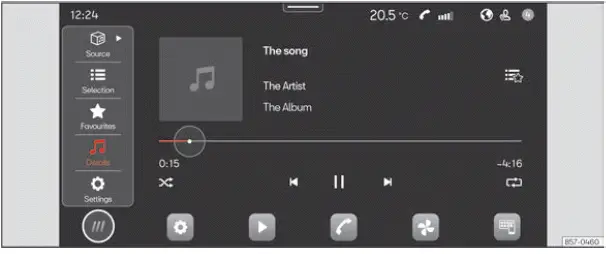
Fig. 132 Schematic representation: Media view
Media mode allows you to play compatible multimedia files from external storage devices and connected media sources through the Seat Ibiza infotainment system. Instead of relying on radio broadcasts, you can select audio content stored on a supported device and, where the infotainment equipment permits, access compatible video files. The available playback functions depend on the type of media source, the files it contains and the capabilities of the installed system.
Depending on the equipment fitted to the Seat Ibiza, the following types of data media can be connected and used as multimedia sources. Compatibility may vary according to the connected device and the connection method:
- USB storage devices. Supported USB media can be used to provide multimedia files to the infotainment system. Examples include USB memory sticks and compatible mobile phones connected through a USB port. The system must be able to recognise the connected device and access its stored multimedia content before playback can begin.
- Bluetooth devices. Compatible devices, such as mobile phones and tablets, can provide audio content through a Bluetooth connection. The available playback and control functions depend on the Bluetooth capabilities of both the external device and the Seat Ibiza infotainment system.
The types of multimedia files that can be reproduced also depend on the installed infotainment system. Not every system supports the same file categories, and the availability of a particular playback function should not be assumed solely because a device can be connected.
- Audio files. Media mode supports playback of compatible audio files from recognised media sources. The infotainment system can reproduce supported audio content through the vehicle's loudspeakers, subject to the file format and the capabilities of the connected device.
- Video files. Certain infotainment versions also support playback of compatible video files. This function depends on the particular system installed in the Seat Ibiza and may not be available on all equipment configurations. The ability to connect a storage device does not necessarily mean that its video files can be played.
Access the MEDIA menu
- To open the multimedia interface, select HOME >
 as shown in
Fig. 132. Media mode provides access to the supported playback functions and allows you to
select content from recognised media sources.
Access the settings
- To view the available Media mode settings, select HOME >
 >
 . The options displayed
depend on the infotainment version and the functions supported by the selected media source.
Data media limitations and indications
External data media may become unreliable or stop functioning if they have been damaged or exposed to excessively high temperatures. Physical deterioration or unsuitable environmental conditions can affect the device's ability to store and provide access to multimedia files. If the Seat Ibiza infotainment system cannot recognise a connected storage device, the condition of the device itself should be considered alongside its compatibility with the system.
Always observe the instructions, operating conditions and handling recommendations provided by the manufacturer of the data medium. These instructions may contain information about suitable temperatures, connection procedures and precautions needed to protect the device and its stored content. Following the manufacturer's guidance can help reduce the likelihood of storage or playback problems.
Data media produced by different manufacturers may vary in quality, construction and operating characteristics. These differences can influence how reliably a device communicates with the infotainment system and supplies multimedia files for playback. As a result, two storage devices containing similar files may not necessarily provide identical playback performance. Problems such as interrupted reproduction or failure to access certain files may be associated with the characteristics or condition of the storage medium.
An incorrectly configured data medium may not be readable by the Seat Ibiza infotainment system. Even when a storage device is physically connected and functioning, its configuration must be compatible with the system's requirements for recognising and accessing stored content. If the configuration is unsuitable, the infotainment system may be unable to identify the device or display its multimedia files.
Playlists do not contain the actual audio or video files that they reference. Instead, a playlist defines the intended playback sequence and identifies the locations of the corresponding multimedia files within the storage device's folder structure. The infotainment system uses this information to locate the individual files and play them in the specified order. A playlist therefore depends on the continued availability of the files to which it refers.
For a playlist to work correctly, the referenced multimedia files must remain accessible in their specified storage locations. If files have been deleted, moved to different folders or are otherwise unavailable, the infotainment system may be unable to play the affected entries. Copying a playlist without the multimedia files it references is not sufficient to reproduce its contents. When organising music or other media on a storage device, keep the relationship between the playlist and the referenced files intact.
Note SEAT accepts no liability for damage to, deterioration of or loss of files stored on external data storage devices. Multimedia files and other information held on removable media remain the responsibility of the device owner. Before connecting a storage device to the Seat Ibiza infotainment system, ensure that any important files are adequately protected and that copies are retained elsewhere if their loss would be significant.
 Radio mode
Introduction
Fig. 131 Schematic representation: Radio view.
Radio mode allows you to listen to available radio stations through the Seat Ibiza infotainment system. You can
search for and ...
 Navigation
Introduction
Fig. 133 Schematic representation: Navigation view.
The Seat Ibiza navigation system uses a global satellite positioning system to determine the vehicle's current
location. ...
See also:
Honda Civic Owners Manual. Voice Portal Screen
When the (Talk) button is
pressed,
available voice commands appear on the
screen.
For a complete list of commands, say ’Voice
Help’ after the beep or select Voice Help.
You can see the list of commands in Voice
Info on the Info menu screen. Select Info,
then select .
T ...
