
Honda Civic Owners Manual: Adjusting the Sound. Display Setup
Adjusting the Sound
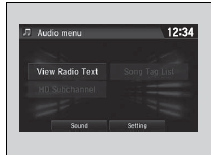
1. Select  .
2. Select Audio.
3. Select  .
4. Select Sound.
Select a tab from the following choices:
- BAS-MID-TRE: Bass, Middle, Treble
- FAD-BAL-SUBW*: Fader, Balance, Subwoofer*
- SVC∙Neural*: Speed Volume Compensation, DTS Neural SurroundTM*
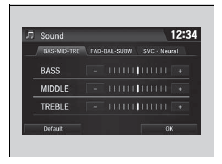
Adjusting the Sound
The SVC has four modes: Off, Low, Mid, and High.
SVC adjusts the volume level based on the vehicle speed. As you go faster, audio volume increases. As you slow down, audio volume decreases
Display Setup
You can change the brightness or color theme of the audio/information screen.
Changing the Screen Brightness

1. Select  .
2. Select Settings.
3. Select System.
4. Select the Display tab.
5. Select Display Settings.
6. Select the setting you want.
7. Select OK.
Changing the Screen’s Color Theme

1. Select  .
2. Select Settings.
3. Select System.
4. Select the Display tab.
5. Select Background Color.
6. Select the setting you want.
7. Select OK.
Changing the Screen Brightness
You can change the Contrast and Black Level settings in the same manner.
Selecting an Audio Source

Select the current source icon, then select an icon on the source list to switch the audio source.
Limitations for Manual Operation
Certain manual functions are disabled or inoperable while the vehicle is in motion.
You cannot select a grayed-out option until the vehicle is stopped.
Selecting an Audio Source
If you startup preinstalled audio apps, is
displayed on the screen.
These preinstalled apps cannot be displayed on the source select screen.
You can startup those audio apps from .
Pandora’ is available only in the U.S..
 Menu Customize. Closing Apps
Menu Customize
You can change menu icons on the right side of Audio, Phone, and Info screen.
1. Select and hold menu icon.
2. Select or
icon, then Audio, Phone,
or Info from Menu Custo ...
 Voice Control Operation
Your vehicle has a voice control system that allows hands-free operation.
The voice control system uses the
(Talk) and (hang-up/back) buttons
on
the steering wheel and a microphone near ...
See also:
Honda Civic Owners Manual. Road Departure Mitigation (RDM) System
Alerts and helps to assist you when the system detects a possibility of your
vehicle
►nintentionally crossing over detected lane markings.
Road Departure Mitigation (RDM) System
Important Safety Reminder
Like all assistance systems, the RDM system has
limitations.
Ov ...
