
Honda Civic Owners Manual: To Switch ACC with LSF to Cruise Control. To Set the Vehicle Speed
To Switch ACC with LSF to Cruise Control
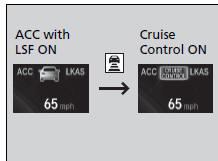
Press and hold the  (interval)
button for one
second. Cruise Mode Selected appears on
the driver information interface for two
seconds, and then the mode switches to
Cruise.
To switch back to ACC with LSF, press and
hold the  button again for one
second. ACC
Mode Selected appears on the driver
information interface for two seconds.
When to use
Desired speed in a range above roughly 25 mph (40 km/h) ~.
|
To Switch ACC with LSF to Cruise Control Always be aware which mode you are in. When you are driving in Cruise mode, the system will not assist you to maintain a following interval from a vehicle ahead of you. |
To Set the Vehicle Speed
Take your foot off the pedal and press the -/SET button when you reach the desired speed.
The moment you release the -/SET button, the set speed is fixed, and cruise control begins. The CRUISE CONTROL indicator comes on.
During cruise control, Straight Driving Assist Function is activated. This control function is an EPS function and it helps reduce the steering effort to keep the steering angle on a straight road with cants.
To Adjust the Vehicle Speed
Each time you press the RES/+ or -/SET button, the vehicle speed is increased or decreased by about 1 mph (1.6 km/h).
If you keep the RES/+ or -/SET button pressed, the vehicle speed increases or decreases until you release it. This speed is then set.
 To Set or Change Following Interval. To Cancel
To Set or Change Following Interval
Press the (interval) button to
change the
ACC with LSF following interval.
Each time you press the button, the followinginterval
(the interval behind a ...
 To Cancel
To cancel cruise control, do any of the following:
Press the CANCEL button.
Press the MAIN button.
Depress the brake pedal.
The CRUISE CONTROL indicator goes off.
...
See also:
Honda Civic Owners Manual. How the System Works
The front camera behind the rearview mirror
monitors left and right lane markings (in white
or yellow). If your vehicle is getting too close
to detected lane markings without a turn
signal activated, the system, in addition to a
visual alert, applies steering torque and alerts
you with rap ...
