
Seat Ibiza (6F) 2017-2026 Owner's Manual: Steering wheel position adjustment
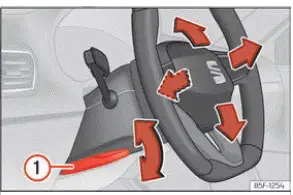
Fig. 62 Lever in the lower left side of the
steering column.
The steering wheel position should be adjusted before starting a journey and only while the Seat Ibiza is stationary. A correctly positioned steering wheel allows the driver to operate the vehicle comfortably while maintaining a safe seating position. The adjustment should provide sufficient space for the driver's arms and ensure that the steering wheel is directed towards the chest rather than the face. Never attempt to reposition the steering wheel while driving, as doing so may affect steering control and create a risk of an accident.
- Pull the steering column adjustment lever downwards, as indicated by item 1 in Fig. 62, to release the steering wheel adjustment mechanism. Move the steering wheel to the position that provides comfortable access to the controls and a suitable driving posture. Once the desired position has been reached, push the lever firmly upwards until it locks into place. Before driving, make sure that the steering wheel is securely fixed and cannot move unexpectedly.
WARNING Incorrect adjustment of the steering wheel or improper use of the steering column adjustment mechanism can cause serious or fatal injuries. A steering wheel that is not correctly positioned or securely locked may interfere with vehicle control and reduce the protection provided by the driver's front airbag during an accident. Always adjust the steering wheel carefully and confirm that the locking mechanism is fully engaged before setting off.
- Secure the adjustment lever after repositioning the steering wheel. Once the steering column has been adjusted, push lever 1 in Fig. 62 firmly upwards until it locks. If the lever is not properly secured, the steering wheel may change position unexpectedly while the Seat Ibiza is moving. This could interfere with steering control and increase the risk of an accident.
- Never adjust the steering wheel while driving. Attempting to release or reposition the steering column while the vehicle is moving can cause a sudden change in steering wheel position and distract the driver from the road. If an adjustment becomes necessary during a journey, stop the vehicle safely before releasing the lever and making the required change.
- Position the steering wheel towards your chest, not your face. The steering wheel must be adjusted so that the driver's front airbag can provide its intended protection in the event of a collision. A steering wheel directed towards the face may increase the risk of injury when the airbag deploys. Maintain a suitable driving position that allows the steering wheel and airbag to function as intended.
- Hold the steering wheel with both hands at the 9 o'clock and 3 o'clock positions. Place your hands on the outer rim of the steering wheel, approximately opposite one another. This position helps maintain effective steering control and reduces the risk of injury to the arms and hands if the driver's front airbag deploys. Keep your hands on the outside of the steering wheel rather than across its central section.
- Never hold the steering wheel at the 12 o'clock position or by its centre. Placing a hand at the top of the steering wheel, holding the central hub or adopting another unsuitable grip can increase the risk of injury during airbag deployment. If the driver's front airbag activates, an incorrectly positioned hand or arm may be forced towards the head or upper body. This can cause serious injuries to the hands, arms or head.
 Functions
Fig. 60 Controls on the steering wheel.
Fig. 61 Controls on the steering wheel.
The Seat Ibiza is equipped with multifunction controls integrated into the steering wheel, allowing ...

See also:
Honda Civic Owners Manual. VSA On and Off
This button is on the driver side control panel.
To partially disable VSA functionality/
features, press and hold it until you hear a
beep.
The traction control stops fully functioning,
allowing the wheels to spin more freely at low
speed. The VSA OFF indicator will also come
on and a ...
