
Seat Ibiza (6F) 2017-2026 Owner's Manual: Functions
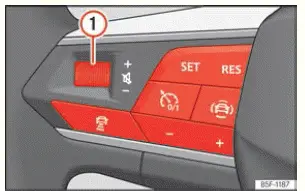
Fig. 60 Controls on the steering wheel.
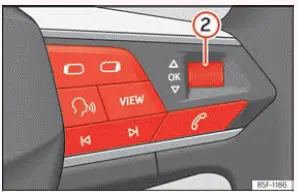
Fig. 61 Controls on the steering wheel.
The Seat Ibiza is equipped with multifunction controls integrated into the steering wheel, allowing the driver to operate several vehicle systems without reaching for the central dashboard or Infotainment display. Depending on the equipment fitted, these controls provide access to audio playback, telephone functions, navigation information, voice commands and driver assistance systems. The arrangement is designed to reduce the need to look away from the road while making commonly used adjustments. Nevertheless, the driver must remain attentive to traffic conditions and use the controls only when it is safe to do so.
Buttons available depending on the version
The functions assigned to the steering wheel buttons vary according to the Seat Ibiza model version and installed equipment. Figures 60 and 61 illustrate the available control arrangements. Some buttons have more than one function, depending on whether they are pressed, rotated or held. The following descriptions explain how the individual controls operate.
- Audio volume control. Rotate the control in one direction to increase the volume and in the
opposite direction to reduce it. This allows the sound level of the active audio source to be adjusted
directly from the steering wheel.
Press: Press the rotary control to mute the audio output. This provides a quick way to silence the sound without changing the selected radio station or media source.
- Instrument cluster menu control. Rotate the control to move through the available options
in the instrument cluster display. When navigation information is being displayed in the instrument cluster,
rotating the control changes the map zoom level, allowing the driver to zoom in or out.
Press: Press the control to confirm or select the option currently highlighted in the instrument cluster menu. This makes it possible to navigate through the displayed information and choose the required setting using the steering wheel.
 Radio: Use this control to search for the previous or next radio station. The corresponding
button allows the driver to move between stations without operating the Infotainment screen.
Media: A short press selects the previous or next track in the current media source. Pressing and holding the control activates fast rewind or fast forward, allowing movement through the track being played. The action depends on the direction of the selected control and the active playback mode.
 Telephone functions: Press this button to access the telephone menu or manage an incoming or
active call. Depending on the current telephone status, the control can be used to answer a call or end a
conversation. This allows basic telephone operations to be performed without reaching for the Infotainment
system.
 Audio source selection: Use this button to switch between the available radio and media
sources. It provides direct access to the main audio playback modes, making it easier to change the source while
keeping your hands on the steering wheel.
 Instrument cluster menu navigation: Press the appropriate control to move to the previous or
next menu in the instrument cluster display. This allows the driver to browse the available vehicle information
and menu sections without using separate dashboard controls.
 Voice control: Press this button to activate or deactivate the voice control function. When
voice control is available, the driver can use supported spoken commands to interact with compatible vehicle
functions instead of selecting options manually.
 Instrument
cluster display views: Use this control to change the information layout or view shown in the
instrument cluster. The available views depend on the display and equipment fitted to the Seat Ibiza.
 Adaptive Cruise
Control (ACC): Press this button to switch the ACC system on or off. The control provides direct
access to the adaptive cruise control function without requiring the driver to navigate through the Infotainment
menus.
 Driver assistance activation: Use this button to activate the selected ACC, Travel Assist or
speed limiter function, depending on the equipment installed and the assistance system currently selected. The
available operation is determined by the active driver assistance mode.
 Resume the
programmed speed: Press this control to restore the previously stored speed setting when the
corresponding driver assistance function permits it. This allows the system to return to the programmed speed
without requiring the driver to enter the value again.
 +: Increase the
programmed speed. Use the plus control when a higher speed setting is required for the active speed-related
assistance function.
-: Decrease the programmed speed. Use the minus control to reduce the stored speed setting to the desired value. The adjustment applies to the relevant active driver assistance function.
 Travel Assist / ACC selection: Use this button to select between Travel Assist and Adaptive
Cruise Control, where these systems are available. The control allows the driver to choose the required
assistance function using the steering wheel.
 Driver assistance menu:
Press this button to open the driver assistance menu in the instrument cluster. The menu provides access to the
assistance functions and related information available on the vehicle.
 ACC following distance: Use this control to change the programmed distance maintained by
Adaptive Cruise Control. The selected setting determines the following distance requested from the ACC system
while it is operating, subject to the system's operating conditions.
 Steering wheel
...
 Steering wheel position adjustment
Fig. 62 Lever in the lower left side of the
steering column.
The steering wheel position should be adjusted before starting a journey and only while the Seat Ibiza is
stationary. A cor ...
See also:
Honda Civic Owners Manual. Storing the Flat Tire
Models with aluminum wheels
Remove the center cap.
All models
Place the flat tire face down in the spare tire
well.
Remove the spacer cone from the wing
bolt, flip it over, and insert it back on the
bolt. Secure the flat tire with the wing bolt.
Securely put ...
