
Seat Ibiza (6F) 2017-2026 Owner's Manual: SEAT Digital Cockpit
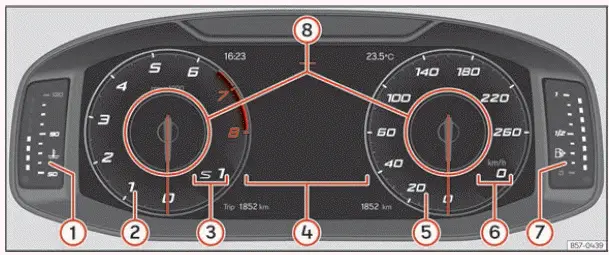
Fig. 2 SEAT Digital Cockpit on the instrument
panel (classic view).
- Engine coolant temperature display. This indicator provides information about the engine coolant temperature, allowing the driver to monitor the engine's thermal operating condition. If the cooling system detects an abnormal temperature, the corresponding warning must be observed and the appropriate instructions followed to prevent possible engine damage.
- Revolution counter. The rev counter, also known as the tachometer, displays the engine's rotational speed in revolutions per minute (rpm). It allows the driver to monitor how quickly the engine is running and provides useful information when accelerating, changing gears or assessing engine operation under different driving conditions.
- Gear engaged or position of the selector lever. This indication shows the currently selected gear or transmission selector position, depending on whether the Seat Ibiza is equipped with a manual gearbox or an automatic transmission. It helps the driver confirm the transmission's current operating state without looking away from the instrument cluster.
- Screen display. The central display area presents information relating to the vehicle's operation, driving data and available electronic systems. Depending on the selected view and equipment configuration, this area can show navigation instructions, multimedia information, vehicle status messages and other details relevant to the journey.
- Speedometer. The speedometer indicates the vehicle's current road speed. In the classic Digital Cockpit layout, it is represented as a circular instrument with a moving pointer, providing a familiar presentation similar to that of a conventional analogue speedometer.
- Digital speed display. In addition to the circular speedometer, the Digital Cockpit provides a numerical indication of the vehicle's current speed. This allows the driver to read the speed directly and precisely without estimating the pointer's position on the dial.
- Fuel gauge. The fuel level indicator shows the approximate quantity of fuel remaining in the tank. It helps the driver monitor fuel availability and determine when refuelling is necessary. Any associated low-fuel warning should be taken into account when planning the remaining journey.
- Information Profile. This configurable area displays additional information selected by the driver. Depending on the vehicle's equipment, the available profiles can include driving statistics, navigation information, audio playback details, assistance system indications and other vehicle-related data. The displayed content can be personalised through the corresponding Digital Cockpit settings.
The SEAT Digital Cockpit is a fully digital instrument cluster equipped with a high-resolution colour TFT display. Instead of relying exclusively on fixed mechanical instruments, it uses an electronic screen to present the speedometer, rev counter, vehicle status information and other driving-related indications. This arrangement allows the Seat Ibiza to display different combinations of information according to the driver's preferences and the systems installed in the vehicle. The display is designed to keep essential driving data clearly visible while providing access to additional functions and information.
The SEAT Digital Cockpit offers three principal display views, which can be selected using the  button on the multifunction steering wheel. Each view presents the instrument information in a different
arrangement, allowing the driver to choose a layout suited to the current driving situation. By selecting
different information profiles, the display can also show content beyond the traditional circular speedometer
and rev counter, including navigation guidance, multimedia details and journey statistics. The availability and
presentation of individual functions depend on the equipment fitted to the vehicle.
- Classic: This view presents the Digital Cockpit in a traditional instrument layout, with the speedometer and rev counter displayed as circular gauges. It retains the familiar appearance of an analogue instrument panel while allowing selected digital information to appear within the configurable display areas. The classic layout is particularly suitable for drivers who prefer to monitor vehicle speed and engine revolutions using conventional-style instruments.
- Dynamic: This view provides an alternative arrangement of the instrument cluster, changing the presentation of driving information while retaining access to the essential vehicle indications. It allows the driver to use a different visual layout and display the available information profiles according to the selected configuration.
- Navigation: This view places greater emphasis on navigation-related information when the corresponding navigation functions are available. Route guidance and other relevant journey details can be presented within the instrument cluster, making it easier to follow navigation instructions while keeping essential driving information accessible.
All three views can present information associated with the vehicle's audio system, telephone functions, journey statistics, operating status, navigation and driver assistance systems. The exact content shown depends on the selected view, the information profile currently in use and the equipment installed in the Seat Ibiza. Certain indications may only appear when the corresponding system is active or when relevant information is available. This flexibility allows the instrument cluster to serve as both a primary driving display and a convenient source of additional vehicle information.
In every available view, the content shown in the Information Profile areas can be personalised to suit the driver's requirements. The configurable sections identified in ››› Fig. 2 8 allow different types of information to be selected without changing the fundamental purpose of the instrument cluster. For example, the driver may prefer to display fuel consumption and remaining range during everyday journeys, while navigation guidance or assistance system information may be more useful in other circumstances. The available combinations depend on the Digital Cockpit version and the functions supported by the vehicle.
Information profiles
To configure the information displayed in the SEAT Digital Cockpit, open the corresponding settings through the
infotainment system. Navigate to the  >
Selection > Digital Cockpit menu and choose from the available information display options. This menu allows
the driver to determine which supported information profiles are presented in the instrument cluster. The
selected configuration affects the content shown in the relevant display areas and makes it possible to adapt
the Digital Cockpit to individual preferences. Make these adjustments while the vehicle is stationary so that
attention remains focused on the road during driving.
Classic View
In Classic View, the rev counter and speedometer are displayed as full circular instruments, with their pointers extending across the corresponding scales as illustrated in ››› Fig. 2. This arrangement closely resembles the layout of a traditional instrument cluster while taking advantage of the Digital Cockpit's electronic display. The driver can monitor engine speed and road speed using the familiar circular gauges, while additional information appears in the available configurable areas. The presentation combines conventional instrument readability with the flexibility of a digital screen.
View 1, 2, 3 or AUTOMATIC
The View 1, View 2, View 3 and AUTOMATIC options allow the information presented in the SEAT Digital Cockpit to be personalised. The driver can choose which available information profiles are displayed and arrange them according to personal preferences. Although several types of information can be selected through the configuration menu, only two information items can be shown simultaneously in the relevant display areas. The user determines which two items are displayed and their order by moving a finger vertically over the dial representations in the corresponding infotainment settings. This makes it possible to prioritise the information considered most useful without overcrowding the instrument display.
Depending on the Seat Ibiza version and the Digital Cockpit configuration, personalised views can be stored for later use. The selected arrangement may be memorised by leaving the configuration menu or by pressing and holding the View button, according to the procedure supported by the vehicle. Once a preferred configuration has been saved, the driver can return to that arrangement without having to select each information item again. The available storage and selection methods may differ between equipment versions.
- Consumption. This profile presents fuel consumption information in two complementary formats. Current fuel consumption is represented graphically, allowing the driver to observe changes as driving conditions and accelerator input vary. Average fuel consumption is shown as a numerical value, providing a convenient reference for assessing fuel use over the relevant measurement period. The combined presentation makes it easier to distinguish immediate consumption from the average recorded during the journey.
- Audio. The Audio profile displays information about the current audio playback in digital format. Depending on the active source and the equipment installed, the information may relate to radio reception or media content being played through the infotainment system. This allows the driver to check the current audio selection directly in the Digital Cockpit without repeatedly consulting the central infotainment display.
- Altitude. This information profile provides a numerical indication of the vehicle's current altitude above sea level. The reading can be useful when travelling through areas with changing elevations, such as mountainous roads or routes involving significant climbs and descents. The displayed value is intended to provide altitude information within the instrument cluster and should not be treated as a substitute for specialised surveying or navigation equipment.
- Compass. The Compass profile displays directional information digitally, allowing the driver to identify the vehicle's general orientation. It provides a convenient reference for the direction of travel and can complement other navigation information available in the Seat Ibiza. The indication is presented within the configurable Digital Cockpit area without requiring a separate compass instrument.
- Destination arrival information. When navigation guidance is available and a destination has been selected, this profile presents useful information about the remaining journey. It includes the estimated travel time still required, the distance to the selected destination and the calculated estimated time of arrival. These values provide an overview of journey progress and may change as the route or driving conditions change.
- Range. The Range profile displays the estimated distance that can still be travelled with the fuel currently available in the tank. This value helps the driver plan refuelling stops and assess whether the remaining fuel is sufficient for the intended journey. Because the calculation depends on fuel consumption and operating conditions, the displayed range is an estimate rather than a guaranteed distance.
- Travelling time. This profile provides information about the time spent travelling during the relevant journey or measurement period. It allows the driver to review journey duration alongside other trip statistics. The displayed information can be useful when comparing journeys or monitoring the time taken to complete a particular route.
- Route guidance. The Route Guidance profile presents information associated with the active navigation route. When the navigation system is providing directions, relevant guidance can be displayed in the instrument cluster so that the driver can follow the planned route while continuing to monitor essential driving information. The exact indications depend on the navigation equipment and the current route.
- Journey. The Journey profile displays the distance travelled in numerical form. This provides a convenient way to monitor the length of a trip or review the distance covered during the selected measurement period. The information can be used together with travelling time and fuel consumption data to obtain a broader picture of the vehicle's operation during a journey.
- Assist systems. This profile provides a graphical representation of the available driver assistance systems. Depending on the equipment installed and the functions currently operating, the display may show information associated with the vehicle's assistance features. The graphical presentation helps the driver recognise the relevant system status, although the driver remains responsible for maintaining control of the vehicle and monitoring surrounding traffic.
- Road signs. The Road Signs profile displays traffic signs detected by the vehicle's road sign recognition function, where fitted. This information can help the driver remain aware of relevant road signs encountered during the journey. However, the recognition system may not identify every sign correctly or under all conditions. Actual road signs and applicable traffic regulations always take precedence over the information shown in the instrument cluster.
- Navigation. The Navigation profile provides a graphical representation of navigation instructions using directional arrows. When route guidance is active, these indications help the driver identify upcoming changes of direction and follow the selected route. Presenting this information within the SEAT Digital Cockpit allows navigation guidance to be viewed alongside the vehicle's primary driving instruments.
The number of selectable information profiles, their contents and the combinations available for display may vary according to the Seat Ibiza's equipment specification, infotainment system and Digital Cockpit version. Some profiles require particular vehicle functions or navigation features to be installed, while others may only provide information when the relevant system is operating. Consequently, the configuration options and display examples described here may differ from those available in an individual vehicle.
 Introduction
If the Seat Ibiza is started with a severely discharged 12-volt battery, or after the vehicle battery has been
replaced, certain electronic system settings may have changed or been erased. These can ...
 Rev counter
The rev counter, also known as the tachometer, displays the engine's rotational speed in revolutions per minute
(rpm). It allows the driver to monitor how quickly the engine is running and provides ...
See also:
Honda Civic Owners Manual. Phone Setup
To pair a cell phone (No phone has
been paired to the system)
Press the button or
the button.
Rotate to select Yes,
then press .
Make sure your phone is in search or
discoverable mode, then press .
HFL automatically searches for a
Bluetooth dev ...
