
Seat Ibiza (6F) 2017-2026 Owner's Manual: Introduction
If the Seat Ibiza is started with a severely discharged 12-volt battery, or after the vehicle battery has been replaced, certain electronic system settings may have changed or been erased. These can include the clock, date, personalised comfort preferences and previously programmed functions. Such changes may occur because some vehicle systems require a stable electrical supply to retain their stored settings. Following a battery replacement or a period of insufficient battery charge, the information shown in the instrument cluster and other electronic systems may therefore differ from the settings previously selected by the driver.
Once the 12-volt battery has been sufficiently charged and the vehicle's electrical systems are operating normally, check the relevant settings and correct any values or preferences that have been altered. Pay particular attention to the time, date and personalised functions that you regularly use. Restoring these settings ensures that the instrument cluster and associated vehicle systems display the information and operate according to your preferred configuration.
WARNING Distraction while driving can cause the driver to lose concentration, react too late to changing traffic conditions or fail to notice a hazard. Even a brief interruption of attention may result in an accident involving serious injury. Operating display menus or adjusting vehicle settings requires visual and mental attention that should remain focused on the road.
- Do not operate the instrument cluster controls or navigate through its menus while driving. Keep your attention on the traffic situation and maintain full control of the vehicle at all times.
- To minimise the risk of accidents and injuries, make changes to instrument cluster settings, displayed information and infotainment system configurations only when the Seat Ibiza is stationary and it is safe to operate the controls. Complete any necessary adjustments before beginning your journey.
Basic version digital instrument cluster
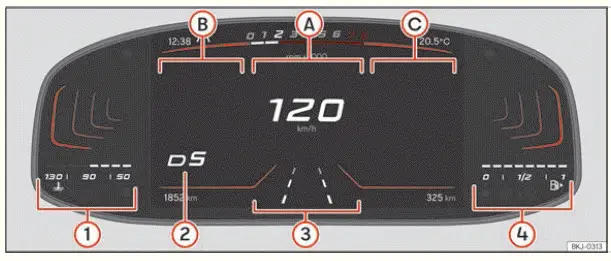
Fig. 1 Basic version digital instrument cluster: Main
view.
The basic digital instrument cluster presents essential driving information in several clearly defined areas of the display. The upper section shows the current time, selected driving profile, engine speed indication and outside temperature. The lower section provides additional information, including the vehicle's total distance travelled in kilometres or miles, the speed selected for cruise control or Adaptive Cruise Control (ACC), where applicable, and the estimated remaining driving range. The information presented in these areas depends on the vehicle's equipment and the functions currently in use.
- Main display: The central display area shows the vehicle's current speed in digital format, allowing the driver to read the speed directly without interpreting a conventional dial. Where supported by the installed equipment, recognised road signs are also displayed in this area, providing relevant traffic sign information alongside the speed indication.
- Secondary indications: This display area provides access to additional driving data, such as average speed, average fuel consumption, distance travelled and other journey-related information. These readings allow the driver to review the vehicle's operation and monitor driving statistics without changing the primary speed display.
- Secondary indications: This area can display information from the vehicle's radio, media playback, telephone and navigation functions, depending on the equipment installed. It allows selected infotainment information to be viewed directly in the instrument cluster, reducing the need to consult the central infotainment screen for every detail.
- Engine coolant temperature indicator: Displays information about the temperature of the engine coolant. This indication helps the driver monitor the engine's thermal operating condition and recognise when the cooling system requires attention. Any associated temperature warning must be taken seriously and handled according to the instructions for the cooling system.
- Gear engaged and gear or selector lever position recommendation: Shows the currently selected gear or transmission selector position, depending on whether the Seat Ibiza is equipped with a manual or automatic gearbox. Where the corresponding function is available, the display may also provide a recommended gear selection to assist the driver in choosing an appropriate gear for the current driving conditions.
- Selected driving assistant: Identifies the driver assistance function currently selected or displayed in the instrument cluster. The information shown depends on the assistance systems installed in the vehicle and their operating status. This indication helps the driver recognise which assistance function is being used or monitored.
- Fuel gauge: Indicates the approximate amount of fuel remaining in the tank. The display allows the driver to monitor the available fuel supply and plan refuelling before the tank becomes nearly empty. The fuel level indication should be considered together with any low-fuel warning or estimated driving range shown elsewhere in the instrument cluster.
The basic version of the Seat Ibiza digital instrument cluster uses a high-resolution colour TFT display to present driving information, vehicle status indications and selected system data. Unlike a conventional instrument panel with fixed mechanical gauges, the digital display can change its presentation according to the selected view. This arrangement allows essential information to remain visible while providing access to additional readings and functions through the instrument cluster controls.
Different display layouts can be selected to suit the driver's preferences or the information required at a particular moment. For example, the instrument cluster can present a traditional-style rev counter, a circular speedometer or a digital speed indication accompanied by secondary information. The content of the main display and the secondary display areas can also be changed, allowing driving statistics, infotainment details and other available information to be shown in different combinations. The selection of views and individual indications depends on the equipment fitted to the vehicle.
Instrument cluster operation
The digital instrument cluster is operated exclusively using the controls integrated into the multifunction
steering wheel. These buttons allow the driver to navigate between display views, select available information
and confirm menu choices without using separate controls on the instrument panel. The precise functions assigned
to the  buttons on the multifunction steering wheel depend on the vehicle's equipment and the steering wheel
configuration. Familiarise yourself with their operation while the vehicle is stationary so that the required
controls can be identified easily.
Instrument cluster views
To change between the available instrument cluster layouts, press the  button on the
multifunction steering wheel. Each press allows the driver to move between the supported display presentations,
changing the arrangement of the primary instruments and the accompanying information. The selected view
determines how vehicle speed, engine speed and secondary indications are presented on the screen.
The following instrument cluster views are available, depending on the vehicle's equipment:
- Main: Displays the current vehicle speed prominently as a digital speedometer, with additional information arranged in the secondary display areas. This layout is intended to provide a clear numerical speed reading while allowing the driver to view selected driving data, vehicle information or compatible infotainment indications at the same time.
- Speed: Presents the speedometer in a traditional circular instrument layout, resembling a conventional analogue dial. The selected secondary indication appears in the centre of the circular speedometer, allowing additional information to be viewed without replacing the primary speed indication. This layout may be preferred by drivers who are accustomed to a classic instrument panel.
- Rev counter: Displays engine speed using a circular instrument similar to a conventional tachometer. The selected secondary information is positioned within the centre of the dial, combining engine speed monitoring with access to additional vehicle data. This view is useful when the driver wishes to observe engine revolutions more prominently while retaining the digital cluster's supplementary information.
The number of available views, their appearance and the information that can be displayed within them may differ according to the Seat Ibiza model version and installed equipment. Certain indications or functions may only be available when the corresponding vehicle system is fitted or active. As a result, the instrument cluster in your vehicle may not show every item illustrated or described in this section.
Note When the ignition is switched off, the instrument cluster may display a vehicle status screen containing information about the journey or the vehicle's current condition. This can include the distance travelled and other relevant data available from the instrument cluster. The exact information shown depends on the vehicle configuration and the display functions supported by the installed system.
Select secondary indications in the "Main" view
In the "Main" instrument cluster view, the secondary display areas identified as B and C can be configured independently. The driver can choose which available information appears in each area or hide an indication when it is not required. This makes it possible to arrange the display according to personal preferences, such as keeping journey statistics visible on one side while showing infotainment information on the other. To change the secondary indications, use the multifunction steering wheel controls as described below while the vehicle is stationary.
1. Use the  and
 buttons to select the secondary indication area you want to configure. Choose the right-hand area B or the
left-hand area C, depending on where the information should appear. The selected area can then be adjusted
without changing the configuration of the other secondary display area.
2. Rotate the thumbwheel on the multifunction steering wheel to move through the available secondary indications. The selectable information may include driving data, vehicle status information and supported infotainment functions, depending on the equipment installed. Continue rotating the thumbwheel until the desired indication is highlighted or selected for the chosen display area.
3. Confirm the selected secondary indication by pressing the  button. The instrument cluster applies the chosen display configuration to the selected area. Repeat the
procedure for the other secondary display area if you wish to change both indications or adjust which
information is visible in the "Main" view.
Selecting secondary indications in the "Speed" or "Rev counter" views
The "Speed" and "Rev counter" layouts use a circular instrument presentation, with the selected secondary indication displayed in the central area of the dial. Unlike the "Main" view, where separate secondary display areas can be configured, these layouts allow the driver to select the supplementary information shown within the circular instrument. The selection is made using the thumbwheel and confirmation control on the multifunction steering wheel.
1. Rotate the thumbwheel on the multifunction steering wheel to browse the available secondary indications. As you move through the options, select the information you want to display in the centre of the speedometer or rev counter. The available choices depend on the vehicle's equipment and the functions supported by the digital instrument cluster.
2. Confirm the desired indication by pressing  .
The chosen information will then appear within the circular instrument display, allowing the driver to view it
alongside the primary speed or engine revolution reading.
Note If warnings concerning existing vehicle faults appear when the ignition is switched on, certain instrument cluster settings or information displays may not be accessible in the manner described above. Active fault messages can affect the normal presentation of information or temporarily restrict the ability to change display configurations. In such circumstances, give priority to the warning indications and follow the instructions associated with the reported malfunction. If the problem persists or the instrument cluster continues to display fault messages, have the Seat Ibiza examined by a suitably qualified specialist workshop. SEAT recommends visiting an authorised SEAT dealership for diagnosis and any necessary repairs.

 SEAT Digital Cockpit
Fig. 2 SEAT Digital Cockpit on the instrument
panel (classic view).
Engine coolant temperature display. This indicator provides information about the engine
coolant temperature, allo ...
See also:
Honda Civic Owners Manual. Automatic Import of Cellular Phonebook and Call History
When your phone is paired, the contents of its phonebook and call history are
automatically imported to HFL.
Automatic Import of Cellular Phonebook and Call
History
When you select a person from the list in the cellular
phonebook, you can see up to three category icons.
...
