
Honda Civic Owners Manual: Ring Tone. Caller's ID Information
Ring Tone
You can change the ring tone setting.
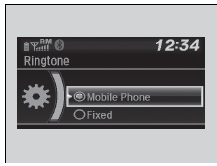
- Press the
 button or
the
 button.
- Rotate
 to select Phone
Setup, then
press
 .
- Rotate to select
Ringtone, then press
.
- Rotate to select Fixed
or Mobile
Phone, then press .
|
Ring Tone Fixed: The fixed ring tone sounds from the speakers. Mobile Phone: For certain connected phones, the ring tone stored in the phone sounds from the speakers. |
Caller's ID Information

You can select a caller's information to be displayed when you have an incoming call.
- Press the button or
the button.
- Rotate to select Phone
Setup, then
press .
- Rotate to select
Caller ID Info, then
press .
- Rotate to select a
mode you want, then
press .
|
Caller's ID Information Name Priority: A caller's name is displayed if it is stored in the phonebook. Number Priority: A caller's phone number is displayed. |
 Phone Setup
To pair a cell phone (No phone has
been paired to the system)
Press the button or
the button.
Rotate to select Yes,
then press .
Make sure your phone is in sear ...
 To Clear the System. Automatic Import of Cellular Phonebook and Call History
To Clear the System
Pairing codes, paired phones, all stored voice tags, all speed dial entries,
all call
history data, and all imported phonebook data are erased.
Press the button or ...
See also:
. Tire Identification Number (TIN)
The tire identification number (TIN) is a group of numbers and letters that
look like
the example in the side column. TIN is located on the sidewall of the tire.
Tire Identification Number (TIN)
DOT B97R FW6X 2209
DOT: This indicates that the tire meets all
requirements of th ...
