
Honda Civic Owners Manual: To Clear the System. Automatic Import of Cellular Phonebook and Call History
To Clear the System
Pairing codes, paired phones, all stored voice tags, all speed dial entries, all call history data, and all imported phonebook data are erased.
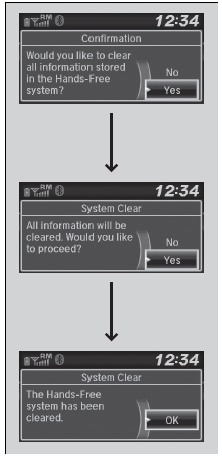
- Press the
 button or
the
 button.
- Rotate
 to select Phone
Setup, then
press
 .
- Rotate to select System Clear, then
press .
- Rotate to select Yes,
then press .
- A confirmation message appears on the
screen. Rotate to select Yes,
then press
.
- A notification appears on the screen. Press
.
Automatic Import of Cellular Phonebook and Call History
When your phone is paired, the contents of its phonebook and call history are automatically imported to HFL.

|
Automatic Import of Cellular Phonebook and Call History When you select a person from the list in the cellular phonebook, you can see up to three category icons. The icons indicate what types of numbers are stored for that name.
If a name has four or more numbers, ... appears instead of category icons. On some phones, it may not be possible to import the category icons to HFL. The phonebook is updated after every connection. Call history is updated after every connection or call. |

 Ring Tone. Caller's ID Information
Ring Tone
You can change the ring tone setting.
Press the button or
the button.
Rotate to select Phone
Setup, then
press .
Rotate to select
Ringtone, then press ...
 Speed Dial
Up to 20 speed dial numbers can be stored per phone.
To store a speed dial number:
Press the button or
the button.
Rotate to select Speed
Dial, then press
.
Ro ...
See also:
. Opening/Closing Windows without Auto-Open/Close Function
To open: Push the switch down.
To close: Pull the switch up.
Release the switch when the window reaches
the desired position.
Opening Windows and Moonroof* with the Remote
To open: Press the unlock button, and then
within 10 seconds, press it again and hold it. If
the windows and ...
