
Seat Ibiza (6F) 2017-2026 Owner's Manual: Radio mode
Introduction
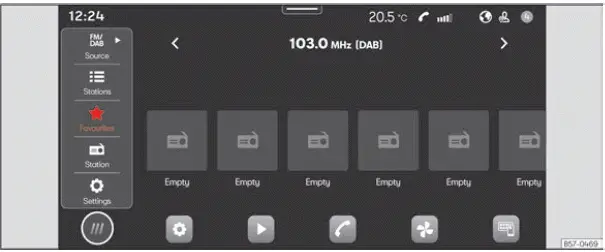
Fig. 131 Schematic representation: Radio view.
Radio mode allows you to listen to available radio stations through the Seat Ibiza infotainment system. You can search for and select stations broadcasting on the supported frequency bands, switch between available reception options and store your preferred stations using the preset buttons. Once a station has been saved as a favourite, it can be selected directly from its assigned preset, making it easier to return to frequently listened-to broadcasts without searching for them again.
The available radio reception methods and frequency bands depend on the infotainment equipment installed in the vehicle and the country in which it is being used. Broadcasting services and the frequency ranges assigned to them are not identical in every market. In some countries, particular frequency bands may no longer carry radio broadcasts or may have been withdrawn from use. Consequently, a reception option described in the Seat Ibiza operating instructions may not be available in every vehicle or location.
Access the RADIO menu
- To open Radio mode, select HOME >
 as illustrated in
Fig. 131. The radio interface will appear, allowing you to select available stations, use
the supported reception functions and access your saved favourites.
Access the settings
- To open the radio configuration options, select HOME >
 >
 . The settings available in this menu
depend on the radio equipment, reception capabilities and infotainment version installed in the vehicle.
Online functions in Radio mode
In addition to conventional radio reception, certain Seat Ibiza infotainment configurations support online functions within Radio mode. These features require the appropriate connected-services equipment, an active user account and a suitable data connection. The availability of online radio functions depends on the vehicle's configuration and whether all the necessary service and connectivity requirements have been met.
- SEAT CONNECT equipment. The vehicle must be fitted with the equipment required to support SEAT CONNECT services. Without the corresponding hardware and infotainment capabilities, online functions in Radio mode cannot be used.
- Active SEAT CONNECT user account. You must have an active SEAT CONNECT account that provides access to the relevant connected services. The account must be available for use with the vehicle's supported online functions.
- Vehicle assigned to the user account. The Seat Ibiza must be linked to your SEAT CONNECT user account. This association is necessary for the corresponding online services to operate in connection with the vehicle.
- Suitable mobile data allowance. A data plan must be available for the online functions. This can be a corresponding data package purchased through the webshop of SEAT's official data supplier or an available mobile data allowance on your own device, shared with the infotainment system through a Wi-Fi hotspot. The connection must provide the data access required by the selected service.
Note
- Radio broadcasters are responsible for the programmes, announcements and other information transmitted by their stations. SEAT does not control the content of these broadcasts. Radio reception may also be affected by electrical equipment connected to the vehicle. Such devices can generate interference that reduces reception quality or produces unwanted noise through the Seat Ibiza loudspeakers. If interference occurs, consider whether it coincides with the operation of a connected electrical device.
- On vehicles equipped with a window aerial, adhesive films, metallic coatings and stickers containing metal may interfere with radio signal reception. Applying these materials to the windows can weaken the signal received by the aerial and reduce radio performance. Bear this in mind when fitting window films or decorative stickers to the vehicle.
 Activation word and commands
Voice control wake words
The Seat Ibiza infotainment system can start voice control automatically when it recognises the configured
activation phrase, also known as the wake word. When this funct ...
 Media Mode
Introduction
Fig. 132 Schematic representation: Media view
Media mode allows you to play compatible multimedia files from external storage devices and connected media
sources through the ...
See also:
Honda Civic Service Manual. Intake Air Resonator Removal and Installation ('12-'13: K24Z7, '14:
4-door K24Z7)
1211T1
1.
Front Bumper
1.
Remove the screws (A), the bolts (B), and the clips (C,
D) securing the front bumper (E).
...
