
Honda Civic Owners Manual: Opening and Closing the Trunk
Precautions for Opening/Closing the Trunk
Opening the trunk
Open the trunk all the way.
- If it is not fully opened, the trunk lid may begin to close under its own weight.
Closing the trunk
Keep the trunk lid closed while driving to:
- Avoid possible damage.
- Prevent exhaust gas from leaking into the vehicle.
Exhaust Gas Hazard
Using the Trunk Opener
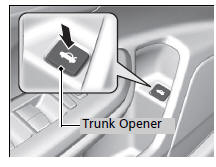
Pressing the trunk opener on the driver’s door unlocks and opens the trunk.
When You Cannot Open the Trunk
Using the Trunk Release Button
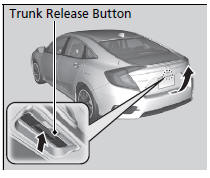
Models with smart entry system
Push up the release button on the trunk lid after the doors are unlocked.
When You Cannot Open the Trunk
Even if the trunk is locked, you can open the trunk if you carry the smart entry remote.
- Some exterior lights flash and the beeper sounds.
Using the Trunk Release Button
Models with smart entry system
- A person who is not carrying the smart entry remote can unlock the trunk if a person who is carrying it is within range.
- The smart entry remote may not operate if it is too close to the trunk.
- If you forget the remote inside, the beeper will sound and the trunk will not close.
- If the beeper sounds after you close the trunk, move the smart entry remote away from the trunk and close again.
Emergency Trunk Opener

The trunk release lever allows you to open the trunk from inside for your safety.
Slide the release lever in the direction of the arrow.
Emergency Trunk Opener
Parents should decide if their children should be shown how to use this feature.
 Auto Door Locking/Unlocking
Your vehicle locks and unlocks all doors automatically when a certain
condition is
met.
Auto Door Locking
Drive lock mode
All doors lock when the vehicle’s speed reaches about 10 mph (15 km/h) ...
 Security System
...
See also:
Honda Civic Owners Manual. Wallpaper Setup
You can change, store, and delete the wallpaper on the audio/information
screen.
Import wallpaper
You can import up to three images, one at a time, for wallpaper from a USB
flash
drive.
1. Connect the USB flash drive to the USB
port.
2. Press the MENU/CLOCK button.
3. Rotate ...
