
Honda Civic Owners Manual: Auto Door Locking/Unlocking
Your vehicle locks and unlocks all doors automatically when a certain condition is met.
Auto Door Locking
Drive lock mode
All doors lock when the vehicle’s speed reaches about 10 mph (15 km/h).
Auto Door Unlocking
Driver’s door open mode
All doors unlock when the driver’s door is opened.
Auto Door Locking/Unlocking
Models without driver information interface
You can turn off or change to another auto door locking/unlocking setting using the master door lock switch.
Customizing the Auto Door Locking/ Unlocking Setting
Models with driver information interface
You can turn off or change to another auto door locking/unlocking setting using the driver information interface or audio/information screen.
Customized Features
Customizing the Auto Door Locking/Unlocking Setting
You can customize the auto door locking/unlocking setting to your liking using the master door lock switch.
List of the Auto Door Locking/Unlocking Customizable Options
| Auto door locking | |
| Mode | Description |
| Drive Lock Mode*1 | All doors lock when the vehicle’s speed reaches about 10 mph (15 km/h). |
| Off | The auto door locking is deactivated all the time |
| Auto door unlocking | |
| Mode | Description |
| Driver’s Door Open Mode*1 | All doors unlock when the driver’s door is opened. |
| Models with
continuously variable
transmission Park Unlock Mode |
All doors unlock when the shift lever is moved into P with the brake pedal depressed. |
| Off | The auto door unlocking is deactivated all the time. |
Customizing Flow for Auto Door Locking Options
| Steps | Drive Lock Mode*2 | Off |
| 1 | Apply the parking brake. Models with continuously variable transmission Move the shift lever out of P. |
Apply the parking brake. Models with continuously variable transmission Move the shift lever to P. |
| 2 | Close the driver’s door. | Open the driver’s door. |
| 3 | Turn the ignition switch to ON
 *1. *1. |
Turn the ignition switch to ON
 *1. *1. |
| 4 | Press and hold the right side of the master door lock switch on the
driver’s door
for more than five seconds. Release the switch after you hear a click
twice. 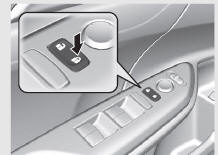 |
Press and hold the right side of the master door
lock switch on the driver’s door for more than
five seconds. Release the switch after you hear
one click. 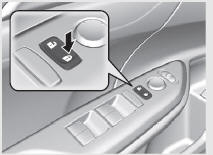 |
| 5 | Turn the ignition switch to ACCESSORY (q*1 within 20
seconds.
|
|
*1:Models with the smart entry system have an ENGINE START/STOP button instead of an ignition switch.
*2:Default setting
Customizing Flow for Auto Door Unlocking Options
| Steps | Driver's Door Open Mode*2 | Models with continuously variable transmission Park Unlock Mode |
Off |
| 1 | Apply the parking brake. Models with continuously variable transmission Move the shift lever out of P. |
Apply the parking brake. Models with continuously variable transmission Move the shift lever to P. |
|
| 2 | Close the driver’s door. | Open the driver’s door. | |
| 3 | Turn the ignition switch to ON
 *1. *1. |
Turn the ignition switch to ON
*1. |
|
| 4 | Press and hold the left side of the master door lock
switch on the driver’s door for more than five seconds. Release the
switch
after you hear a click twice.
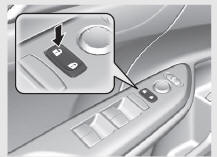 |
||
| 5 | Turn the ignition switch to ACCESSORY
 *1 within 20 seconds. *1 within 20 seconds.
|
||
*1:Models with the smart entry system have an ENGINE START/STOP button instead of an ignition switch.
*2:Default setting
 Childproof Door Locks
The childproof door locks prevent the rear doors from being opened from the
inside
regardless of the position of the lock tab.
Setting the Childproof Door Locks
Slide the lever in the rear do ...

See also:
Honda Civic Owners Manual. Front Side Marker Light Bulbs
When replacing, use the following bulbs.
Front Side Marker Light: 3 W
Push the tab to remove the light assembly.
Push the tab to remove the coupler.
Driver side
Turn the socket counter-clockwise to
remove it, then remove the old bulb.
Insert a new bulb.
Pas ...
