
Honda Civic Owners Manual: Live Sports Alert. Traffic and Weather Information
Live Sports Alert
While listening to other channels, you can receive sports alerts such as scores from the games of your favorite teams.
To set up a favorite team
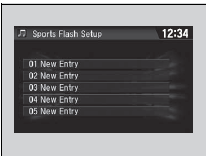
1. Select  .
2. Select Settings.
3. Select Audio.
4. Select Sports Flash Setup.
5. Select Favorite Team.
6. Select a team.
To set up an alert message
1. Select .
2. Select Settings.
3. Select Audio.
4. Select Sports Flash Setup.
5. Select Interrupt.
6. Select On(one time) or On(continue).
Live Sports Alert
The sports alert function is available in SiriusXM’ mode only.
To set up a favorite team
Sports alerts cut in only when SiriusXM’ mode is on.
Selecting On(one time) from the customize settings disables the alert feature next time you turn the power mode to ON.
Customized Features
You can also set up a favorite team by the following procedure.
1. Select Audio.
2. Select  .
3. Select Setting.
4. Select Sports Flash Setup.
To set up an alert beep
1. Select  .
2. Select Settings.
3. Select Audio.
4. Select Sports Flash Setup.
5. Select Interrupt Beep.
6. Select On.
Receiving a sports alert
1. A pop-up appears and notifies you of a sports alert.
2. Select Listen.
- You can use the same items as the playback mode pop-up screen.
To go back to the previous screen, select Back.
Listening to a missed sports alert
If you have missed a sports alert:
1. Select .
2. Select Sports Flash List.
3. Select alert.
To set up an alert beep
You can also set up a alert beep by the following procedure.
1. Select Audio.
2. Select  .
3. Select Setting.
4. Select Sports Flash Setup.
Traffic and Weather Information
You can receive traffic and weather information.
To set up a traffic & weather information
1. Select .
2. Select Settings.
3. Select Audio.
4. Select Traffic & Weather Setup.
5. Select the region.
- When you do not want to receive the information, select Unregistered.
Listening a traffic and weather information
1. Select  .
2. Select Traffic & Weather.
- Play mode can also use the any items same as playback mode
To go back to the previous screen, select OK.
Traffic and Weather Information
The traffic and weather information function at SiriusXM’ mode only.
You can also set up the traffic and weather information by the following procedure.
1. Select Audio.
2. Select  .
3. Select Setting.
4. Select Traffic & Weather Setup.
Traffic & Weather Now are registered trademarks of SiriusXM’ Radio, Inc.
 Preset Memory. Replay Function
Preset Memory
To store a channel:
1. Tune to the selected channel.
2. Press and hold the preset number for the station you want to store.
3. Select OK.
You can also store a channel by the foll ...
 Scan
Sample each channel on the selected mode for 10 seconds.
1. Select Scan.
2. Select Scan Channels.
You can select the desired channel by songs using Scan Songs in Preset.
To turn off scan, ...
See also:
. Tire Rotation
Rotating tires according to the maintenance messages on the information
display*/
driver information interface* helps to distribute wear more evenly and increase
tire
life.
Tires without rotation marks
Rotate the tires as shown here.
Tires with rotation marks
Rotate the tires as sh ...
