
Seat Ibiza (6F) 2017-2026 Owner's Manual: Initial configuration wizard
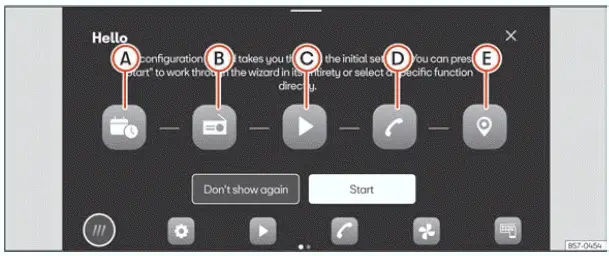
Fig. 12 Schematic representation: Initial
configuration wizard
The initial configuration wizard guides the user through the basic setup of the Seat Ibiza infotainment system when it is switched on for the first time. It brings together several important configuration tasks, including setting the date and time, preparing radio stations, accessing online media settings, connecting a mobile phone and entering frequently used navigation destinations. Completing these steps helps ensure that the relevant infotainment functions are configured before regular use.
The initial setup screen shown in Fig. 12 may appear whenever the infotainment system is switched on if one or
more configuration parameters have not yet been completed. Incomplete items are identified by the  symbol. The wizard may also continue to appear if the Don't show again function has not been
selected. This allows the user to return to unfinished setup tasks on a subsequent occasion without having to
locate each setting separately.
Function buttons: The initial configuration wizard contains the following options, identified by the corresponding letters in the illustration. Each button opens the relevant setup function so that the required information or preference can be entered.
- Date and time: Press this button to configure the infotainment system's date and time settings. Check that the displayed values are correct, as they are used for the time and date information presented by the vehicle.
- Radio station search: Select this option to search for radio stations with the strongest reception available at the vehicle's current location. The stations found during the search can be stored in the system's memory, making them easier to access later without repeating the search manually.
- Online Media: Press this button to open the Online Media settings. This section provides access to the configuration options associated with the infotainment system's supported online media functions.
- Mobile phone connection: Select this option to begin linking a compatible mobile phone with the infotainment system. Once the connection has been configured, the functions available through the connected device depend on the phone and the vehicle's equipment.
- Home and work addresses: Press this button to configure the home and work destinations used by the navigation system. The addresses can be selected using the vehicle's current position or entered manually. Storing these locations makes it more convenient to select frequently used destinations during future journeys.
Don't show again prevents the initial configuration wizard from being displayed automatically on subsequent infotainment system startups. Selecting this option does not mean that the underlying vehicle settings can never be changed. Instead, the introductory setup screen is no longer presented automatically, and any settings that still need to be configured must be accessed through the appropriate Settings menus. This option is useful once the initial configuration has been completed or when the user prefers to make the remaining adjustments later.
Start launches the configuration wizard and allows the user to proceed through the available initial setup functions. Select this button when you are ready to begin configuring the infotainment system's basic settings.
End finishes the configuration process from the wizard's main menu after one or more settings have been applied. Pressing this button concludes the current setup session and allows the user to leave the wizard. Any configuration items that remain incomplete can be addressed later through the relevant settings, subject to the wizard's display preferences.
 Closes the configuration wizard and returns
the user from the initial setup interface. This control can be used when the user wishes to leave the wizard
without continuing through the remaining configuration options. Settings that have not been completed may still
require attention later.
 Explanation of the function buttons
Fig. 11 Schematic representation: Overview of the
possible function buttons on the screen.
Top part of the screen
The upper section of the Seat Ibiza infotainment display provides quick ...
 Assistance systems and vehicle settings
Fig. 13 Schematic representation: Assistance
systems and vehicle settings
To open the menu containing the vehicle's driver assistance functions and related settings, select Driver assis ...
See also:
Honda Civic Service Manual. License Plate Light Removal and Installation (2-door)
Removal
1.
License Plate Light Assembly
1.
Push the license plate light assembly (A) to the side to release
the retaining spring, and pull out the license plate light assembly.
...
