
Seat Ibiza (6F) 2017-2026 Owner's Manual: Explanation of the function buttons
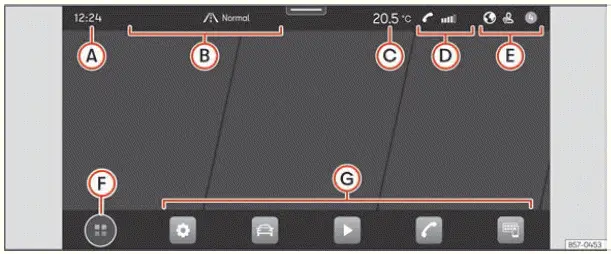
Fig. 11 Schematic representation: Overview of the
possible function buttons on the screen.
Top part of the screen
The upper section of the Seat Ibiza infotainment display provides quick access to essential information about the vehicle, the current journey and connected devices. Depending on the equipment installed and the functions currently in use, this area can show the time, navigation details, climate control information, telephone status and user-related notifications. The arrangement illustrated in Fig. 11 is schematic, so the information actually displayed may vary according to the infotainment system version and vehicle configuration.
- Current time. The current time is displayed in the upper section of the infotainment screen, allowing the driver and passengers to check it without opening a separate menu. The displayed time follows the vehicle's configured date and time settings.
- Drive profile and navigation information.
When route guidance is active, this area displays the estimated time and remaining distance to the selected destination. These details provide a convenient overview of the journey without requiring the navigation map to remain open on the main screen. The information relates to the route currently being followed.
If no navigation route is active, the display shows the selected driving profile instead. On Seat Ibiza versions that do not offer a drive profile function, the current address is displayed when route guidance is inactive. The information presented therefore depends on both the navigation status and the equipment available in the vehicle.
- Air conditioning information. The upper information area can display the status of selected
climate-related functions. In vehicles equipped with a heated steering wheel or windscreen heating, the
corresponding symbol appears when that function is activated. This makes it possible to recognise whether
the relevant heating feature is currently switched on without opening the climate control menu.
When these heating indications are not being displayed, the area shows the current outside temperature. The temperature reading provides information about the conditions outside the vehicle and can be checked directly from the infotainment screen.
- Telephone information. When a compatible mobile phone is connected to the infotainment system, this area can display information about the connected device and its communication status. Depending on the phone, connection and available functions, the indications may include mobile network signal strength, Bluetooth connection status, missed calls, newly received messages and the device's battery level. The information shown reflects the data available from the connected mobile device, so not every indication will necessarily appear with every phone or connection.
- System customisation based on user and notifications. The infotainment system can associate certain personalised settings with individual user accounts. Where the personalisation function is available, these preferences can be stored and recalled when a different user account is selected. This allows supported settings to change automatically according to the active user profile rather than requiring each preference to be adjusted manually whenever another person uses the Seat Ibiza. The same area also provides access to relevant user and system notifications, depending on the installed equipment and available functions.
Bottom part of the screen
The following controls apply to vehicles equipped with the Connect System infotainment system. The lower section of the display contains buttons for changing the main menu presentation and accessing frequently used functions. Some of these controls can be customised, allowing the user to arrange the interface according to their preferences and the functions they use most often.
- Main menu display mode: The infotainment system offers different ways of presenting its
main functions. The selected display mode determines how the available menus are arranged on the touchscreen
and how the user moves between them.
 :
This option displays the main menu with six principal functions divided between two screens, with three
functions shown on each screen. The arrangement can be customised by the user by pressing the
corresponding function, allowing the available shortcuts to be organised according to personal
preferences.
 : This option switches the main menu to a tiled layout, displaying the infotainment system's available
functions as individual tiles. The tiled presentation provides an alternative way to browse the system's
menus and select the required function directly from the screen.
- Direct access to infotainment functions: The lower area can provide shortcuts to as many as ten infotainment functions, arranged in two groups of five. These shortcuts are customisable, allowing the user to choose which functions should be readily accessible without navigating through several menus. By pressing the relevant icon, functions can be selected or deselected for inclusion in the shortcut arrangement. This makes it possible to adapt the Seat Ibiza infotainment interface to frequently used features while retaining access to the full range of functions through the main menu.
 Introduction
The infotainment system in the Seat Ibiza combines a range of important vehicle functions within a central
control interface. Depending on the equipment installed, it provides access to climate cont ...
 Initial configuration wizard
Fig. 12 Schematic representation: Initial
configuration wizard
The initial configuration wizard guides the user through the basic setup of the Seat Ibiza infotainment system
when it is ...
See also:
Honda Civic Owners Manual. Models with smart entry system
Make sure the parking brake is applied.
The electric parking brake indicator
comes on for 15 seconds when you pull
►p the electric parking brake switch.
Continuously variable transmission models
Check that the shift lever is in P, then
depress the brake peda ...
