
Seat Ibiza (6F) 2017-2026 Owner's Manual: Assistance systems and vehicle settings
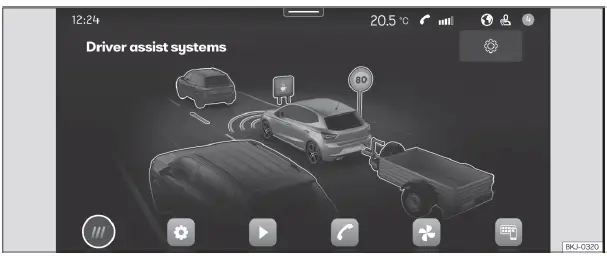
Fig. 13 Schematic representation: Assistance
systems and vehicle settings
To open the menu containing the vehicle's driver assistance functions and related settings, select  Driver assistance from the
infotainment system's main menu. This section brings together the controls and information associated with the
assistance systems fitted to the Seat Ibiza, allowing the driver to review their status and adjust supported
functions through the central touchscreen.
The number of assistance systems shown, the available settings and the possibility of activating or deactivating individual functions depend on the vehicle version, installed equipment and country of use. Some functions may be available only on certain configurations, while others may have restrictions on when or how their settings can be changed. The menu may include the following systems and vehicle functions:
- Park assist: Provides access to the available parking assistance functions and their associated settings, depending on the parking assistance equipment installed in the vehicle.
- ESC, stabilisation systems and brake assist: Contains the available controls for activating or deactivating the relevant electronic stability and braking assistance functions. The options provided depend on the vehicle's configuration and the operating conditions permitted for each system.
- Start-Stop system: Allows the automatic Start-Stop function to be activated or deactivated where the corresponding control is available. This setting determines whether the system is enabled according to the selected vehicle configuration.
- Adaptive cruise control (ACC): Provides access to the available settings and information associated with Adaptive Cruise Control on vehicles equipped with this assistance function.
- Lane Assist: Contains the available controls for the lane departure warning system, which assists the driver in relation to the vehicle's position within a traffic lane. The menu options depend on the installed Lane Assist equipment.
- Front Assist: Provides access to the emergency braking assistance system and its supported configuration options. The system's availability and settings depend on the vehicle version and equipment.
- Fatigue detection: Contains the settings associated with the driver fatigue monitoring function, where fitted. This system is intended to provide warnings when monitored driving behaviour suggests that the driver may be becoming tired.
- Speed warning system: Allows the driver to review and, where permitted, adjust the settings associated with warnings about recognised speed limits. Available options may include the function's activation status and related warning preferences.
- Side Assist: Provides access to the settings associated with the Side Assist function on vehicles equipped with this driver assistance system.
- Lights: Opens the available lighting-related vehicle settings, allowing supported lighting functions to be configured through the infotainment system.
Vehicle information
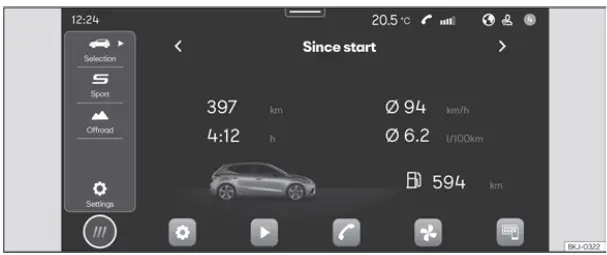
Fig. 14 Schematic representation: Vehicle
information and status
To access the vehicle information menu, select  Vehicle > Selection from the infotainment system's main menu. This opens a section
containing information about the vehicle's operation, recorded driving data and current status. Depending on the
equipment installed, the following submenus are available:
- Digital Cockpit: Displays the available configuration options for the information presented in the Digital Cockpit instrument cluster. This section allows the user to review the supported display arrangements and select the information to be shown according to the options provided by the vehicle. The available choices depend on the instrument cluster version and its installed functions.
- Driving data: Provides access to recorded journey information, including average fuel consumption, average speed, distance travelled, journey duration and the estimated remaining driving range. These readings help the driver review the vehicle's use over different periods and compare information from individual journeys with longer-term driving data. The system provides three driving data memories: Since start, which relates to the current driving period; Long-term, which retains accumulated driving information; and Since refuelling, which provides data associated with the period following refuelling. The information shown depends on the data available from the vehicle and the selected memory.
The From departure and Total calculation driving data memories can be reset
through the Seat Ibiza infotainment system. To clear the corresponding stored values, open  Vehicle > Settings > Instrument cluster > Reset data. Select the appropriate reset
option for the memory you want to clear. Resetting a driving data memory removes the accumulated values
associated with that memory so that subsequent driving information can be recorded from a new starting point.
Make sure the intended memory is selected before confirming the reset.
- Vehicle status: Displays information about the current condition of the vehicle, including warnings associated with faults or other reported incidents. This section also provides access to relevant tyre pressure monitoring information, including the memorisation of tyre pressure values where supported, and information about the next scheduled inspection service. Reviewing the vehicle status menu allows the driver to check messages that may require attention, identify reported problems and consult available service-related information without searching through separate instrument cluster notifications.
 Initial configuration wizard
Fig. 12 Schematic representation: Initial
configuration wizard
The initial configuration wizard guides the user through the basic setup of the Seat Ibiza infotainment system
when it is ...
 Safety
...
See also:
Honda Civic Service Manual. Audio-Navigation Unit Removal and Installation ('13)
1.
Dashboard Center Pocket
1.
Remove the screws (A).
2.
Remove the dashboard center pocket (A).
...
