
Seat Ibiza (6F) 2017-2026 Owner's Manual: Description
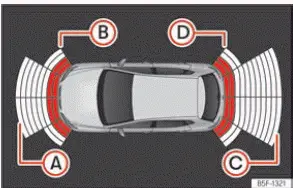
Fig. 120 Park assist view on the Infotainment
system display.
Park Distance Control Plus, also known as Park Pilot or Park Assist Plus, helps the driver manoeuvre the Seat Ibiza by providing visual and audible warnings when obstacles are detected in front of or behind the vehicle. The system is particularly useful when parking in confined spaces, approaching walls or manoeuvring near other parked vehicles. By indicating the approximate position and proximity of detected obstacles, it provides additional information that can help the driver judge the available space. However, the system does not replace direct observation or the driver's responsibility for controlling the vehicle.
Ultrasonic sensors installed in the front and rear bumpers monitor the surrounding areas within their detection range. When an obstacle is recognised, Park Assist Plus communicates its presence through audible warning signals and a corresponding visual indication on the infotainment system display, as illustrated in Fig. 120. The displayed information helps the driver identify the general location of an obstacle relative to the Seat Ibiza, while the acoustic signals provide additional guidance without requiring constant attention to the screen. The accuracy of these indications depends on the characteristics of the obstacle and the operating conditions of the sensors.
As the Seat Ibiza moves closer to an obstacle, the driver can distinguish whether the warning relates to the front or rear of the vehicle by listening to the acoustic signals. The warning sounds associated with the monitored areas provide an indication of where the detected obstacle is located. The frequency of the warning signals changes as the distance decreases, helping the driver recognise when the available clearance is becoming smaller. Always check the actual surroundings before continuing a manoeuvre, particularly when obstacles are close to the vehicle.
The approximate detection ranges of the ultrasonic sensors are shown below. These distances correspond to the sensor areas identified in the parking assistance illustration and represent the approximate maximum ranges within which the system can detect suitable obstacles:
- Area A: Approximately 1.20 m. Obstacles within this detection area may be identified when they are sufficiently close to the Seat Ibiza and can be reliably detected by the corresponding sensors.
- Area B: Approximately 0.90 m. This shorter detection range applies to the sensor area marked B and should be considered when manoeuvring close to nearby objects.
- Area C: Approximately 1.60 m. This detection area has the longest approximate measurement range of the four zones listed, allowing suitable obstacles to be recognised from a greater distance.
- Area D: Approximately 0.90 m. Obstacles in this area may be detected within the specified approximate range, depending on their position, size and ability to reflect ultrasonic signals.
As the vehicle approaches a detected obstacle, the intervals between the audible warning signals become progressively shorter. This increasing warning frequency indicates that the remaining distance is decreasing and that the driver should reduce speed accordingly. At approximately 0.30 m from the obstacle, the warning becomes a continuous tone. Stop the vehicle immediately when this continuous warning sounds. The indicated distance is approximate, and contact with an obstacle may occur if the driver continues moving. If the distance between the Seat Ibiza and the detected obstacle remains unchanged, the warning volume is reduced after approximately four seconds. This automatic reduction in volume does not mean that the obstacle has disappeared or that it is safe to continue the manoeuvre.
Error messages
If an error or fault message relating to Park Assist appears on the instrument cluster, the parking assistance system has detected a malfunction. The fault may affect one or more sensor areas and can prevent the system from providing reliable information about nearby obstacles. The driver should take the warning seriously and avoid relying on the affected parking assistance functions until the cause has been identified and corrected.
If the fault remains present when the ignition is switched off, the corresponding warning may not be displayed again the next time Park Assist is activated. The absence of a repeated fault message does not necessarily indicate that the malfunction has been resolved. If the system continues to behave abnormally or a previously affected detection area remains unavailable, the parking assistance function should be checked.
When a rear sensor is faulty, Park Assist may continue detecting obstacles in front of the Seat Ibiza, but the rear detection area will no longer provide normal obstacle information. Conversely, if a front sensor fails, the system may display only obstacles detected behind the vehicle. A corresponding fault symbol is displayed to indicate the problem. The driver must remember that an unavailable detection area cannot be relied upon to warn of nearby objects, even if the remaining sensors continue operating normally.
If a Park Assist fault is detected, have the Seat Ibiza inspected by a qualified specialist workshop. Professional diagnosis can establish whether the problem is caused by a defective sensor, damage to the sensor mounting area or another component affecting the parking assistance system. Repairing the underlying fault is necessary to restore reliable operation of the affected detection zones.
Trailer mode
On Seat Ibiza vehicles equipped with a factory-fitted trailer hitch, the rear parking sensors are automatically
disabled when a trailer is connected. In this condition, the rear sensors do not activate when reverse gear is
selected or when the  button is pressed. As a result, obstacles behind or alongside the rear of the vehicle are not indicated on the
infotainment display, and the corresponding audible proximity warnings are not produced. This operating
restriction must be taken into account whenever the vehicle is manoeuvred with a trailer attached.
While trailer mode is active, the infotainment display shows only obstacles detected by the front parking sensors. The vehicle's predicted trajectory is also hidden from the parking assistance view. The driver must therefore assess the space behind the Seat Ibiza and around the trailer independently, using the mirrors and direct observation whenever possible. Particular care is necessary when reversing or turning because the trailer can change the space required for a manoeuvre and the rear parking assistance indications are unavailable.
Park assist settings
The audible warnings and related operating preferences for Park Assist Plus can be adjusted through the Seat Ibiza infotainment system. These settings allow the driver to configure how the parking assistance function is activated and how its warning sounds are presented. The available options include:
- Automatic activation: Switches the automatic activation function on or off. This setting determines whether Park Assist can activate automatically under the relevant operating conditions, rather than requiring the driver to switch it on manually each time.
- Front volume: Adjusts the volume of the relevant parking assistance warning signals associated with the front and rear monitoring areas, according to the system's available settings. Select a level that allows the warnings to be heard clearly during manoeuvres.
- Rear volume: Controls the loudness of the acoustic warnings for obstacles detected behind the Seat Ibiza. The setting can be adjusted to make rear proximity indications sufficiently noticeable when reversing or parking.
- Reduce volume: Determines how much the volume of the current audio source is lowered when Park Assist is switched on. Depending on the selected option, music or other infotainment audio is reduced so that the parking assistance warnings can be heard more clearly.
- Front sound settings/treble: Adjusts the tone of the acoustic warnings associated with the front detection area. This allows the driver to modify the sound characteristics of the front parking signals.
- Rear sound settings/treble: Adjusts the tone of the warning signals associated with the rear detection area. Different sound characteristics can help the driver distinguish rear obstacle warnings from those relating to the front of the vehicle.
WARNING Park Assist Plus is a driver assistance function and cannot guarantee that every obstacle, person or hazardous situation will be detected. Its warnings must never be treated as a substitute for careful observation and responsible vehicle control. Failure to monitor the surroundings while parking or manoeuvring can result in collisions, serious injuries or damage to the Seat Ibiza.
- Always observe the surrounding traffic and parking area directly. Before and during every manoeuvre, check for pedestrians, cyclists, other vehicles and obstacles that could be in the Seat Ibiza's path. Parking assistance systems provide supplementary information but cannot replace the driver's awareness or judgement. Responsibility for completing the manoeuvre safely always remains with the driver.
- Remember that the ultrasonic sensors have blind spots. Certain objects and people may be outside the sensors' detection areas or may not be recognised reliably because of their position, size or surface characteristics. Pay particular attention to children and animals, who may be difficult to see and may move unexpectedly near the vehicle. Never assume that the absence of a warning means the area is clear.
- Maintain a clear view of the vehicle's surroundings. Use direct observation whenever possible and check the exterior and interior mirrors for additional information. If visibility is restricted, stop the manoeuvre until you can establish that the intended path is safe. The parking assistance display and acoustic signals should support these checks rather than replace them.
NOTICE The operation of Park Assist Plus can be affected by the shape, position and surface characteristics of obstacles, as well as environmental conditions and the condition of the ultrasonic sensors. In certain situations, the system may fail to detect an object, provide an inaccurate distance indication or issue a warning when no relevant obstacle is present. Relying exclusively on these indications can result in damage to the Seat Ibiza or nearby objects.
- Some objects may not be detected or displayed correctly. The ultrasonic sensors cannot
reliably recognise every obstacle within their nominal detection range. This limitation is particularly
important when manoeuvring near narrow, elevated or unusually shaped objects, including:
- Chains, trailer drawbars, narrow bars, fences, posts and thin trees. Their limited width or shape may make them difficult for the ultrasonic sensors to detect consistently, even when they are close to the vehicle.
- Objects positioned above the sensor detection areas, such as projections extending from a wall. Although the lower part of a wall may be detected, an overhanging object can remain outside the effective monitoring area and may still come into contact with the vehicle.
- Objects with particular surfaces or structures, including wire mesh fences and powder snow. These materials may reflect ultrasonic signals poorly or irregularly, preventing the system from determining their position reliably.
- Certain materials do not reflect ultrasonic signals adequately. The surfaces of some
objects and types of clothing may absorb, scatter or otherwise fail to return the signals emitted by the
parking sensors.
Consequently, Park Assist Plus may be unable to detect these objects or people wearing such clothing correctly. This limitation makes direct observation especially important when pedestrians are close to the Seat Ibiza, even if the system does not produce an audible warning.
- External sound sources can interfere with sensor operation. Ultrasonic signals generated by nearby equipment or environmental noise may disturb the parking assistance system. Under these conditions, the sensors may have difficulty recognising people or objects, and the displayed information or audible warnings may not accurately represent the available space.
- Low obstacles may disappear from the detection area as the vehicle approaches. An obstacle that was initially recognised can move outside the effective measuring range of the ultrasonic sensors when the Seat Ibiza gets closer to it. The warning may then stop even though the obstacle remains directly beside or beneath part of the vehicle. High kerbs and similar objects can be particularly problematic because they may damage the underside of the vehicle without being detected reliably. Do not continue moving simply because a previous warning has disappeared.
- Ignoring the parking distance warnings can cause substantial vehicle damage. When Park Assist indicates that an obstacle is close, reduce speed and assess the available clearance. Continuing to manoeuvre despite repeated or continuous warnings may result in contact with nearby objects, damage to body panels or damage to components beneath the Seat Ibiza.
- Damage to bodywork or surrounding components may affect sensor alignment. Impacts
involving the radiator grille, bumpers, wheel arches or vehicle underbody can alter the position or
orientation of the parking sensors. Even when a sensor remains externally intact, a change in its
alignment may affect the accuracy of obstacle detection.
If the Seat Ibiza has sustained damage in one of these areas and Park Assist subsequently behaves abnormally, have the system inspected by a qualified specialist workshop. The affected components may require checking before the parking assistance function can operate correctly again.
- Incorrectly sized or deformed number plates can interfere with the sensors. A number plate or holder that extends beyond the intended mounting area, or a plate that is curved, bent or otherwise distorted, may obstruct part of a sensor's detection field. This can lead to false obstacle indications or reduce the sensor's ability to monitor the surrounding area. Make sure the number plate and its holder are correctly positioned and securely fitted.
- The infotainment display does not update instantaneously. There is a slight delay between the system detecting a change in the surroundings and the corresponding information appearing on the screen. During a manoeuvre, the Seat Ibiza may continue moving while the displayed obstacle position is being updated. Drive slowly and do not rely on the graphic representation as an exact, real-time measurement of clearance.
- False warnings may occur even when no obstacle is present in the monitored area.
Certain road surfaces, weather conditions and external influences can affect ultrasonic detection and
cause the system to indicate an obstacle incorrectly. Examples include:
- Rough or cobbled roads and surfaces covered with long grass. Irregular ground features or vegetation may interfere with the sensor readings and produce warnings that do not correspond to a solid obstacle in the vehicle's path.
- External ultrasonic sources, including parking assistance systems operating on nearby vehicles. Signals from other equipment may interfere with the Seat Ibiza's ultrasonic sensors and cause unexpected indications.
- Heavy rain, snowfall, hail or dense exhaust gases. These conditions can affect the transmission or reflection of ultrasonic signals and may reduce the reliability of obstacle detection.
- A number plate that is not securely attached to the bumper. Incorrect positioning or movement of the plate can interfere with the sensor detection area and lead to false warnings.
- Changes in road gradient. Steep transitions, ramps and uneven surfaces can alter the relationship between the sensors and the ground, potentially causing unexpected proximity indications.
- Keep the ultrasonic sensors clean and unobstructed. Remove dirt, snow and ice from the sensor areas and make sure they are not covered by stickers, decorative materials or other objects. Contamination or physical obstruction can reduce detection performance and prevent Park Assist Plus from operating as intended.
- Use high-pressure or steam cleaning equipment carefully. Do not direct a concentrated jet at the parking sensors for an extended period. If the cleaning jet passes directly over a sensor, keep the exposure very brief and maintain a distance of more than 10 cm. This helps reduce the risk of damage to the sensors and their surrounding components.
- Accessories fitted to the front of the vehicle may interfere with Park Assist. Items such as an advertising number plate holder can obstruct the detection area or affect the ultrasonic signals. Before installing accessories near the front bumper, consider whether they could restrict the parking sensors' ability to detect nearby obstacles.
- Become familiar with the parking assistance system in a safe location. Practise parking and low-speed manoeuvres in an area free from traffic and unnecessary obstacles. This allows the driver to understand how the audible warnings change with distance and how the visual indications correspond to objects around the Seat Ibiza, without the pressure of surrounding traffic.
- The warning volume and tone can be adjusted. Use the available Park Assist settings to select acoustic indications that are clearly audible and easy to distinguish. The chosen settings should allow the driver to recognise proximity warnings promptly while remaining attentive to the actual surroundings.
- Observe the instructions relating to trailer towing. When a trailer is connected to a vehicle with a factory-fitted trailer hitch, the rear parking sensors are disabled as described in the trailer mode section. Do not expect normal rear obstacle warnings while towing, and take the additional space required by the trailer into account when manoeuvring.
Note On Seat Ibiza vehicles that are not equipped with an infotainment system, the Park Assist parameters described above cannot be adjusted through an infotainment menu. These settings can instead be modified by a SEAT Official Service centre or a qualified specialist workshop. Contact an appropriate service provider if changes to the parking assistance warning settings are required.

 Operating Park Assist Plus
Fig. 121 Centre console: parking aid button
(depending on the version).
Switching on and off manually
Press the
button once to switch Park Assist Plus on or off manually. Dependi ...
See also:
Honda Civic Service Manual. License Plate Light Removal and Installation (2-door)
Removal
1.
License Plate Light Assembly
1.
Push the license plate light assembly (A) to the side
to release the retaining spring, and pull out the license
...
