
Seat Ibiza (6F) 2017-2026 Owner's Manual: Operating Park Assist Plus
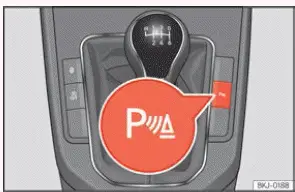
Fig. 121 Centre console: parking aid button
(depending on the version).
Switching on and off manually
- Press the
 button once to switch Park Assist Plus on or off manually. Depending on the vehicle's equipment, this
control is located on the centre console, as illustrated in Fig. 121. When the system is activated, the
parking assistance display provides information about obstacles detected around the Seat Ibiza. Pressing the
button again switches off the function, allowing the driver to control when parking assistance is required.
Automatic activation
- Engage reverse gear. Selecting reverse activates Park Assist Plus automatically, allowing the system to monitor the relevant areas around the Seat Ibiza while the driver prepares to move backwards. The parking assistance display provides visual information about detected obstacles, accompanied by audible warnings when the applicable conditions are met.
- Alternatively, approach an obstacle while driving forwards at less than 15 km/h (9 mph). If automatic activation is enabled, Park Assist Plus can recognise an obstacle at a distance of approximately 95 cm or less and activate the parking assistance display. In this situation, a reduced view appears on the infotainment screen, providing proximity information without immediately opening the full parking assistance display. The function is intended for low-speed manoeuvres and depends on the sensors detecting a suitable obstacle.
- Alternatively, move the vehicle backwards by a short distance. Park Assist Plus can also activate when the Seat Ibiza moves backwards approximately 10 to 20 cm. The distance required depends on whether an obstacle has been detected. This allows the parking assistance system to respond to a short reversing movement, provided the relevant operating requirements are satisfied.
When Park Assist Plus activates automatically, a representation of the Seat Ibiza appears on the infotainment display together with the graphical segments indicating detected obstacles. The segments provide an approximate indication of the position and proximity of objects around the vehicle. Depending on how the system was activated, the information may initially appear in a reduced display rather than the complete parking assistance view.
The automatic activation function operates when the vehicle's speed falls below 15 km/h (9 mph) for the first time. It does not repeatedly activate simply because the Seat Ibiza continues travelling below this threshold. After the relevant activation event, the system's subsequent behaviour depends on the selected settings, vehicle movement and whether Park Assist Plus has been switched off manually.
Automatic activation of Park Assist Plus can be enabled or disabled through the infotainment system. To change the setting, follow these steps:
- Switch on the ignition. The ignition must be on so that the infotainment system and the relevant parking assistance settings are available. The engine does not need to be running merely to access the menu.
- Open the parking assistance settings. In the Seat Ibiza infotainment system, select
 > Settings
> Parking and manoeuvring. This menu contains the available configuration options for the
vehicle's parking assistance functions.
- Select the Automatic activation checkbox. Enable the checkbox to allow Park Assist Plus to activate automatically under the specified conditions. Clear the checkbox if you prefer to prevent this automatic activation and use the available manual controls instead.
- Alternatively, use the settings within the parking assistance function. Open the parking assistance display and select Settings > Automatic activation. This provides another way to change the same operating preference without navigating through the main vehicle settings menu.
When Park Assist Plus has been activated automatically while driving forwards, an audible proximity warning is issued only when an obstacle ahead is approximately 50 cm away or closer. Obstacles detected at greater distances may still be represented visually on the reduced parking assistance display, but the acoustic warning does not begin until the specified proximity threshold is reached. The driver must therefore continue observing the area ahead rather than waiting for an audible signal before slowing down or stopping.
If Park Assist Plus has been switched off using the  button, automatic
activation will not resume immediately under the same conditions. One of the following actions must occur before
the system can activate automatically again:
- Switch the ignition off and then on again. Restarting the ignition allows the automatic activation function to become available again, provided it remains enabled in the infotainment settings and the normal operating conditions are satisfied.
- Alternatively, drive forwards at a speed above approximately 15 km/h (9 mph). Exceeding this threshold allows the automatic activation function to respond again when the Seat Ibiza subsequently slows down and encounters the relevant activation conditions.
- Alternatively, move the transmission selector lever into position P and then out of P again. On vehicles equipped with an automatic transmission, changing the selector position in this way allows the automatic activation function to become available again. The vehicle must be operated safely and the appropriate transmission procedures followed.
- Alternatively, change the automatic activation setting in the infotainment system. Switch the Automatic activation option off and then on again. This resets the selected activation preference and allows Park Assist Plus to respond automatically when its operating requirements are subsequently met.
Automatic disconnection
- Drive forwards at 15 km/h (9 mph) or faster. Park Assist Plus switches off automatically when the Seat Ibiza reaches this speed while travelling forwards. The parking assistance function is intended for low-speed manoeuvres and does not remain active as a normal driving aid once the specified speed threshold has been reached.
- Alternatively, move the automatic transmission selector lever into position P. Selecting Park causes the parking assistance system to disconnect automatically. When the vehicle is subsequently moved out of position P, the availability of Park Assist Plus depends on the applicable activation conditions and the system's current settings.
Temporary sound suppression
- Press the
 function button on
the infotainment screen to temporarily silence the acoustic parking assistance warnings. This allows the
driver to suppress the warning sounds without necessarily closing the visual parking assistance display. The
surrounding obstacles must still be monitored carefully, as muting the acoustic signals removes an important
source of proximity information during the manoeuvre.
Change from reduced view to full view
- Select reverse gear. Engaging reverse changes the parking assistance display from the reduced view to the full view, allowing the driver to see the available graphical information while preparing to manoeuvre backwards.
- Press the vehicle symbol in the reduced display. Touching the car icon on the infotainment screen expands the parking assistance information to the full view. This is useful when the reduced display has appeared automatically while approaching an obstacle and the driver wants a more complete representation of the monitored surroundings.
- Alternatively, move the Seat Ibiza backwards by approximately 10 to 20 cm. Depending on whether an obstacle has been detected, this short reversing movement can cause the system to change from the reduced parking assistance view to the full display. The driver should move slowly and check the area behind the vehicle before reversing.
Switch to the reverse assist image (Rear View Camera "RVC")
- Engage reverse gear. On vehicles equipped with the Rear View Camera, selecting reverse allows the reverse assistance image to be displayed on the infotainment screen. The camera view provides additional visual information about the area behind the Seat Ibiza and should be used together with direct observation and the available parking sensor indications.
- Alternatively, press the RVC function button. Selecting the Rear View Camera function on the infotainment display switches to the camera image, provided the vehicle is equipped with this system and the relevant operating conditions are satisfied. The camera view supplements the parking assistance information but cannot show every obstacle or hazard around the vehicle.
When Park Assist Plus is switched on using the relevant control, a short acoustic confirmation signal is heard and the button symbol illuminates. These indications confirm that the parking assistance function has been activated. The driver should nevertheless check the infotainment display and surrounding area before beginning a manoeuvre, as activation of the system does not guarantee that every nearby obstacle will be detected.
NOTICE Park Assist Plus activates automatically only when the Seat Ibiza is travelling at very low speed and the specified operating conditions are satisfied. The system is intended to assist with parking and manoeuvring, not to compensate for excessive speed or an unsuitable driving technique. If the driver fails to adapt speed and vehicle movement to the available space, visibility and surrounding traffic, a collision may occur, potentially resulting in serious injuries or damage to the vehicle. Always approach obstacles slowly and remain prepared to stop immediately.
 Description
Fig. 120 Park assist view on the Infotainment
system display.
Park Distance Control Plus, also known as Park Pilot or Park Assist Plus, helps the driver manoeuvre the Seat
Ibiza by pro ...
 Visual indication segments
Fig. 122 Park assist view on the Infotainment
system display.
The Park Assist Plus display uses coloured segments to indicate the approximate location and distance of
obstacles detecte ...
See also:
Honda Civic Owners Manual. Selecting a Child Seat
Most child seats are LATCH-compatible (Lower Anchors and Tethers for CHildren).
Some have a rigid-type connector while others have a flexible-type connector.
Both
are equally easy to use. Some existing and previously owned child seats can only
be
installed using the seat belt. Whichever typ ...
