
Honda Civic Owners Manual: Android Auto Menu. Auto Pairing Connection
Android Auto Menu
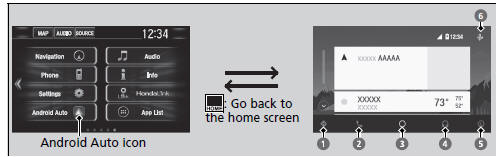
- Maps (Navigation)
Display Google Maps and use the navigation function just as you would with your Android phone. When the vehicle is in motion, it is not possible to make keyboard entries. Stop the vehicle in a safe location to undertake a search or provide other inputs.
Models with navigation system
Only one navigation system (pre-installed navigation or Android Auto) can give directions at a time. When you are using one system, directions to any prior destination set on the other system will be canceled, and the system you are currently using will direct you to your destination.
The audio/information screen shows you turn-by-turn driving directions to your destination.
- Phone (Communication)
Make and receive phone calls as well as listen to voicemail.
- Google Now (Home screen)
Display useful information organized by Android Auto into simple cards that appear just when they’re needed.
For details on countries and regions where Android Auto is available, as well as information pertaining to function, refer to the Android Auto homepage.
Android Auto Operating Requirements & Limitations
Android Auto requires a compatible Android phone with an active cellular connection and data plan.
Your carrier’s rate plans will apply.
Changes in operating systems, hardware, software, and other technology integral to providing Android Auto functionality, as well as new or revised governmental regulations, may result in a decrease or cessation of Android Auto functionality and services.
Honda cannot and does not provide any warranty or guarantee of future Android Auto performance or functionality.
It is possible to use 3rd party apps if they are compatible with Android Auto. Refer to the Android Auto homepage for information on compatible apps.
- Music and audio
Play Google Play Music and music apps that are compatible with Android Auto.
To switch between music apps, press this icon.
- Go back to the Home Screen.
- Voice
Operate Android Auto with your voice.
Auto Pairing Connection
When you connect an Android phone to the unit via the front USB, Android Auto is automatically initiated.
Enabling Android Auto
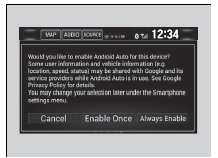
Enable Once: Allows only once. (Prompt shows again next time.) Always Enable: Allows anytime. (Prompt does not show again.) Cancel: Does not allow this consent.
You may change the consent settings under the Smartphone settings menu.
Enabling Android Auto
Only initialize Android Auto when you are safely parked. When Android Auto first detects your phone, you will need to set up your phone so that auto pairing is possible. Refer to the instruction manual that came with your phone.
You can use the method below to change Android
Auto settings after you have completed the initial
setup:
Select HOME Settings
 Smartphone
 Android
Auto
Use of user and vehicle information
The use and handling of user and vehicle information transmitted to/from your phone by Android Auto is governed by Google’s Privacy Policy.
 Android Auto
When you connect an Android phone to the audio system via the front USB,
Android Auto is automatically initiated. When connected via Android Auto, you
can
use the audio/information screen to acces ...
 Operating Android Auto with Voice Recognition
Press and hold the talk button to operate Android Auto with your voice.
Below are examples of commands you can give with
voice recognition:
Reply to text.
Call my wife.
Navigate to Honda ...
See also:
Honda Civic Owners Manual. Gauges
Gauges include the speedometer, tachometer, fuel gauge, and related
indicators.
They are displayed when the ignition switch is in ON
*1.
Speedometer
Displays your driving speed in mph or km/h.
Tachometer
Shows the number of engine revolutions per minute.
Gauges
Models with information d ...
