
Honda Civic Owners Manual: Voice Recognition. Voice Portal Screen
Voice Recognition
To achieve optimum voice recognition when using the voice control system:
- Make sure the correct screen is displayed for the voice command that you are using.
- Close the windows and moonroof*.
- Adjust the dashboard and side vents so air does not blow onto the microphone on the ceiling
- Speak clearly in a natural speaking voice without pausing between words.
- Reduce any background noise if possible. The system may misinterpret your command if more than one person is speaking at the same time.
Voice Control Operation
When you press the button,
a helpful prompt asks
what you would like to do. Press and release the
 button again to bypass this prompt and give a
command.
Voice Recognition
The voice control system can only be used from the driver’s seat because the microphone unit removes noises from the front passenger’s side.
Voice Portal Screen
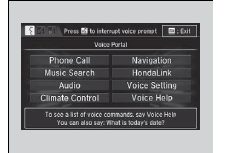
When the (Talk) button is
pressed,
available voice commands appear on the
screen.
For a complete list of commands, say ’Voice Help’ after the beep or select Voice Help.
You can see the list of commands in Voice
Info on the Info menu screen. Select Info,
then select  .
The system only recognizes the commands on the following pages, at certain screens.
Free form voice commands are not recognized.
Phone Call
This can be only used when the phone is connected. When the system recognizes the Phone call command, the screen will change to the voice recognition screen for phone commands.
- Dial by number
- Call history
- Redial
- Call <Your Contact Name>
- Call <Phone Number>
- Call Police
- Call 911
Phone Call commands are not available if using Apple CarPlay.
Music Search
This can be only used when the iPod or USB device is connected.
Climate Control*1
When the system recognizes the Climate Control command, the screen will change the dedicated screen to the climate control voice recognition screen.
Climate Control Commands
Audio*1
When the system recognizes the Audio command, the screen will change to the audio voice recognition screen.
- Audio On
- Audio Off
- Radio FM
- Radio AM
- Radio SXM*
- Pandora*
- iPod
- USB
- Other Sources
Pandora* cannot be used with Android Auto.
Navigation*1
The screen changes to the navigation screen.
Refer to the Navigation System Manual
HondaLink
This can be only used when the phone is connected
Voice Setting
The screen changes to the Voice Recog tab on the System settings screen.
Voice Help
You can see a list of the available commands on the screen.
- Useful Commands
- Phone Commands
- Audio Commands*1
- On Screen Commands
- Music Search Commands
- General Commands
- Climate Control Commands*1
Useful Commands
The system accepts these commands on the voice portal top screen.
- Call <Phone Number>
- Call <Your Contact Name>
- What time is it’
- What is today’s date’
Phone Commands
The system accepts these commands on the dedicated screen for the voice recognition of the phone.
- Call by Number
- Call by Name
- Call <Phone Number>
- Call <Your Contact Name>
 Voice Control Operation
Your vehicle has a voice control system that allows hands-free operation.
The voice control system uses the
(Talk) and (hang-up/back) buttons
on
the steering wheel and a microphone near ...
 Audio Commands*1. Music Search Commands
Audio Commands*1
The system accepts these commands on the
dedicated screen for the voice recognition
of the audio.
Radio FM Commands
Radio tune to <87.7-107.9> FM
Radio tune to <87.7 ...
See also:
Honda Civic Owners Manual. HFL Menus
The ignition switch must be in ACCESSORY (q or ON (w*1 to use HFL.
Phone settings screen
*1: Models with the smart entry system have an ENGINE START/STOP button
instead of an
ignition switch.
HFL Menus
To use HFL, you must first pair your Bluetoothcompatible
cell phon ...
