
Seat Ibiza (6F) 2017-2026 Owner's Manual: Unlocking and locking from the inside
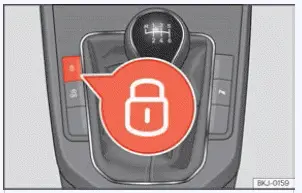
Fig. 50 Centre console: central locking switch.
The Seat Ibiza is equipped with an interior central locking switch that allows the doors to be locked or unlocked from inside the passenger compartment. This control is located on the centre console, as illustrated in Fig. 50. It provides a convenient way to operate the central locking system without using the remote control key, particularly when the driver wishes to secure the doors while remaining inside the vehicle.
- Locking from inside: Press the
 button on the central locking switch, as
shown in Fig. 50. The system locks the vehicle doors, preventing them from being opened normally from
outside. This can help protect the occupants against unwanted access while the vehicle is stationary or in
use.
- Unlocking from inside: Press the
 button on the central locking switch
again, as indicated in Fig. 50. This releases the central locking system and allows the doors to be opened
from outside in the normal way. The switch provides direct control over the locking status when the relevant
security conditions permit its operation.
When using the central locking button to secure the Seat Ibiza from inside, take the following operating characteristics into account. The system is designed to restrict access from outside while still providing specified ways for occupants to leave the vehicle and for the doors to be released in an emergency.
- External access is restricted. When the doors are locked using the interior central locking
button, they cannot be opened normally from outside. The rear lid is also secured against external opening.
This is useful in situations where the vehicle is temporarily stationary, such as when waiting at traffic
lights, because it helps prevent unauthorised people from opening the doors or accessing the luggage
compartment.
Although this provides additional security for the occupants, remember that locked doors can also delay access from outside if assistance is required. The locking function should therefore be used with an understanding of its effects on entry to the passenger compartment.
- Central locking indicator lamp. The indicator lamp in the central locking button illuminates when all the doors are closed and locked. This gives the driver a visual indication that the locking system is active. If a door is not properly closed, the normal locked status may not be achieved, so the condition of the doors should be checked when the expected indication is absent.
- Opening individual doors from inside. Even when the Seat Ibiza has been locked using the interior central locking button, the doors can be opened individually from within the passenger compartment by pulling the corresponding interior door handle. This allows an occupant to leave through a particular door without first operating the central unlocking button. The operation described here applies to locking with the interior switch and should not be confused with the additional restrictions imposed by the Safe security system.
- Fuel tank flap locking. When the vehicle is secured using the interior central locking button, the fuel tank flap is also locked. This prevents the flap from being opened from outside while the central locking system is active. Its locking status therefore follows the interior locking command under these conditions.
- Automatic unlocking following airbag deployment. If the Seat Ibiza is involved in an
accident and the airbags are triggered, doors that were locked from inside are automatically unlocked. This
function is intended to make it easier for emergency personnel and other people at the scene to access the
passenger compartment and assist the occupants.
Automatic unlocking can be particularly important after a serious collision when passengers may be injured or unable to operate the door locks themselves. However, the ability to open a door will still depend on whether the door and surrounding bodywork have been damaged during the accident.
WARNING
- The interior central locking button remains operational even when the ignition is switched off, except when the Safe security system has been activated. This means that the doors can still be locked from inside while the vehicle is parked and the ignition is not operating. Take particular care if children or people requiring assistance are inside the Seat Ibiza, as they may operate the switch without understanding the consequences.
- The central locking button cannot be used to unlock the vehicle when it has been locked from outside with the Safe security system activated. Under these conditions, the additional security function prevents the interior switch from overriding the external locking command. This restriction is intended to improve protection against unauthorised entry, but it can also prevent occupants from releasing the locks from inside. Never leave anyone inside the vehicle when activating the Safe security system.
- Locked doors can delay rescue or assistance in an emergency because people outside the vehicle may be unable to open them immediately. Never leave anyone unattended inside a locked Seat Ibiza, especially children or people who may have difficulty operating the doors or requesting help. A closed vehicle can also become dangerously hot or cold depending on the weather, creating a serious risk to anyone unable to leave independently.
Note The Seat Ibiza automatically locks its doors when the vehicle reaches a speed of
approximately 15 km/h (9 mph), provided that the Auto Lock function is active. This allows the doors to be
secured during normal driving without requiring the driver to press the interior locking switch. If you need
to unlock the vehicle again, press the  button on the central locking control. The
doors will then be released according to the operation of the interior central locking system.
 Unlock and lock with the key
Fig. 49 Remote control key: buttons.
The Seat Ibiza can be locked and unlocked from outside using the buttons on the remote control key. The central
locking system responds to the selecte ...
 "Safe" security system
Depending on the equipment and specification of the Seat Ibiza, the vehicle may be fitted with the "Safe"
security system. This additional security function works alongside the central locking syste ...
See also:
Honda Civic Owners Manual. To Play Bluetooth’ Audio Files
1. Make sure that your phone is paired and
connected to HFL.
2. Press the MEDIA button until the
Bluetooth’ Audio Source is selected.
If the phone is not recognized, another HFLcompatible
phone, which is not compatible
for Bluetooth’ Audio, may already be
connected.
To pause or res ...
