
Seat Ibiza (6F) 2017-2026 Owner's Manual: Shown on the display
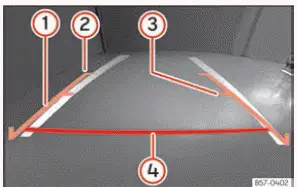
Fig. 123 Infotainment system display:
guidance lines.
- Lateral guidance lines: These lines represent the approximate extension of the Seat Ibiza's overall width onto the road surface behind the vehicle. They help the driver assess whether there is sufficient space to reverse into a parking bay or pass between nearby obstacles. The lines provide a visual reference for positioning the vehicle, but they should not be treated as an exact measurement of clearance. Always check the actual distance to surrounding objects, particularly when manoeuvring close to walls, posts or other parked vehicles.
- End of the lateral lines: The far ends of the side guidance lines indicate a point approximately 2 metres behind the vehicle, measured along the road surface. This reference helps the driver judge the depth of the visible reversing area and the approximate distance to objects appearing near the ends of the lines. Because the camera image is affected by perspective, the indicated distance should be regarded as guidance rather than a precise measurement.
- Intermediate reference line: This marking represents a distance of approximately 1 metre behind the Seat Ibiza on the road surface. It provides an additional reference between the vehicle and the outer ends of the lateral lines, making it easier to estimate how far the vehicle has moved towards a parking boundary or another stationary object. The driver should continue reversing slowly and compare the displayed information with the actual surroundings.
- Horizontal red reference line: The red line indicates a distance of approximately 40 cm behind the vehicle on the road surface. It serves as a close-range reference when approaching an obstacle or the rear boundary of a parking space. The distance is approximate and does not guarantee that the vehicle will clear every object, particularly those projecting above the ground. Stop the manoeuvre if there is any doubt about the remaining space.
Switching the system on and off
- Automatic activation when reverse gear is selected: Reverse Assist switches on when the driver engages reverse gear. The rear-mounted camera begins providing an image of the area behind the Seat Ibiza, which is displayed on the infotainment screen together with the available orientation lines. Before moving backwards, check that the displayed image is clear and that the surroundings are safe.
- Deactivation after reverse gear is disengaged: The system switches off approximately 8 seconds after reverse gear has been disengaged. This brief delay allows the camera function to remain available for a short period following the gear change. If the ignition is switched off, Reverse Assist deactivates immediately, regardless of whether the 8-second period has elapsed.
- Camera image interruption at higher speeds: If the Seat Ibiza is travelling faster than 15 km/h (9 mph) with reverse gear engaged, the camera stops transmitting images to the infotainment display. Reverse Assist is intended for low-speed parking and manoeuvring, and the camera image must not be relied upon when the vehicle is moving outside its specified operating range.
When Reverse Assist is fitted together with Park Assist Plus, the infotainment display changes its presentation after reverse gear is disengaged. The rear-view camera image disappears, and the screen instead shows the graphical parking information supplied by Park Assist Plus. This allows the driver to continue receiving the available visual obstacle indications from the parking sensors without keeping the camera image on the screen. The information displayed depends on the parking assistance functions that are active at the time.
The Reverse Assist camera image can also be hidden manually without necessarily switching off the ignition or changing the transmission position. This may be useful when the driver wishes to return to another infotainment function or view the parking assistance information in a different format:
- Press one of the infotainment system buttons: Selecting an available infotainment control on the display allows the driver to leave the rear-view camera image and access the corresponding screen or function. The camera view is then hidden from the display.
- Alternatively, press the miniature vehicle symbol: Touch the small vehicle graphic shown on the infotainment screen to hide the Reverse Assist image. On vehicles equipped with the relevant parking assistance functions, this provides a way to change the displayed parking information without using the transmission controls.
If the rear-view camera image has been hidden and the driver wishes to display it again, either of the following actions can be used:
- Disengage reverse gear and select it again: Moving out of reverse and then re-engaging it reactivates the Rear View Camera display, provided the system's operating conditions are satisfied. Make sure the Seat Ibiza is stationary and operate the transmission in accordance with the normal driving instructions.
- Alternatively, press the RVC function button: Select the Rear View Camera function on the infotainment screen to return to the camera image. The display will again show the area behind the vehicle and the available guidance lines, allowing the driver to continue the manoeuvre with additional visual assistance.
Parking manoeuvre
- Position the vehicle before reversing: Bring the Seat Ibiza to a stop in front of the intended parking space and select reverse gear. Check the area behind and around the vehicle, paying attention to pedestrians, other vehicles and any obstacles that may not be visible on the camera display. Once Reverse Assist is active, use the image and guidance lines to assess the position of the parking space relative to the vehicle.
- Reverse slowly while adjusting the steering: Begin moving backwards at a controlled speed and turn the steering wheel as necessary to direct the lateral guidance lines towards the parking space. Observe how the displayed lines relate to the parking boundaries and nearby obstacles. Make steering corrections gradually, checking the mirrors and surrounding area throughout the manoeuvre rather than relying exclusively on the infotainment screen.
- Align the vehicle within the parking space: Continue guiding the Seat Ibiza backwards until the lateral guidance lines run approximately parallel to the sides of the parking space. Use the displayed reference markings to help assess the vehicle's position, while checking that sufficient clearance remains on both sides and behind the vehicle. Stop when the vehicle is correctly positioned and there is adequate space between it and any surrounding obstacles.
 Introduction
The Seat Ibiza Reverse Assist system, also known as the Rear View Camera, helps the driver when reversing into a
parking space or carrying out manoeuvres that require a clear view of the area behind ...
 Rear Cross Traffic Alert
How it works
Fig. 124 Park assist diagram: detected area
around the vehicle that is driving off.
Rear Cross Traffic Alert is a driver assistance function designed to help identify vehic ...
See also:
Honda Civic Service Manual. Parking Brake Adjustment (Disc Brake)
1.
Vehicle Lift
1.
Raise the vehicle on a lift, and make sure it is securely supported.
2.
Rear Wheel
1.
Remove b ...
