
Honda Civic Service Manual: Power Window Master Switch Removal and Installation (4-door)

Removal
| 1. | Front Door Power Window Switch Panel (4-door) |
|
|
|
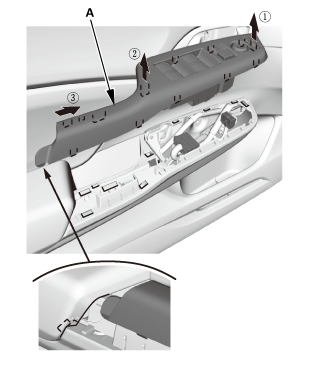
| 2. | Front Door Power Window Switch - Driver's Side |
|
|
|
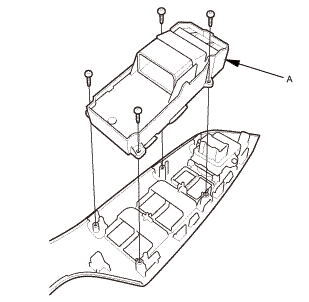

Installation
| 1. | Front Door Power Window Switch - Driver's Side |
|
|
|
| 2. | Front Door Power Window Switch Panel (4-door) |
|
|
|
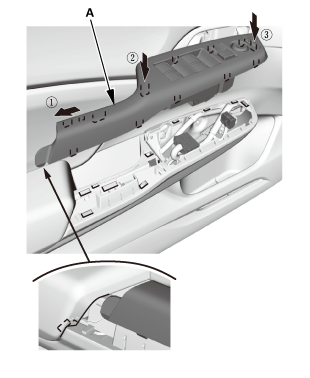
| 3. | Power Window Control Unit - Reset |
|
Resetting the power window is required when any of the following have occurred: |
|
|||
|
|||
|
|||
|
|||
|

|
1. |
Turn the ignition switch to ON (II). |
|
2. |
Move the driver's window all the way down with the driver's window DOWN switch. |
|
3. |
Open the driver's door. |
|
|
NOTE: Steps 4-7 must be done within 5 seconds of each other. |
||
|
4. |
Turn the ignition switch to LOCK (0). |
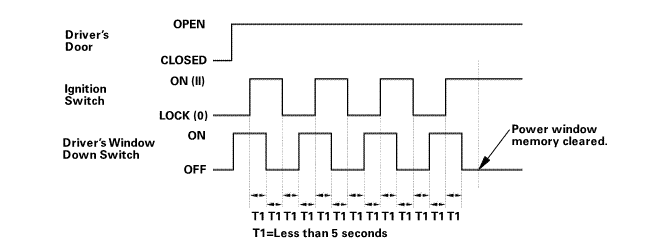 armounupnwlrwindnwdawdawnswiich
|
5. |
Push and hold the driver's window DOWN switch. |
|
6. |
Turn the ignition switch to ON (II). |
|
7. |
Release the driver's window DOWN switch. |
|
8. |
Repeat step 4-7 three more times. |
|
9. |
Wait at least 1 second. |
|
10. |
Confirm that AUTO UP and AUTO DOWN do not work. If AUTO UP and DOWN work, go back to step 1. |
|
11. |
Move the driver's window all the way down with the driver's window DOWN switch. |
|
12. |
Pull up and hold the driver's window UP switch until the window reaches the fully closed position, then continue to hold the switch for at least 1 second. |
|
13. |
Confirm that the power window control unit is reset by using the driver's window AUTO UP and AUTO DOWN functions: |
|||||||||
|
||||||||||
 Resetting the Power Window Control Unit
Procedure
1.
Power Window Control Unit - Reset
Resetting the power window is required when any of the following have
occurred:
...
 Rear Power Window Switch Removal and Installation (4-door)
744120 LEFT REAR
744130 RIGHT REAR
Removal
1.
Rear Door Power Window Switch Panel
1.
Remove the power ...
See also:
Honda Civic Service Manual. Radiator Connecting Pipe Removal and Installation (R18A9)
1.
Radiator Cap
1.
Wait until the engine is cool, then carefully remove the radiator
cap.
2.
Vehicle Lift
1.
Raise th ...
