
Honda Civic Owners Manual: Playing Bluetooth’ Audio
Your audio system allows you to listen to music from your Bluetooth-compatible phone.
This function is available when the phone is paired and connected to the vehicle’s Bluetooth’ HandsFreeLink’ (HFL) system.
Phone Setup
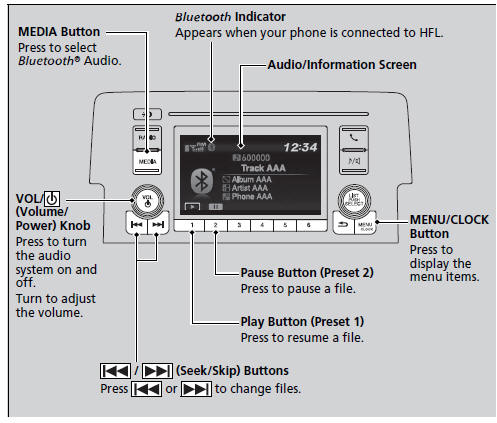
Playing Bluetooth’ Audio
Not all Bluetooth-enabled phones with streaming audio capabilities are compatible with the system.
For a list of compatible phones:
- U.S.: Visit www.handsfreelink.honda.com, or call 1-888-528-7876
- Canada: Visit www.handsfreelink.ca, or call 1-888- 528-7876.
In some states, it may be illegal to perform some data device functions while driving.
Only one phone can be used with HFL at a time.
When there are more than two paired phones in the vehicle, the first paired phone the system finds is automatically connected.
If more than one phone is paired to the HFL system, there will be a delay before the system begins to play.
In some cases, the name of the artist, album, or track may not appear correctly.
Some functions may not be available on some devices.
- To Play Bluetooth’ Audio Files
- How to Select a Song from the Music Search List with the Selector Knob
 How to Select a Play Mode
You can select repeat, random, and scan modes when playing a file.
Available mode icons appear above the play
mode buttons.
Press the button corresponding to the mode
you want to select.
To ...
 To Play Bluetooth’ Audio Files
1. Make sure that your phone is paired and
connected to HFL.
2. Press the MEDIA button until the
Bluetooth’ Audio Source is selected.
If the phone is not recognized, another HFLcompatible
...
See also:
Honda Civic Owners Manual. Opening and Closing the Windows
Opening/Closing the Power Windows
The power windows can be opened and closed when the ignition switch is in ON
*1, using the switches on the doors.
The driver’s side switches can be used to
open and close all of the windows.
The power window lock button on the driver’s side must be switc ...
