
Seat Ibiza (6F) 2017-2026 Owner's Manual: Operating Travel Assist
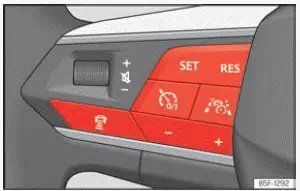
Fig. 115 Left side of the multifunction steering
wheel
Switch on and start regulation
1. While driving with Adaptive Cruise Control (ACC) activated, press the  button on the
multifunction steering wheel, as illustrated in Fig. 115. This selects Travel Assist and allows the vehicle to
change from conventional ACC operation to the combined assistance function, which incorporates adaptive cruise
control and adaptive lane guidance.
The Seat Ibiza switches from ACC to Travel Assist. The way the system responds depends on whether ACC was already regulating the vehicle's speed and following distance when Travel Assist was selected. The availability of steering assistance also depends on whether the camera can recognise the lane boundaries and whether the necessary operating conditions are satisfied.
Depending on the current driving situation and the previous status of ACC, Travel Assist enters one of the following operating states:
- ACC was already regulating: Travel Assist continues using the previously selected cruising
speed and following distance. The transition does not require the driver to select these settings again, as
the existing ACC regulation is maintained.
If the camera detects suitable lane markings and the conditions for adaptive lane guidance are satisfied, Travel Assist also provides corrective steering assistance to help keep the Seat Ibiza within its lane. The system therefore combines the existing speed and distance regulation with steering support. The driver must continue holding the steering wheel and remain prepared to intervene whenever necessary.
- ACC was not regulating: Travel Assist is selected but remains in a passive state. In this condition, the system is not actively controlling the vehicle's speed or following distance. Selecting Travel Assist does not automatically mean that regulation has started, so the driver must continue controlling the vehicle until the function is activated under suitable operating conditions.
Press the  button on the multifunction
steering wheel to start regulation when Travel Assist has been selected but is not yet actively regulating.
Travel Assist then changes to its active operating status, provided the requirements for regulation are satisfied. The precise assistance available depends on the driving situation, including whether the system can detect the vehicle ahead and recognise the lane boundaries. Adaptive cruise control may be active while adaptive lane guidance remains passive if the conditions for steering assistance are not met.
The instrument cluster displays the control lamp corresponding to the current Travel Assist status. A message also appears to inform the driver about the system's operating condition. These indications should be checked after activation to confirm whether the combined assistance functions are available or whether part of the system remains passive.
Interrupting regulation
1. Briefly press the  button on the multifunction steering wheel. This interrupts the current Travel Assist regulation without
requiring the driver to change the previously selected following distance.
Alternatively, press the brake pedal to interrupt regulation. Applying the brakes allows the driver to take direct control of the vehicle's deceleration when the traffic situation requires manual intervention. The driver must then manage the vehicle's speed and steering as necessary rather than relying on Travel Assist to continue regulating automatically.
The selected following distance remains stored after regulation has been interrupted. This allows the existing distance setting to be retained for subsequent assistance operation, rather than requiring the driver to configure it again. However, the stored setting does not mean that Travel Assist is continuing to regulate the vehicle while the function is interrupted.
Switch to ACC
1. Press the  button on the multifunction steering wheel to change from Travel Assist back to Adaptive Cruise Control.
The Seat Ibiza switches from Travel Assist to the ACC operating status appropriate for the current driving situation. The combined Travel Assist function is no longer selected, and the vehicle returns to the corresponding adaptive cruise control mode. Depending on the circumstances, ACC may continue regulating speed and following distance or remain in a passive state. The driver should check the instrument cluster indication to confirm the system's current status and must continue steering the vehicle independently.
Making other adjustments
All remaining Travel Assist settings and adjustments are operated in the same way as the corresponding Adaptive Cruise Control functions. This includes the controls used to manage the selected cruising speed and following distance. Refer to the ACC operating instructions for details of these adjustments, and remember that Travel Assist can provide adaptive lane guidance only when the relevant detection and operating requirements are satisfied. The driver remains responsible for choosing suitable settings and adapting them to the road and traffic conditions.
 Introduction
Travel Assist is a driver assistance system that combines the functions of Adaptive Cruise Control (ACC) with
adaptive lane guidance. By coordinating longitudinal and lateral assistance, it helps th ...
 Troubleshooting
Travel Assist is not
available or does
not work as expected
If the Travel Assist control lamp illuminates yellow, the system is unavailable or is not operating as expected.
A correspon ...
See also:
Honda Civic Owners Manual. Overheating
How to Handle Overheating
Overheating symptoms are as follows:
The temperature gauge pointer is at the H mark or the engine
suddenly loses
power.
Steam or spray comes out of the engine compartment.
First thing to do
Immediately park the vehicle in a safe pl ...
