
Seat Ibiza (6F) 2017-2026 Owner's Manual: Locking and unlocking with the Keyless Access system
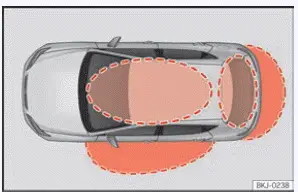
Fig. 47 Keyless Access: proximity zones.
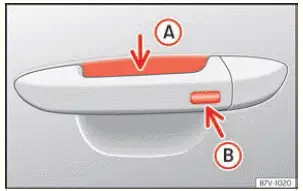
Fig. 48 Door handle: sensor surfaces.
- Unlocking sensor surface. The sensor area on the inside of the exterior door handle is used to unlock the Seat Ibiza when a valid vehicle key is detected within the corresponding proximity zone. Touching this surface allows the Keyless Access system to recognise the unlocking request without requiring the driver to press a button on the remote control key.
- Locking sensor surface. The sensor area on the outside of the exterior door handle is used to lock the vehicle. When the system detects an authorised key in the appropriate proximity zone, touching this surface activates the locking function. The outer sensor is also used for certain additional functions, including temporary deactivation of Keyless Access and comfort closing of the electric windows and sunroof, where fitted.
Depending on the equipment fitted, the Seat Ibiza may feature the Keyless Access system, which allows the vehicle to be locked, unlocked and started without actively operating the remote control key. Instead of pressing the key buttons, the driver can use the sensor surfaces integrated into the exterior door handles. For the system to respond, a valid vehicle key must be located within the detection area associated with the requested operation, as illustrated in Fig. 47. The vehicle checks for the presence of an authorised key before carrying out the corresponding locking or unlocking command. This provides convenient access when the key is being carried in a pocket or bag, provided that it remains within the required proximity zone.
Unlocks the vehicle.
- To unlock the Seat Ibiza using Keyless Access, touch the sensor surface marked A on the inside of the
exterior door handle, as shown in Fig. 48. When a valid key is detected in the corresponding proximity zone,
the central locking system releases the appropriate doors. All the vehicle's direction indicators flash
twice to confirm that the unlocking command has been accepted.
If the vehicle is equipped with selective unlocking, the first touch may unlock only the doors specified by the active locking configuration. Touch the unlocking sensor surface a second time to unlock the entire vehicle. This allows the driver to choose between the normal selective unlocking operation and releasing all the doors when passengers also need access.
If the vehicle remains without being unlocked for an extended period, the Keyless Access unlocking function is automatically deactivated. This behaviour prevents the proximity unlocking function from remaining continuously active during prolonged periods of inactivity. To restore normal operation, unlock the Seat Ibiza using the remote control key. The Keyless Access function will then become active again and can be used normally on subsequent occasions.
Locks the vehicle.
- Park and secure the vehicle. Bring the Seat Ibiza to a complete stop in a suitable location before attempting to lock it. Make sure the vehicle is properly secured, that all occupants have left and that the doors and rear lid are closed. Keep the authorised vehicle key with you so that it remains within the relevant proximity detection zone when the locking command is issued.
- Touch the exterior locking sensor. Place a finger on sensor surface B on the outside of the door handle, as illustrated in Fig. 48. When the Keyless Access system recognises the valid key and accepts the locking request, the central locking system locks the vehicle. All direction indicators flash once to confirm the operation. After locking, check that the vehicle is secure before leaving it unattended.
To allow the driver to verify that the Seat Ibiza has been locked correctly, the Keyless Access unlocking function is temporarily disabled for a few seconds immediately after locking. During this short interval, pulling the door handle will not normally trigger the proximity unlocking function. This makes it possible to check that the door is securely locked without accidentally unlocking it again. Once the interval has passed, the normal Keyless Access unlocking function becomes available again.
Unlocking the rear lid
When the Seat Ibiza is locked, the Keyless Access system allows the rear lid to be unlocked automatically when the opening mechanism is operated, provided that a valid vehicle key is detected within the rear lid's proximity zone. This enables the luggage compartment to be accessed without first unlocking the vehicle doors or pressing a button on the remote control. The system checks for the authorised key near the rear of the vehicle before permitting the rear lid to open. Once the rear lid has been closed again, it locks automatically, helping to keep the luggage compartment secure without requiring an additional locking command.
Temporarily deactivating the Keyless Access system
The Keyless Access unlocking function can be temporarily disabled when you do not want the Seat Ibiza to respond to proximity-based unlocking requests. This procedure prevents the doors from being unlocked simply by touching the handle while an authorised key is nearby. The temporary deactivation remains in effect until the vehicle is subsequently unlocked using the remote control key. To activate this mode, follow the steps below in the specified order.
- Select transmission position P. Move the selector lever to position P before attempting to lock the vehicle. The Seat Ibiza must be properly secured, and the specified parking position must be selected where applicable. Otherwise, the vehicle cannot be locked as required for this procedure. Make sure the vehicle is stationary and ready to be left unattended.
- Lock the vehicle using the remote control. Press the locking button on the vehicle key to activate the central locking system. This initial locking operation must be performed using the key button rather than the Keyless Access sensor surface, because it forms part of the temporary deactivation sequence.
- Touch the exterior door handle sensor within five seconds. No later than 5 seconds after
locking the vehicle with the remote control, touch sensor surface B on the outside of the door handle once,
as illustrated in Fig. 48.
Do not wrap your hand around or grip the door handle while performing this step. Touch only the exterior locking sensor surface. Gripping the handle could also bring your hand into contact with the unlocking sensor and interfere with the intended procedure. When the sequence is completed correctly, the Keyless Access unlocking function is temporarily deactivated.
- Check that the function has been disabled. Wait at least 10 seconds before pulling the exterior door handle to verify that the vehicle remains locked. The door should not open when the handle is pulled, even though the authorised key is nearby. This confirms that proximity-based unlocking has been temporarily disabled. If the door opens, repeat the procedure carefully, observing the required timing and avoiding contact with the unlocking sensor.
After temporary deactivation, the next electronic unlocking operation must be carried out using the buttons on the vehicle key. Touching the door handle sensor alone will not unlock the Seat Ibiza while this mode remains active. Once the vehicle has been unlocked using the remote control, the Keyless Access system is automatically reactivated. The driver can then return to normal keyless locking and unlocking without performing an additional activation procedure.
Comfort functions
The Keyless Access system also supports comfort closing of the electric windows and sunroof, where these features are fitted to the Seat Ibiza. To close them using this function, place a finger on locking sensor surface B on the exterior door handle, as shown in Fig. 48, and keep it there for several seconds. Maintain contact with the sensor until the windows and sunroof have fully closed. This allows the driver to close the openings from outside the vehicle without returning to the passenger compartment. Before activating comfort closing, make sure that no person or object is in the path of the moving windows or sunroof, and observe the closing process to prevent injury or damage.
The way in which the doors respond when the unlocking sensor on the exterior handle is touched depends on the
settings selected in the Seat Ibiza Infotainment system. These settings determine the active door unlocking
configuration, including whether selective unlocking is used. To review or change the relevant options, open the
Infotainment menu using the function button  > Settings >
Opening and closing. The selected configuration determines how the Keyless Access system responds when the door
handle sensor is operated, allowing the unlocking behaviour to be adjusted according to the available vehicle
settings.

 Troubleshooting
The Keyless Access system does not work
If the Keyless Access system on your Seat Ibiza does not respond when you touch the door handle, check the
condition of the sensor surfaces before assuming t ...
See also:
Honda Civic Service Manual. Dashboard Center Pocket Removal and Installation ('13-'14)
1.
Dashboard Center Pocket
1.
Remove the screws (A).
2.
Remove the dashboard center pocket (A).
...
