
Honda Civic Service Manual: Dashboard Center Pocket Removal and Installation ('13-'14)
Honda Civic Service Manual / Body / Body Interior / Dashboard Assembly / Dashboard Center Pocket Removal and Installation ('13-'14)

| 1. | Dashboard Center Pocket |
|
|
|
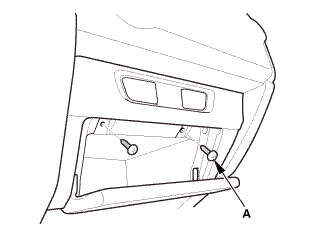
|
|
|
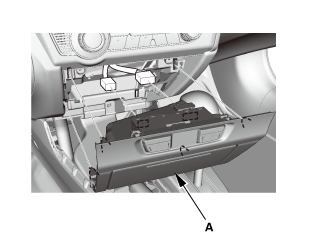

| 1. | Dashboard Center Pocket |
|
|
|
|
|
|
 Passenger's Outer Vent Removal and Installation
8411J2 PASSENGER SIDE
Removal
1.
Front Door Opening Seal As Needed - Passenger's Side
1.
Remove th ...
 Driver's Dashboard Lower Cover Removal and Installation
Removal
1.
Driver's Dashboard Lower Cover
1.
Remove the driver's dashboard lower cover (A).
...
See also:
Honda Civic Service Manual. Engine Oil Filter Feed Pipe Removal and Installation (Except K24Z7)
1111M6
1.
Vehicle Lift
1.
Raise the vehicle on a lift, and make sure it is securely supported.
2.
Oil Filter Assembly
1.
...
© 2016-2026 Copyright www.hocivic.com

0.0258