
Honda Civic Service Manual: Knock Sensor Removal and Installation (Except K24Z7)
121188

| 1. | Vehicle Lift |
|
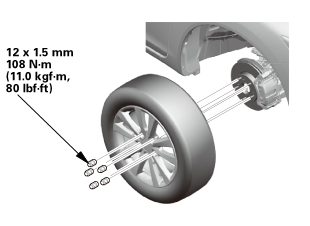
| 2. | Tire and Wheel-Removal, Front Right |
|
|
|
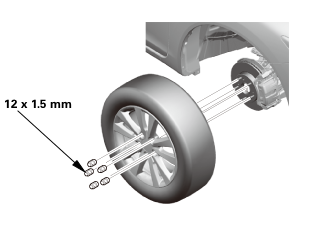 12x1mm
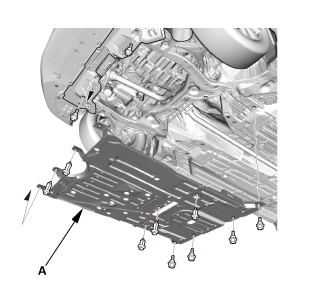
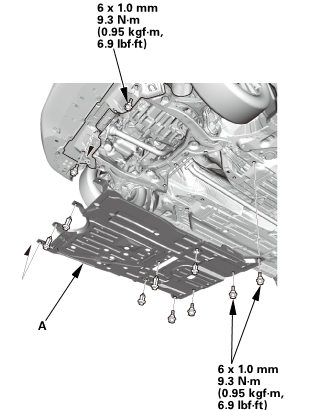
| 3. | Engine Undercover |
|
|
|
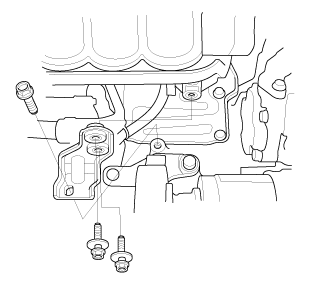
| 4. | INTAKE MANIFOLD BRACKET |
|
|
|
| 5. | Knock Sensor |
|
|
|
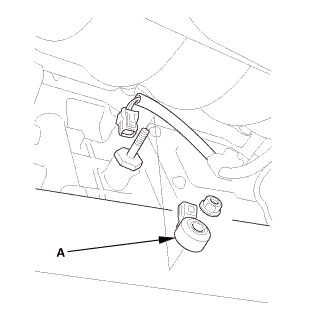

| 1. | Knock Sensor |
|
|
|
|||||||||
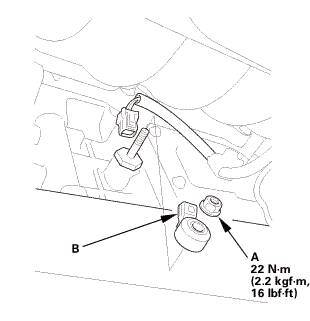
| 2. | INTAKE MANIFOLD BRACKET |
|
|
|
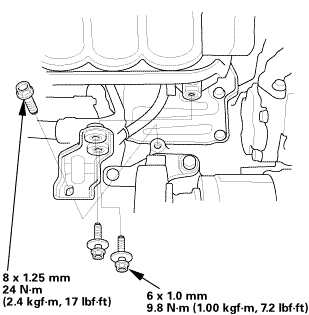 l25n-m
| 3. | Engine Undercover |
|
|
|
| 4. | Tire and Wheel-Installation, Front Right |
|
|
|
||||||
 mminmuan
 Outside Air Temperature Sensor Removal, Installation, and Test ('13)
1.
Front Grille Cover
1.
Remove the front grille cover (A).
...
 Secondary HO2S Removal and Installation (Except K24Z7 and R18Z1 (CVT))
1211U2
1.
Vehicle Lift
1.
Raise the vehicle on a lift, and make sure it is securely supported.
...
See also:
Honda Civic Owners Manual. How to Select a Play Mode
You can select shuffle and repeat modes when playing a file.
Select a play mode.
To turn off a play mode
Select the mode you want to turn off.
How to Select a Play Mode
Play Mode Menu Items
Shuffle All Songs: Plays all available files in a
selected list (playlists, artists, albums, song ...
