
Honda Civic Owners Manual: How to Set Up the Jack. Replacing the Flat Tire
How to Set Up the Jack
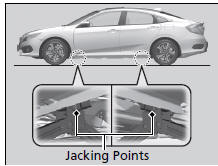
- Place the jack under the jacking point closest to the tire to be changed.
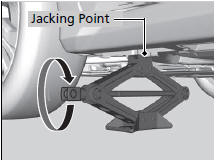
- Turn the end bracket clockwise as shown in
the image until the top of the jack contacts
the jacking point.
► Make sure that the jacking point tab is resting in the jack notch.
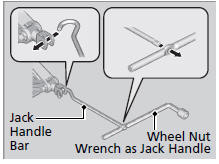
- Raise the vehicle, using the jack handle bar and the jack handle, until the tire is off the ground.
|
How to Set Up the Jack WARNING
The vehicle can easily roll off the jack,
seriously injuring anyone underneath.
Follow the directions for changing a tire
exactly, and never get under the vehicle
when it is supported only by the jack. Do not use the jack with people or luggage in the vehicle. Use the jack provided in your vehicle. Other jacks may not support the weight ("load") or their shape may not match. The following instructions must be followed to use the jack safely:
|
Replacing the Flat Tire

- Remove the wheel nuts and flat tire.

- Wipe the mounting surfaces of the wheel with a clean cloth.
- Mount the compact spare tire.
- Screw the wheel nuts until they touch the lips around the mounting holes, and stop rotating.

- Lower the vehicle and remove the jack.
Tighten the wheel nuts in the order indicated in the image. Go around, tightening the nuts, two to three times in this order.
Wheel nut torque: 80 lbf∙ft (108 N∙m, 11 kgf∙m)
|
Replacing the Flat Tire Do not over tighten the wheel nuts by applying extra torque using your foot or a pipe. Models with wheel cover Make sure the wire support ring is hooked into the clips around the edge of the wheel cover.
Align the valve mark on the wheel cover to the tire valve on the wheel, then install the wheel cover.
|


 Changing a Flat Tire. Getting Ready to Replace the Flat Tire
Changing a Flat Tire
If a tire goes flat while driving, grasp the steering wheel firmly, and brake
gradually
to reduce speed. Then, stop in a safe place. Replace the flat tire with a
compact
spa ...
 Storing the Flat Tire. TPMS and the Compact Spare Tire
Storing the Flat Tire
Models with aluminum wheels
Remove the center cap.
All models
Place the flat tire face down in the spare tire
well.
Remove the spacer cone from the w ...
See also:
Honda Civic Owners Manual. Immobilizer System
The immobilizer system prevents a key that has not been pre-registered from
starting the engine. Each key contains electronic transmitters that use
electronic
signals to verify the key.
Pay attention to the following when inserting the key into the ignition switch
or
pressing the ENGINE ST ...
