
Honda Civic Service Manual: Front Door Panel Removal and Installation (2-door)
Honda Civic Service Manual / Body / Doors and Enclosures / Doors / Front Door Panel Removal and Installation (2-door)

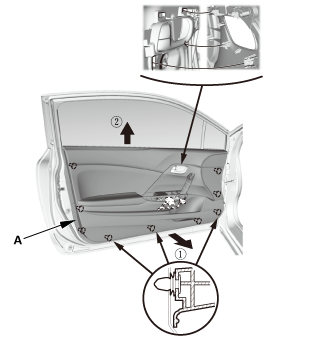
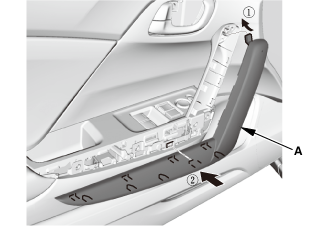
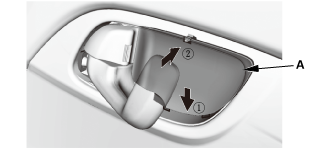
Removal
| 1. | Front Door Panel (2-Door) |
|
|
|
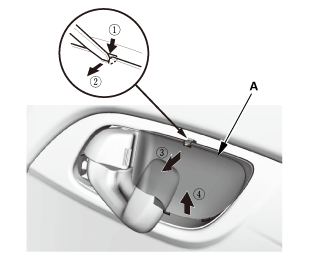
|
|
|
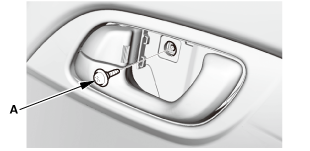
|
|
|
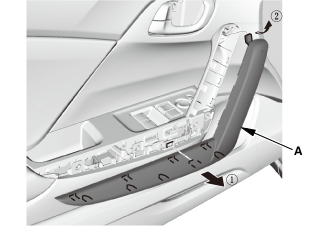
|
|
|
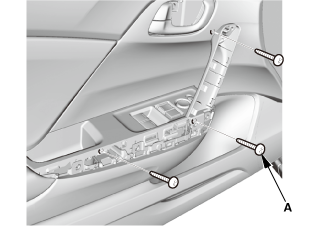
|
|
|

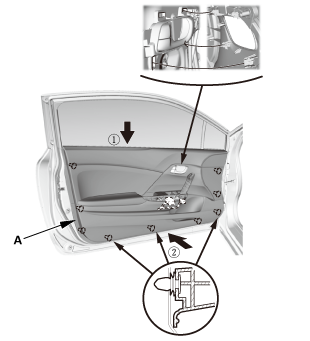
Installation
| 1. | Front Door Panel (2-Door) |
|
|
|
|
|
|
|
|
|
|
|
|
|
|
|
 Front Door Outer Handle Removal and Installation (4-door)
818110 LEFT
819110 RIGHT
1.
Front Door Power Window Switch Panel (4-door)
1.
...
 Front Door Regulator Removal and Installation (2-door)
Removal
1.
Front Door Panel (2-Door)
1.
Remove the inner handle ...
See also:
Honda Civic Owners Manual. Phone Setup
To pair a cell phone (No phone has
been paired to the system)
Press the button or
the button.
Rotate to select Yes,
then press .
Make sure your phone is in search or
discoverable mode, then press .
HFL automatically searches for a
Bluetooth dev ...
© 2016-2026 Copyright www.hocivic.com

0.0074