
Seat Ibiza (6F) 2017-2026 Owner's Manual: Driving with Side Assist
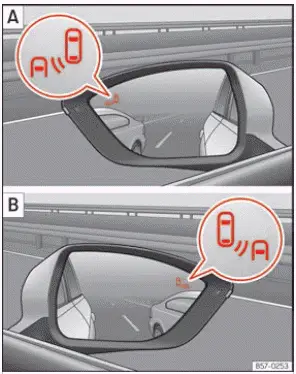
Fig. 116 Control lamp of the lane departure
warning.
Connecting and disconnecting
Side Assist can be activated or deactivated through the Assistants menu in the Seat Ibiza infotainment system. Depending on the vehicle's equipment, the function can also be controlled through the instrument cluster display using the buttons on the multifunction steering wheel. If the vehicle is equipped with a multifunction camera, Side Assist may additionally be accessed using the assistance systems button located on the main beam headlight lever. These controls allow the driver to select whether the system should monitor surrounding traffic and provide warnings about vehicles approaching from behind or occupying adjacent lanes.
When Side Assist is activated and ready for operation, the warning lamps illuminate briefly to confirm that the function is available. This short indication allows the driver to recognise that the system has been switched on. It should not be confused with a continuous warning about a vehicle in the blind spot, which has a different meaning. Even when Side Assist is ready to operate, its ability to detect surrounding traffic remains subject to the system's speed requirements and operating limitations.
When the Seat Ibiza is restarted, Side Assist retains the setting selected before the ignition was switched off. If the function was enabled previously, that setting remains selected for the next journey. Similarly, if the driver manually deactivated Side Assist, the system retains the deactivated setting. The driver can check or change the current selection through the relevant assistance systems menu whenever necessary.
Indication on the exterior mirror
Side Assist uses warning lamps in the exterior mirrors to inform the driver about potentially critical traffic situations behind and alongside the vehicle. Each lamp provides information for its corresponding side of the Seat Ibiza. The warning lamp in the left exterior mirror relates to vehicles detected towards the rear left, while the lamp in the right exterior mirror indicates relevant traffic towards the rear right. When the system determines that a vehicle's position or movement may present a risk during a lane change, the appropriate lamp illuminates to draw the driver's attention to that side. These indications supplement normal mirror checks and direct observation but do not replace them.
If the vehicle has been fitted with tinted windows or aftermarket window tinting film, the Side Assist indications in the exterior mirrors may be more difficult to see. Depending on the tint and lighting conditions, the warning lamps may appear less distinct from the driver's seating position. This can make it harder to recognise an illuminated or flashing warning promptly, particularly when visibility is already affected by strong sunlight or reflections. The driver must take this limitation into account and continue checking surrounding traffic carefully before changing lanes.
Keep both exterior mirrors clean and free from snow, ice and other contamination that could obscure the Side Assist warning lamps. Do not attach stickers, decorative films or similar materials over the warning areas, as these may reduce the visibility of the indications. Clear, unobstructed mirrors are essential not only for recognising Side Assist warnings but also for observing vehicles approaching from behind and travelling in adjacent lanes.
It lights up
Brief illumination: When Side Assist is activated, the relevant warning lamp lights up momentarily to indicate that the lane departure warning function has been switched on and is ready to operate. This brief confirmation occurs during system activation and does not necessarily indicate that another vehicle has been detected. The lamp should return to its normal state after the activation indication has finished.
Continuous illumination: If a warning lamp remains illuminated, Side Assist has detected a vehicle in the blind spot on the corresponding side of the Seat Ibiza. The indication warns the driver that another vehicle is occupying an area that may not be clearly visible through the mirrors alone. Before attempting to change lanes, check the adjacent lane and surrounding traffic carefully. Do not assume that the manoeuvre is safe simply because the detected vehicle is not immediately visible in the mirror.
Flashes
A flashing Side Assist warning lamp indicates that the system has detected a vehicle in an adjacent lane and the driver has activated the turn signal towards that vehicle. For example, if a vehicle is detected on the left and the left turn signal is switched on, the warning lamp in the left exterior mirror flashes to emphasise the potential danger of moving into that lane. The flashing indication is more urgent than a continuously illuminated lamp because it occurs when the driver is signalling an intended manoeuvre towards the detected traffic. Check the situation carefully and postpone the lane change if the adjacent lane is not clear.
On Seat Ibiza vehicles equipped with both Side Assist and Lane Assist, an additional warning function known as Lane Assist "Plus" may be available. With this combination, a lane-change warning can also be issued when the vehicle approaches or crosses a lane boundary towards detected traffic, even if the driver has not activated the turn signal. This provides an additional warning in situations where the vehicle may be moving towards an occupied adjacent lane without an indicated intention to change lanes. The function remains dependent on the operating conditions and detection capabilities of the associated assistance systems.
When the ignition is switched on, the Side Assist control lamps illuminate as part of the system's initial function check. Under normal conditions, they should switch off again after approximately two seconds. This brief illumination confirms that the warning lamps are being checked and should not be mistaken for a blind-spot warning. If an indication remains active after the function check, its meaning should be assessed according to the current Side Assist status and the surrounding traffic situation.
If the Side Assist warning lamp in the exterior mirror remains off, the system has not detected any vehicles in the monitored area behind or alongside the Seat Ibiza that require a warning. Under normal operating conditions, the absence of an indication means that no relevant traffic has been identified within the system's detection range. However, this does not guarantee that the adjacent lane is clear. Side Assist has detection limits, and certain vehicles or traffic situations may not be recognised. Always check the mirrors and surrounding traffic before changing lanes, even when neither warning lamp is illuminated.
When the exterior lighting is dim, the brightness of the Side Assist warning lamps is reduced to make the indications more comfortable to view in low-light conditions. The driver can also adjust the brightness manually through the infotainment system. Five intensity levels are available, allowing the warning lamps to be set according to personal preference and visibility requirements. Choose a setting that makes the indications clearly recognisable without causing unnecessary distraction, particularly when driving at night or in changing lighting conditions.
Lane assist Plus.
Lane Assist Plus combines the functions of Lane Assist and Side Assist to provide additional assistance when the Seat Ibiza approaches an occupied adjacent lane. The function becomes available when both Lane Assist and Side Assist are activated and their operating requirements are satisfied. By combining information about detected lane boundaries with the presence of vehicles alongside or approaching from behind, Lane Assist Plus extends the normal warning functions and can provide a corrective steering response when a potentially dangerous lane change is detected.
If the driver begins a lane-change manoeuvre while another vehicle is detected in a position that could create a collision risk, Lane Assist Plus may respond in several ways. These interventions are intended to alert the driver to the danger and help prevent the Seat Ibiza from moving into an occupied lane. Depending on the situation, the following warnings and steering assistance may be provided:
- The Side Assist warning lamp flashes on the affected side. If the system identifies a potentially dangerous movement towards an adjacent lane, the warning lamp in the corresponding exterior mirror begins flashing, even when the driver has not activated the turn signal. This draws attention to a vehicle that may be approaching from behind or travelling in the blind spot. The warning therefore does not depend solely on the driver indicating an intended lane change.
- The steering wheel vibrates to warn of a possible collision. Lane Assist Plus can produce a noticeable vibration through the steering wheel when it detects a potentially hazardous lane-change manoeuvre. This tactile warning supplements the visual indication in the exterior mirror and alerts the driver to the need for immediate attention. The driver should assess the position of surrounding vehicles and avoid continuing the manoeuvre if the adjacent lane is occupied.
- Corrective steering torque is applied. If the system determines that the vehicle is moving towards a detected hazard in an adjacent lane, it can apply a corrective steering force to help guide the Seat Ibiza back towards its original lane. This intervention is intended to reduce the risk of a collision, but it cannot guarantee that the vehicle will remain within the lane or avoid another road user. The driver must keep control of the steering wheel and can override the correction whenever the actual traffic situation requires a different response.
Driving situations
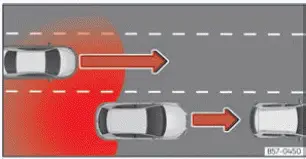
Fig. 117 Overtaking with traffic behind the
vehicle.
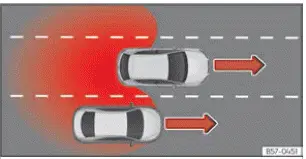
Fig. 118 Overtaking in the central lane and then
joining the right lane.
Side Assist evaluates the movement of vehicles behind and alongside the Seat Ibiza to determine when a warning should be displayed. The warning lamp in the relevant exterior mirror, identified by the arrow in Fig. 116, illuminates when the system recognises a traffic situation that may be important for a lane-change manoeuvre. The following examples illustrate two typical circumstances in which the driver may receive an indication:
- When another vehicle is overtaking the Seat Ibiza. As illustrated in Fig. 117, Side Assist monitors vehicles approaching from behind and moving past the Seat Ibiza in an adjacent lane. If the system determines that the approaching or overtaking vehicle is relevant to a potential lane change, the warning lamp on the corresponding side illuminates. This helps the driver recognise traffic that may be difficult to see clearly through the mirrors, especially when another vehicle is entering or occupying the blind spot. The warning should be taken into account before attempting to move into that lane.
- When the Seat Ibiza is overtaking another vehicle. In the situation illustrated in Fig. 118, the Seat Ibiza passes another vehicle while travelling in the centre lane and then prepares to return to the right-hand lane. Side Assist may display a warning when the difference in speed between the two vehicles is approximately 10 km/h (6 mph). If the Seat Ibiza overtakes the other vehicle at a considerably higher relative speed, the system may not display an indication. The driver must therefore check that the overtaken vehicle has been passed safely and that sufficient space is available before moving back into the right-hand lane.
The timing of a Side Assist warning depends not only on the distance to another vehicle but also on the difference between the vehicles' speeds. When a vehicle approaches the Seat Ibiza more quickly, the system may illuminate the warning lamp earlier because the distance between the vehicles is decreasing at a faster rate. Conversely, when the relative speed is lower, the indication may appear later. As a result, two vehicles at the same distance from the Seat Ibiza may produce warnings at different moments, depending on how quickly they are approaching or moving relative to it. This speed-dependent assessment helps Side Assist identify potentially critical traffic situations, but the driver must still judge the available space and timing of every lane-change manoeuvre independently.
 Introduction
The Side Assist lane departure warning system uses radar sensors to monitor the areas behind and alongside the
Seat Ibiza, helping the driver identify vehicles that may present a risk when changing ...

See also:
Honda Civic Owners Manual. To Play Bluetooth’ Audio Files
1. Make sure that your phone is paired and
connected to HFL.
2. Press the MEDIA button until the
Bluetooth’ Audio Source is selected.
If the phone is not recognized, another HFLcompatible
phone, which is not compatible
for Bluetooth’ Audio, may already be
connected.
To pause or res ...
