
Honda Civic Owners Manual: Adding the Coolant
Honda Civic Owners Manual / Maintenance / Maintenance Under the Hood / Engine Coolant / Adding the Coolant
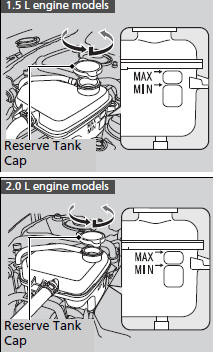
- Make sure the engine and radiator are cool.
- Turn the reserve tank cap 1/8 of a turn counterclockwise and relieve any pressure in the cooling system.
- Push down and turn the reserve tank cap counterclockwise to remove it.
- Pour coolant into the reserve tank until it reaches the MAX mark.
- Put the reserve tank cap back on, and tighten it fully.
|
Engine Coolant Do not add rust inhibitors or other additives to your vehicle's cooling system. They may not be compatible with the coolant or with the engine components. Adding the Coolant NOTICE Pour the fluid slowly and carefully so you do not spill any. Clean up any spills immediately; they can damage components in the engine compartment. |
 Checking the Coolant
Check the amount of coolant in the reserve
tank.
If the coolant level is below the MIN mark,
add the specified coolant until it reaches
the MAX mark.
Inspect the cooling s ...

See also:
Honda Civic Service Manual. A/C Compressor Thermal Protector Removal and Installation (K24Z7)
6181F2
Air conditioning refrigerant or lubricant vapor can irritate
your eyes, nose, or throat.
Be careful when connecting service equipment.
...
© 2016-2026 Copyright www.hocivic.com

0.025