
Seat Ibiza (6F) 2017-2026 Owner's Manual: ACC operation
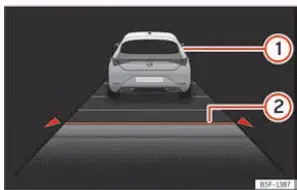
Fig. 103 On the instrument cluster display:
ACC active.
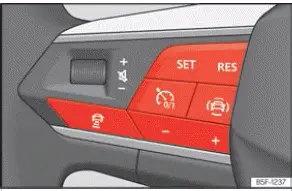
Fig. 104 On the multifunction steering wheel:
buttons for operating the ACC.
- Vehicle detected ahead. This indication appears when Adaptive Cruise Control (ACC) recognises a vehicle travelling in front of the Seat Ibiza and the following distance has been selected. It allows the driver to see that the system is monitoring a vehicle ahead and taking its presence into account when regulating speed and distance.
- Selected distance level 2. The display indicates that the second of the available following-distance settings has been selected. This setting determines the distance ACC attempts to maintain from a detected vehicle ahead, subject to the system's operating conditions and limitations.
Information about ACC operation can be shown in the central area of the Assistants view or in the left-hand information profile of the digital instrument cluster. These display options provide the driver with an overview of the system's current status, including the detection of a vehicle ahead and the selected following-distance setting. If neither of these views is selected, the relevant ACC information appears automatically in a simplified format in the lower central section of the instrument cluster. This ensures that the driver can still see the essential operating information without changing the current display layout.
The programmed cruising speed is displayed next to the ACC status indicator. Together, these indications allow the driver to check whether Adaptive Cruise Control is active and which speed has been selected. The displayed speed represents the stored target value; the vehicle's actual speed may be lower when ACC is adapting to slower traffic ahead.
Connecting
- Press the
 button on the
multifunction steering wheel, as illustrated in Fig. 104. This switches on Adaptive Cruise Control and
prepares the system for speed and distance regulation.
ACC is now switched on but has not yet started regulating the vehicle's speed or following distance. The system remains in standby mode until the driver activates regulation using the appropriate steering wheel control. During standby, the driver continues to control the Seat Ibiza's speed directly with the accelerator and brake pedals.
Start regulation
Start regulation
When Adaptive Cruise Control is activated, Electronic Stability Control (ESC) and the Traction Control System (TCS) are also activated automatically. These systems operate alongside ACC and form part of the vehicle's electronic driving assistance functions. Their activation helps ensure that the necessary stability and traction control functions are available while ACC regulates the vehicle's speed and following distance.
- To begin automatic speed and distance regulation, press the
 button
on the multifunction steering wheel, as shown in Fig. 104. The vehicle must satisfy the relevant operating
requirements before ACC can begin regulating.
When regulation starts, ACC stores the vehicle's current speed as the desired cruising speed. If the current speed falls outside the permitted operating range, the system uses the closest valid speed within that range. Once the target speed has been established, ACC regulates acceleration and, where necessary, braking to maintain the selected speed or adapt to a detected vehicle travelling ahead.
Vehicles with automatic transmission: The selector lever must be in position D, S or M for ACC regulation to operate. These transmission positions allow the vehicle to travel forwards while the system manages speed according to the selected settings and the surrounding traffic conditions.
Vehicles with manual transmission: A forward gear other than first gear must be engaged, and reverse gear must not be selected. The vehicle must also be travelling faster than approximately 30 km/h (18 mph). The driver remains responsible for selecting an appropriate gear and ensuring that the engine operates within a suitable speed range while ACC is active.
Depending on whether ACC has detected a vehicle ahead, the instrument cluster displays one of the following green control lamps. These indications distinguish between regulation with a detected vehicle in front and regulation when no vehicle ahead is being monitored within the relevant detection area.
 Lights up green
Adaptive Cruise Control is active, and no vehicle has been detected ahead within the system's relevant detection area. ACC regulates the Seat Ibiza towards the programmed cruising speed, provided the current road and operating conditions allow it. The driver must continue observing traffic because the absence of a detected vehicle does not mean that the road ahead is necessarily free of hazards.
 Lights up green
Adaptive Cruise Control is active, and a vehicle travelling ahead has been detected. ACC takes the detected vehicle into account when regulating speed and attempts to maintain the selected following distance. If the vehicle ahead is travelling more slowly than the stored cruising speed, the Seat Ibiza may reduce its speed accordingly. The driver must remain prepared to brake if the system's response is insufficient.
When ACC is switched on but remains in standby mode, the corresponding control lamps illuminate grey instead of green. This indicates that automatic regulation is not currently active, even though the system has been selected. The driver must not assume that ACC is controlling the vehicle's speed or distance while the grey standby indication is displayed.
Program the speed
To select the desired cruising speed, use the + or - buttons on the multifunction steering wheel, as shown in Fig. 104. These controls allow the stored speed to be increased or decreased in increments of 10 km/h (5 mph). The selected value is displayed in the instrument cluster, allowing the driver to confirm the new setting before continuing. Choose a speed that is suitable for the applicable speed limit, visibility, road surface and traffic conditions.
While ACC is actively regulating speed, smaller adjustments can be made using the dedicated controls. Press the
 button to increase the programmed speed by 1 km/h (1 mph). To reduce the selected speed by the same increment,
press the
 button. These smaller adjustments are useful when the driver wants to fine-tune the cruising speed without
making a larger change. ACC continues to take the distance to a detected vehicle ahead into account, so changing
the programmed speed does not necessarily produce an immediate change in the vehicle's actual speed.
Program the distance setting
Adaptive Cruise Control allows the driver to choose between five following-distance levels, ranging from very short to very long. The selected level determines the distance that ACC attempts to maintain behind a detected vehicle travelling ahead. A longer setting provides a greater separation, while a shorter setting reduces the programmed following distance. The driver should select a distance appropriate for the prevailing conditions and must never rely on the system to compensate for an unsafe setting.
- Press the
 button on the multifunction steering wheel, then use the corresponding adjustment buttons shown in Fig. 104
to select the desired following-distance level. Check the instrument cluster display to confirm that the
intended setting has been selected.
- Alternatively, press the
 button
repeatedly until the required distance level appears on the instrument cluster display. Each operation
changes the selected setting, allowing the driver to choose the preferred distance from the available
levels.
When choosing a following-distance setting, always observe the minimum safe-distance requirements and applicable traffic regulations in the country where the vehicle is being driven. The selected distance must also be appropriate for the vehicle's speed, the available visibility, the condition of the road surface and the prevailing weather. A greater distance may be necessary when braking performance or tyre grip is reduced. The driver remains responsible for maintaining sufficient space to slow down or stop safely.
Suspend regulation (standby)
- Briefly press the
 button on the multifunction steering wheel, as illustrated in Fig. 104, or press the brake pedal. Either
action interrupts active ACC regulation and places the system in standby mode, allowing the driver to
control the vehicle's speed directly.
When regulation is suspended, the ACC indicator lamp changes to grey. The previously programmed cruising speed and following-distance setting remain stored, allowing the driver to resume regulation later without selecting these values again. While ACC is in standby, it does not actively maintain the stored speed or following distance, so the driver must manage acceleration and braking independently.
If Electronic Stability Control (ESC) or the Traction Control System (TCS) is switched off, ACC regulation is interrupted automatically. The system requires the relevant electronic assistance functions to be available during normal operation. If ACC is interrupted in this way, the driver must take over speed control and should only attempt to resume regulation when the necessary operating conditions have been restored.
Reinstating the cruise control
- Press the
 button to resume Adaptive Cruise Control using the last stored cruising speed and following-distance
setting. Before pressing the button, check that the previously selected speed remains appropriate for the
current road and traffic conditions. ACC then resumes regulation according to those stored values.
- OR: Press the
 button to restart regulation using the vehicle's current speed as the selected cruising speed. This allows
the driver to establish a new target based on the speed at which the Seat Ibiza is presently travelling,
rather than returning to the previously stored cruising speed.
Switching off
- Press and hold the ACC control button on the multifunction steering wheel to switch off the system completely. Unlike temporarily suspending regulation, this action deactivates ACC and clears the previously programmed cruising speed. If the driver wishes to use Adaptive Cruise Control again, the function must be switched on and a new speed selected.
Exceeding the speed regulated by the ACC
While driving with Adaptive Cruise Control active, the driver can temporarily increase the Seat Ibiza's speed by pressing the accelerator pedal. This allows additional acceleration when required, for example during an overtaking manoeuvre or when responding to a change in traffic conditions. As long as the accelerator pedal is being used to override the system, ACC regulation is suspended and the driver directly controls the vehicle's acceleration. During this period, the system does not perform its normal ACC speed and following-distance regulation. Once the accelerator pedal is released, ACC resumes regulation according to the stored settings, provided the operating conditions are satisfied. The driver must monitor the distance to surrounding vehicles throughout the override and brake whenever necessary.
Changing the drive profile
In Seat Ibiza models equipped with SEAT Drive Profile, the selected driving profile can influence how Adaptive Cruise Control accelerates and brakes the vehicle. Different profile settings may alter the system's response when approaching a slower vehicle or returning towards the programmed cruising speed. The selected profile therefore affects the character of ACC regulation, while the driver remains responsible for choosing a suitable speed and following distance.
In vehicles without SEAT Drive Profile, ACC behaviour can also be influenced by the driving profiles available through the infotainment system's Drive Assist settings. When one of these profiles is selected, ACC uses the corresponding acceleration and braking characteristics. These settings are equivalent to those provided through SEAT Drive Profile, allowing the driver to select the available ACC response characteristics through the infotainment system. Regardless of the selected profile, ACC remains subject to the same fundamental operating limitations and safety requirements.
WARNING Before driving off, always check that the road ahead is clear and that the vehicle can move safely. The front radar sensor may fail to detect certain obstacles or objects in the vehicle's path, particularly when they are stationary or outside the sensor's effective detection capabilities. Do not assume that ACC will identify every obstruction or automatically prevent the Seat Ibiza from moving towards a hazard. Failure to check the surroundings and intervene when necessary can result in a collision and serious injury. Apply the brakes immediately if the vehicle begins moving when it is unsafe to do so, or if an obstacle is present in its path.
NOTICE If the driver increases speed by pressing the accelerator pedal while ACC is active, the system's normal regulation is temporarily overridden. Because Adaptive Cruise Control has inherent detection and response limitations, it may not be able to adjust the vehicle's speed or following distance safely during or immediately after such an acceleration manoeuvre. The driver must assess the available space and traffic conditions independently, particularly when approaching another vehicle at a higher speed. Do not rely on ACC to compensate automatically for an unsuitable acceleration decision or an insufficient following distance.
- Remain prepared to intervene whenever the driving situation requires it. Release the accelerator, apply the brakes or adjust the vehicle's speed manually if the distance to another vehicle becomes unsafe or ACC does not respond adequately. The driver must always retain control of the Seat Ibiza and take prompt action when traffic conditions change.
 Introduction
Adaptive Cruise Control (ACC) helps the driver maintain a selected driving speed while automatically adjusting
the distance to vehicles travelling ahead. Unlike conventional cruise control, which is ...
 Special driving situations
Fig. 105 On the instrument cluster display:
ACC active, vehicle detected on the left.
Adaptive Cruise Control (ACC) provides additional assistance in certain driving situations, includin ...
See also:
Honda Civic Owners Manual. Tire Sizes
Whenever tires are replaced, they should be replaced with tires of the same
size.
Tire Labeling
Following is an example of tire size with an
explanation of what each component means.
P205/55 R16 89H
P: Vehicle type (P indicates passenger vehicle).
205: Tire width in mill ...
