
Honda Civic Owners Manual: When the System can be Used. To cancel
When the System can be Used
The system can be used when the following conditions are met.
- The lane in which you are driving has detectable lane markers on both sides, and your vehicle is in the center of the lane.
- The vehicle speed is between 45 and 90 mph (72 and 145 km/h).
- You are driving on a straight or slightly curved road.
- The turn signals are off.
- The brake pedal is not depressed.
- The wipers are not in continuous operation.
How to activate the system
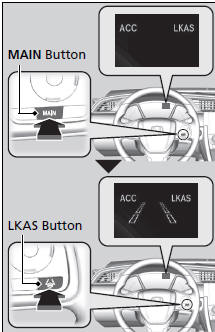
- Press the MAIN button.
► The LKAS is on in the driver information interface.
The system is ready to use.
- Press the LKAS button.
► Lane outlines appear on the driver information interface.
The system is activated.
|
When the System can be Used If the vehicle drifts toward either the left or right lane line due to the system applying torque, turn off the LKAS and have your vehicle checked by a dealer. The LKAS temporarily deactivates when it fails to detect lane lines. When the system detects the lines again, it comes back on automatically. |
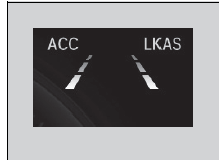
- Keep your vehicle near the center of the
lane while driving.
► The dotted outer lines change to solid ones once the system starts operating after detecting the left and right lane markings.
To cancel
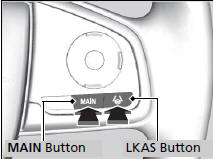
To cancel the LKAS: Press the MAIN or LKAS button.
The LKAS is turned off every time you stop the engine, even if you turned it on the last time you drove the vehicle.
|
To cancel Pressing the MAIN button also turns ACC with LSF on and off. |
The system operation is suspended if you:
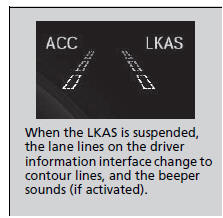
- Set the wipers to continuous operation.
► Turning the wipers off resumes the LKAS.
Models with automatic intermittent wipers
- Set the wiper switch to AUTO and the
wipers operate continuously.
► The LKAS resumes when the wipers stop or operate intermittently.
All models
- Decrease the vehicle speed to 40 mph (64
km/h) or less.
► Increasing the vehicle speed to 45 mph (72 km/h) or more resumes the LKAS.
- Depress the brake pedal.
► The LKAS resumes and starts detecting the lane lines again once you release the brake pedal.
The LKAS may automatically be suspended when:
- The system fails to detect lane lines.
- The steering wheel is quickly turned.
- You fail to steer the vehicle.
- The vehicle runs on a curved road over the speed limit.
Once these conditions no longer exist, the LKAS automatically resumes.
The LKAS may automatically be canceled when:
- The camera temperature gets extremely high or low.
- The camera behind the rearview mirror, or the area around the camera, including the windshield, gets dirty.
- When driving through a sharp curve.
- When driving at a speed in excess of approximately 90 mph (145 km/h).
- When the ABS or VSA systems engage.
A beeper sounds if the LKAS is automatically canceled.
 Lane Keep Support Function. Lane Departure Warning Function
Lane Keep Support Function
Provides assistance to keep the vehicle in the center of the lane. When the
vehicle
nears a white or yellow line, steering force of the electric power steering will
bec ...
 LKAS Conditions and Limitations
The system may not detect lane markings and therefore may not keep the
vehicle in
the middle of a lane under certain conditions, including the following:
Environmental conditions
Driving ...
See also:
Honda Civic Owners Manual. Battery
Checking the Battery
Check the battery terminals for corrosion
monthly.
If your vehicle's battery is disconnected or goes dead:
The audio system is disabled.
The clock* resets.
The navigation system* is disabled.
Canadian models only The immobilizer system needs to be
...
