
Seat Ibiza (6F) 2017-2026 Owner's Manual: Ownership and identity accreditation
SEAT CONNECT requires an ownership verification procedure before a user can obtain primary-user status for the vehicle. The method used depends on the infotainment system installed in the Seat Ibiza. Depending on the equipment, ownership is confirmed either by using both physical vehicle keys or by entering a registration code. These procedures establish that the person registering as the primary user has the required access to the vehicle.
9.2" Infotainment system
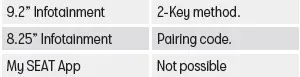
If your Seat Ibiza is equipped with the 9.2-inch infotainment system, you must have both physical vehicle keys available to become the primary user and confirm ownership. The verification is performed inside the vehicle during the SEAT CONNECT registration process. If you already have a SEAT CONNECT user account, you can sign in through the infotainment system and access the relevant ownership verification function under user management. Both keys are required because the procedure uses them to confirm the user's authorised access to the vehicle.
- Switch on the ignition and infotainment system. Make sure the Seat Ibiza is stationary and that the infotainment interface is ready to use. Have both physical vehicle keys available before beginning the ownership verification procedure.
- Register for SEAT CONNECT through the infotainment system. Follow the displayed registration instructions to associate your user account with the vehicle. If you are registering for the first time, complete the necessary account steps before proceeding with ownership confirmation.
- Alternatively, access the primary-user registration menu. Open Manage users > Settings > Become primary user and follow the instructions displayed on the screen. This option allows an existing SEAT CONNECT account holder to begin the ownership accreditation process through the vehicle's user management settings.
- Press the unlock button on the first vehicle key. When instructed, use the first physical key to perform the required confirmation. Follow the sequence indicated by the infotainment system rather than pressing the buttons before the appropriate step is displayed.
- Press the unlock button on the second vehicle key. Complete the verification by operating the unlock button on the second physical key as instructed. The system uses the confirmation from both keys as part of the process for establishing primary-user status.
8.25" Infotainment system
For a Seat Ibiza fitted with the 8.25-inch infotainment system, primary-user registration and ownership accreditation are completed using a registration code rather than the two-key procedure. The required code is available through the SEAT website and the My SEAT App after the vehicle has been linked to your account. To establish this connection, open My Garage > Add Vehicle, enter the necessary vehicle information and accept the applicable terms and conditions and SEAT Privacy Policy. Once the vehicle has been added to your account, the registration code can be used to verify ownership from inside the vehicle.
In the Seat Ibiza infotainment system, open Vehicle settings > SEAT CONNECT > Registration and enter the pairing code displayed in the My SEAT App. Check the code carefully before confirming the entry, as it must correspond to the vehicle and account being registered. The infotainment system then processes the required information through its radio communication connection to complete the ownership accreditation procedure. After the registration has been processed successfully, you can check the current verification status in the My SEAT App. This allows you to confirm whether the vehicle has been associated with your account and whether primary-user accreditation has been completed.
How is ownership accredited?
Identity accreditation (SEAT ID)
In addition to confirming ownership of the Seat Ibiza, certain SEAT CONNECT functions require verification of the user's personal identity. This additional accreditation must be completed before services with security-related functions can be used. One example is the "Remote Opening" service, which requires identity verification because it allows access to a function directly associated with vehicle security. Completing the normal SEAT CONNECT registration or becoming the primary user does not necessarily replace this separate identity verification requirement.
Identity accreditation can be completed in two ways. You can visit a specialised SEAT dealership, where a brand specialist will assist with the verification procedure, or you can carry out the process independently online through the My SEAT App. The available instructions guide you through the necessary steps for confirming your identity. Choose the method that is most convenient and complete the required verification before attempting to activate or use a service that depends on identity accreditation.
Further information about SEAT ID, including the identity verification procedure and the requirements for accessing protected SEAT CONNECT services, is available in the My SEAT App. Consult the information provided there if you need to complete accreditation, check the relevant requirements or understand why a security-related service is not yet available for your Seat Ibiza.
 Activation of SEAT CONNECT and S-PIN
To activate SEAT CONNECT in your Seat Ibiza, you must complete the registration process and link the vehicle to
your personal SEAT account. This procedure establishes the connection between your use ...
 Legal provisions
When SEAT CONNECT services are used in the Seat Ibiza, information is transmitted and processed online through
the vehicle's communication systems. Depending on the services activated, this informat ...
See also:
Honda Civic Service Manual. Dashboard/Steering Hanger Beam Disassembly and Reassembly (Without Navigation)
SRS components are located in this area. Review the SRS component locations
and the precautions and procedures before doing repairs or service.
1.
Dashboard Subdisplay Visor
1.
...
