
Seat Ibiza (6F) 2017-2026 Owner's Manual: Overview and controls
Seat Ibiza (6F) 2017-2026 Owner's Manual / Infotainment system / Overview and controls
Connect System
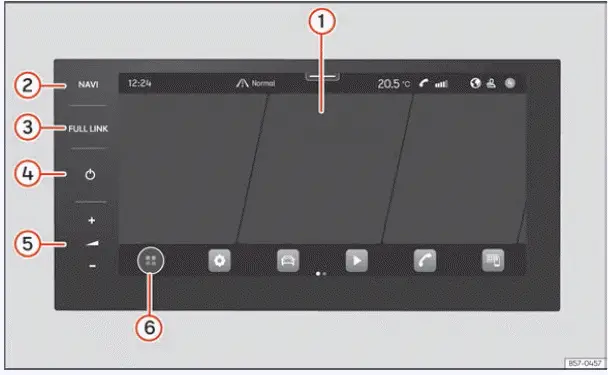
Fig. 129 Overview: control unit
- Touchscreen. The touchscreen is the main interface for operating the Seat Ibiza infotainment system. It allows you to access available functions, navigate through menus, select options and adjust settings by touching the corresponding areas of the display. The information and controls shown depend on the function currently in use.
- Navigation menu access. Opens the navigation menu, providing access to the navigation functions supported by the installed infotainment system. Use this control to switch directly to the navigation interface without searching through the other main menus.
- Full Link menu access. Opens the Full Link interface, where compatible smartphones can be connected and the supported smartphone integration functions can be selected. The available connection options depend on the mobile device and the equipment installed in the Seat Ibiza.
- Infotainment on/off control. Switches the infotainment system on or off. This control allows the driver to activate or deactivate the system without navigating through the touchscreen menus.
- Volume adjustment. Increases or decreases the audio volume. Use the corresponding controls to set a comfortable listening level for the current audio source, while ensuring that important sounds from outside the vehicle remain audible.
- Main menu in tile view. Opens the infotainment system's main menu with the available functions presented as tiles. This layout provides an overview of the principal infotainment features and allows the desired function to be selected directly from the screen.
Media System
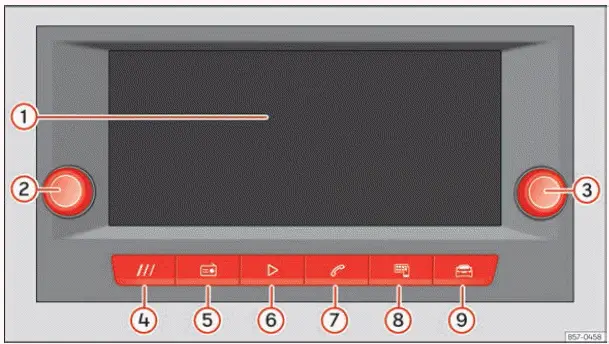
Fig. 130 Overview: control unit and indication in the 8.25-inch version
- Touchscreen. The 8.25-inch display provides access to the infotainment system's functions and settings. Menu items, information panels and available operating options can be selected directly on the screen. The displayed content changes according to the selected function and the equipment configuration of the Seat Ibiza.
- Volume and power rotary push button. Turn this control to increase or decrease the infotainment audio volume. The same control also serves as the on/off button for the infotainment system, allowing the system to be switched on or off using the physical control.
- Search and selection rotary push button. Use this rotary control to search through available options and make selections within the infotainment system. It provides an alternative to touchscreen operation when navigating through supported menus or choosing displayed items.
- HOME button. Opens the infotainment system's start page. Press this button to return to the main interface and access the available functions from the home screen.
- Radio. Opens the radio functions, allowing you to access available radio stations and the corresponding radio controls. The stations and reception options depend on the infotainment equipment and the radio signals available in the current location.
- Multimedia. Provides access to the Media functions for playing content from supported audio sources and connected media devices. The available playback options depend on the source selected and the compatibility of the connected equipment.
- Telephone. Opens the telephone interface, where supported calling functions can be operated through the infotainment system when a compatible mobile phone is connected. The functions available depend on the mobile device and its connection to the vehicle.
- Full Link. Opens the Full Link menu for connecting compatible smartphones and using the supported smartphone integration technologies. This interface provides access to the corresponding connection and operating options.
- Vehicle. Opens the vehicle-related menu, providing access to the information and settings supported by the Seat Ibiza's equipment configuration. The options displayed may differ depending on the vehicle version and installed systems.
 Safety instructions
Certain functions of the Seat Ibiza infotainment system may contain links to websites operated by independent
third parties. These links are provided as a means of accessing external information or ...

See also:
Honda Civic Owners Manual. How to Select a Song from the iPod Music List with the Selector Knob
1. Press to display the iPod
music list.
2. Rotate to select a category.
3. Press to display a list of
items in the
category.
4. Rotate to select an item, then
press .
Press and rotate
repeatedly until a
desired item you want to listen is
displayed.
Playing a ...
© 2016-2026 Copyright www.hocivic.com

0.0065