
Seat Ibiza (6F) 2017-2026 Owner's Manual: Operation using the multifunction steering wheel
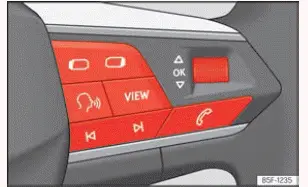
Fig. 10 Right side of multifunction steering
wheel: buttons to the menus and informative
indications on the instrument panel (depending
on the version).
The multifunction steering wheel allows the driver to navigate the Seat Ibiza instrument cluster menus, review
vehicle information and adjust supported settings using the controls on the steering wheel. However, while a
priority 1 warning remains active, access to the normal menus is unavailable because the warning requires
immediate attention. Certain warning messages can be acknowledged and temporarily concealed by pressing the  button on the multifunction steering wheel, as illustrated in Fig. 10. Acknowledging a warning does not correct
the condition that caused it, and any necessary action must still be taken.
Select a menu or an informative display
- Switch on the ignition to activate the instrument cluster and make the available vehicle information and menu functions accessible. The menus displayed depend on the equipment and instrument cluster version fitted to the Seat Ibiza.
- If a message or vehicle status symbol is currently shown on the display, press the corresponding button illustrated in Fig. 10 to acknowledge it and continue to the menu information. Depending on the number and type of messages displayed, it may be necessary to press the button several times. Priority 1 warnings can prevent access to the menus while they remain active.
- To move between the available menus, use the
 or
 buttons. These
controls allow you to browse the menu categories and information displays supported by the instrument
cluster without operating separate dashboard controls.
- When the required menu or information display is selected, press the
 button to open it. Alternatively, wait a few seconds without making another selection; the highlighted menu
or information display may then open automatically. The information shown will correspond to the selected
menu and the functions available on the vehicle.
Changing menu settings
- With the required menu open, rotate the right-hand thumbwheel on the multifunction steering wheel to move
through its available settings. Continue turning the thumbwheel until the option you want to change is
highlighted.
The selected option is identified by a visible frame around it, making it easier to distinguish the current selection from the other menu entries. Check that the correct function is highlighted before making any changes.
- Press the
 button to select the highlighted option and make the required adjustment. Depending on the function, this
may activate or deactivate a setting or allow the selected value to be changed.
A mark displayed beside the relevant option indicates that the corresponding system or function is activated. If the mark is not present, the function is not indicated as active. The exact appearance of the selection and confirmation depends on the instrument cluster version.
Back to menu selection
- To return from the current menu or information display to the menu selection, press the
 or
 button. This allows you to leave the current screen and navigate to another available menu without switching
off the ignition.
 Introduction
With the ignition switched on, the Seat Ibiza instrument cluster allows the driver to access a range of vehicle
information and functions through its menu system. The available displays can be viewe ...

See also:
Honda Civic Service Manual. Rear Door Glass Adjustment (4-door)
Removal
1.
Rear Door Power Window Switch Panel
1.
Remove the power ...
