
Seat Ibiza (6F) 2017-2026 Owner's Manual: Operating the speed limiter
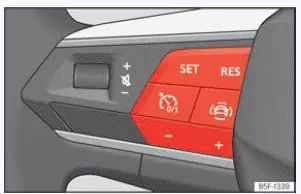
Fig. 101 On the multifunction steering wheel:
buttons to control the speed limiter.
Connecting
Press the  button on the
multifunction steering wheel to switch on the speed limiter. This selects the speed limiting function and
prepares it for operation, allowing the driver to set the desired maximum speed using the corresponding
controls.
- Speed regulation has not yet started. At this stage, the speed limiter is switched on but is not actively restricting the vehicle's speed. The driver must first store a limit before the system can begin regulating acceleration according to the selected value.
Start regulation
- While driving, press the
 button on the multifunction steering wheel. The vehicle should be travelling at a suitable speed within the
system's operating range when the limit is selected.
The current driving speed is stored as the programmed maximum speed. Once regulation becomes active, the speed limiter helps prevent the Seat Ibiza from accelerating beyond this value during normal accelerator operation. The selected limit remains available until it is changed or deleted by switching off the system.
Adjusting the speed
The programmed speed limit can be increased or decreased using the controls on the multifunction steering wheel. Small adjustments allow the driver to fine-tune the selected value, while larger increments make it easier to change the limit when entering a road with a different speed restriction. The following controls modify the stored speed:
 +1 km/h (1 mph). Increases the stored speed limit by one increment, allowing a small upward
adjustment to the maximum permitted speed.
 -1 km/h (1 mph). Reduces the programmed speed limit by one increment, making it possible to
select a slightly lower maximum speed without resetting the function.
 +10 km/h (5 mph). Raises the stored speed limit by a larger increment, allowing the driver to
adjust the programmed maximum more quickly when conditions permit.
 -10 km/h (5 mph). Lowers the stored speed limit by a larger increment, providing a convenient
way to select a reduced maximum speed when approaching a lower speed restriction.
Interrupting the adjustment
- Press the
 button to
temporarily interrupt speed limiter regulation. This suspends the function without completely switching off
the system, allowing the driver to control acceleration directly while retaining the previously selected
limit.
The programmed speed remains stored after regulation has been interrupted. It can be used again when the driver resumes the speed limiter, provided the system is still switched on and the necessary operating conditions are met. There is no need to select the same speed again unless the stored value has been deleted.
Reinstating the cruise control
- Press the
 button to resume regulation using the previously stored speed limit. Before reactivating the function, make
sure the selected limit remains suitable for the current driving conditions.
The speed limiter resumes its regulating function as soon as the Seat Ibiza is travelling below the stored maximum speed. If the vehicle is still moving faster than the programmed limit, normal limiting operation will not resume until its speed has fallen below that value. The previously selected speed remains stored during this process.
Switching off
- Press and hold the
 button on the multifunction steering wheel to deactivate the speed limiter completely. This ends the current
speed limiting operation rather than merely suspending regulation.
The speed limiter switches off and the programmed speed is deleted from the system. If the driver wishes to use the limiter again, it must be switched on and a new maximum speed selected. The instrument cluster indication changes accordingly to show that speed limiting is no longer active.
Switch to another driver assistance system
- Press the
 button to access the available driver assistance functions. This allows the driver to change the selected
speed control mode using the multifunction steering wheel controls.
- Read the corresponding message on the instrument cluster display to confirm the change of assistance system. When another function is selected, the speed limiter is switched off and no longer regulates the programmed maximum speed. Make sure the newly selected system is appropriate for the intended driving situation.
Troubleshooting
 The speed limiter is not available
The corresponding control lamp illuminates yellow on the Seat Ibiza instrument cluster. This warning indicates that the speed limiter is unavailable because the system has detected a malfunction or an operating condition that prevents normal regulation. The driver should not assume that the vehicle will continue restricting acceleration to the previously selected maximum speed.
- If a malfunction is indicated, switch off the speed limiter and arrange for the Seat Ibiza to be inspected by a qualified specialist workshop. The cause of the fault should be identified and corrected before the speed limiting function is used again. Until normal operation has been restored, monitor the speedometer and control the vehicle's speed directly with the accelerator and brake pedals.
Regulation is interrupted unexpectedly
- Electronic Stability Control (ESC) has been switched off. Deactivating ESC can cause the speed limiter to interrupt regulation because the required operating conditions are no longer satisfied. Check the vehicle's stability control settings if the speed limiting function becomes unavailable after ESC has been deactivated.
- The brakes have overheated. Excessive brake temperatures can cause the speed limiter to suspend operation. Allow the braking system sufficient time to cool down before checking whether the function operates normally again. Avoid unnecessary braking while the brakes are hot, and do not attempt to restore the function until conditions permit safe operation.
- The interruption or malfunction continues. If the speed limiter remains unavailable or
repeatedly stops regulating after the relevant conditions have been checked, consult a qualified specialist
workshop for diagnosis.
For safety reasons, the speed limiter only switches off completely when the driver releases the accelerator pedal or manually switches off the system. This operating behaviour should be taken into account when responding to an unexpected interruption. Continue controlling the Seat Ibiza's speed directly and do not rely on the limiter until its normal operation has been confirmed.
 Introduction
The speed limiter helps the driver of the Seat Ibiza avoid exceeding a previously selected driving speed. Once a
limit has been set and the function is active, the system regulates the vehicle's res ...
 Eco-efficient driving assistance
Fig. 102 Eco-efficient driving assistance
indication (schematic representation).
Eco-efficient driving assistance is designed to help the driver adopt a smoother, more economical driving ...
See also:
Honda Civic Owners Manual. To Cancel
To cancel ACC with LSF, do any of the
following:
Press the CANCEL button.
Press the MAIN button.
ACC with LSF indicator goes off.
Depress the brake pedal.
When the LSF function has stopped the
vehicle, you cannot cancel ACC with LSF
by dep ...
